When accessing database view in hosted environment the font small. Can we adjust?





In database view the font is so small, it strains my eyes. The webview is perfect. Is there way for a user to increase font size in database view in Citrix hosted environment without having to change my entire desktop per https://kb.blackbaud.com/knowledgebase/Article/48898? I’ve tried changing the Citrix Workspace DPI settings but the font is still small with each option.
Comments
-
I have the same desire on the occasion my vision (contacts?) are going wonky. Yesterday I changed the display resolution but still wasn't a great fix to the problem…
0 -
I'm interested in a solution for this too!
0 -
If you are using Citrix:
Article 199768
No option to change High DPI selections
When launching database view in RE the size of the database is incorrect.
Raiser Edge appears to be smaller on their screen.
There is no High DPI option in Citrix Workspace 2206.
I need to change my Citrix to High DPI but it isn't available.Answer:
Citrix Workspace 2206 does not include a High DPI option. If this is needed for your resolution, roll back to a previous version of Citrix Workspace (2205) where it remains available or work with your local IT to adjust the Group Policy Settings. This is not controlled by Blackbaud.
0 -
This is happening to me too and it is driving me crazy because every time I uninstall the new version of Citrix, (the old one is fine), they keep prompting me to upgrade again and I worry about security issues if I don't upgrade. Really no idea what to do.
0 -
@Debbie Atkinson & @Jessica Moes - Unfortunately, the only way I have found to increase the size is to get a bigger monitor.
0 -
@Austen Brown But is that a solution. I feel that I was sold an inferior product when we upgraded to the RENXT environment. We can no longer use Raiser’s Edge to merge documents and if we want to see a workable view of the database view, the control we have is the size of our monitor. To work in the database view, we can no longer use our laptops. For the first time as BB customer for over 30 years and my 19 years managing Raiser’s Edge, we are considering investigating other CRM’s. Our contract for NXT is over April 2023.
0 -
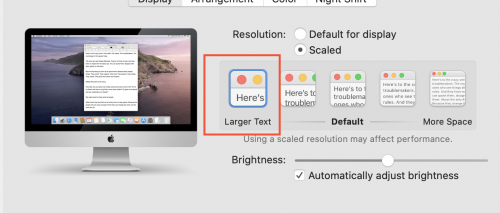
@Debbie Atkinson The only thing I've found that works is to change my computer's display to “large text." It helps - and I have a HUGE monitor. I also do this on my laptop, in addition to having a second monitor plugged into my laptop - both have helped.
0 -
@Austen Brown A larger monitor does not help. It only increases the blank spaces in the page. The font is the same. I have a laptop and a second monitor. It is still very hard to read.
0 -
@Debbie Atkinson RE has hard coded font sizes. Unfortunately, it has been that way since forever. I don't know if there is any help, outside of using a magnifying program on your computer.
There have been several posts about this exact issue over the years. It is a problem, but don't expect it to be fixed.
0 -
To change to font sizes, you need the Citrix 2205 version instead of the latest version 2206.
Here is the link for Windows.
0






















Categories
- All Categories
- New YourCause Community TEST
- New SKY Community TEST
- New Grantmaking TEST Community
- New Altru Test Community
- New bbcon Community - TEST
- 12 Blackbaud Agents for Good™
- New Raiser's Edge NXT Community
- 7 Blackbaud Community Help
- 218 bbcon®
- 1.4K Blackbaud Altru®
- 409 Blackbaud Award Management™ and Blackbaud Stewardship Management™
- 1.2K Blackbaud CRM™ and Blackbaud Internet Solutions™
- 16 donorCentrics®
- 361 Blackbaud eTapestry®
- 2.7K Blackbaud Financial Edge NXT®
- 680 Blackbaud Grantmaking™
- 598 Blackbaud Education Management Solutions for Higher Education
- 3.3K Blackbaud Education Management Solutions for K-12 Schools
- 952 Blackbaud Luminate Online® and Blackbaud TeamRaiser®
- 85 JustGiving® from Blackbaud®
- 7K Blackbaud Raiser's Edge NXT®
- 3.9K SKY Developer
- 257 ResearchPoint™
- 123 Blackbaud Tuition Management™
- 165 Organizational Best Practices
- 247 Member Lounge (Just for Fun)
- 40 Blackbaud Community Challenges
- 37 PowerUp Challenges
- 3 (Closed) PowerUp Challenge: Grid View Batch
- 3 (Closed) PowerUp Challenge: Chat for Blackbaud AI
- 3 (Closed) PowerUp Challenge: Data Health
- 3 (Closed) Raiser's Edge NXT PowerUp Challenge: Product Update Briefing
- 3 (Closed) Raiser's Edge NXT PowerUp Challenge: Standard Reports+
- 3 (Closed) Raiser's Edge NXT PowerUp Challenge: Email Marketing
- 3 (Closed) Raiser's Edge NXT PowerUp Challenge: Gift Management
- 4 (Closed) Raiser's Edge NXT PowerUp Challenge: Event Management
- 3 (Closed) Raiser's Edge NXT PowerUp Challenge: Home Page
- 4 (Closed) Raiser's Edge NXT PowerUp Challenge: Standard Reports
- 4 (Closed) Raiser's Edge NXT PowerUp Challenge: Query
- 822 Community News
- 3.1K Jobs Board
- 57 Blackbaud SKY® Reporting Announcements
- 47 Blackbaud CRM Higher Ed Product Advisory Group (HE PAG)
- 19 Blackbaud CRM Product Advisory Group (BBCRM PAG)