Blackbaud not showing as Connector option in Power BI Desktop



I've followed all previous steps in the installation and setup of the Connector and have the .mez file in the correct Power BI Desktop > Custom Connectors folder (and I've connected the application to my Raiser's Edge account). However, when I select Get Data and follow those steps in Power BI Desktop, Blackbaud is not an option.
Has anyone else struggled with this and is there a solution? Thank you!
Comments
-
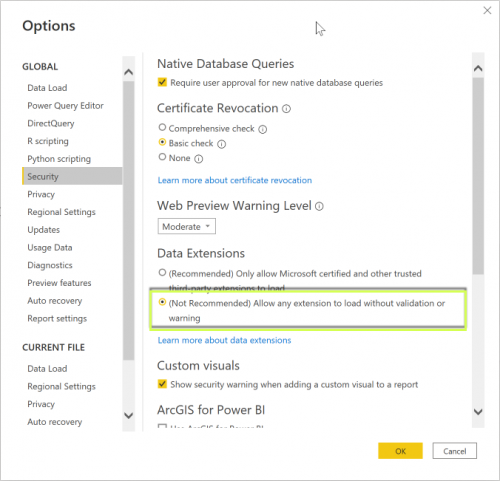
Hey @Abbie Joyce, you need to turn on the feature that allows uncertified connectors within Power BI. If you go to File > Options and Settings > Security
You want to change the Data Extension field to allow any extension. Once you hit OK, close Power BI and reopen and you should be good to go!
 2
2 -
Thank you!
0 -
I am still unable to get this to work. I have installed Power BI Desktop, set up the Blackbaud app, have the Blackbaud.mez file in Documents/Power BI Desktop/Custom Connectors and have adjusted the security settings. But I cannot find Blackbaud in the Get Data section. I had to create both the Power BI Desktop folder and the Custom Connectors folder as these did not exist. Can anyone provide guidance? Thank you.
1 -
Hey @Evan Webb, did you connect your application in the Marketplace for your RE environment?
0 -
Yes, the Power Platform app is connected in RE NXT. And I have set up the Sky App & have the keys set in the files in Blackbaud.mez.
0 -
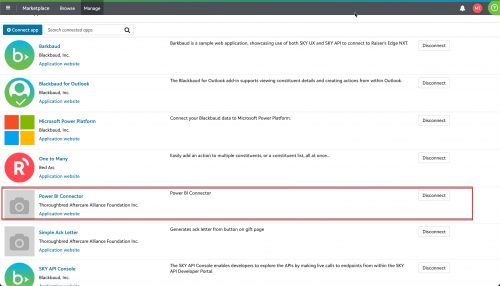
This is a separate app. Once you've created the app in the SKY Developer platform for the BI Connector, you need to add that application to your Marketplace as well.
 1
1 -
Edit: I have fixed this. My issue was when creating the “mez” file, I zipped the folder, rather than the contents of the folder.
0 -
@Evan I was having the same issue. I realized I named the folder in Power BI Desktop “Custom Connections” instead of “Custom Connectors”. Once I fixed that, it appeared in my PowerBi Desktop get data search. You may want to double check your folder names.
 1
1 -
@Evan Webb
I am stuck here as well…0














Categories
- All Categories
- New YourCause Community TEST
- New SKY Community TEST
- New Grantmaking TEST Community
- New Altru Test Community
- New bbcon Community - TEST
- 12 Blackbaud Agents for Good™
- New Raiser's Edge NXT Community
- 7 Blackbaud Community Help
- 219 bbcon®
- 1.4K Blackbaud Altru®
- 409 Blackbaud Award Management™ and Blackbaud Stewardship Management™
- 1.2K Blackbaud CRM™ and Blackbaud Internet Solutions™
- 16 donorCentrics®
- 361 Blackbaud eTapestry®
- 2.7K Blackbaud Financial Edge NXT®
- 682 Blackbaud Grantmaking™
- 599 Blackbaud Education Management Solutions for Higher Education
- 3.3K Blackbaud Education Management Solutions for K-12 Schools
- 952 Blackbaud Luminate Online® and Blackbaud TeamRaiser®
- 85 JustGiving® from Blackbaud®
- 7K Blackbaud Raiser's Edge NXT®
- 3.9K SKY Developer
- 257 ResearchPoint™
- 123 Blackbaud Tuition Management™
- 165 Organizational Best Practices
- 247 Member Lounge (Just for Fun)
- 40 Blackbaud Community Challenges
- 37 PowerUp Challenges
- 3 (Closed) PowerUp Challenge: Grid View Batch
- 3 (Closed) PowerUp Challenge: Chat for Blackbaud AI
- 3 (Closed) PowerUp Challenge: Data Health
- 3 (Closed) Raiser's Edge NXT PowerUp Challenge: Product Update Briefing
- 3 (Closed) Raiser's Edge NXT PowerUp Challenge: Standard Reports+
- 3 (Closed) Raiser's Edge NXT PowerUp Challenge: Email Marketing
- 3 (Closed) Raiser's Edge NXT PowerUp Challenge: Gift Management
- 4 (Closed) Raiser's Edge NXT PowerUp Challenge: Event Management
- 3 (Closed) Raiser's Edge NXT PowerUp Challenge: Home Page
- 4 (Closed) Raiser's Edge NXT PowerUp Challenge: Standard Reports
- 4 (Closed) Raiser's Edge NXT PowerUp Challenge: Query
- 822 Community News
- 3.1K Jobs Board
- 57 Blackbaud SKY® Reporting Announcements
- 47 Blackbaud CRM Higher Ed Product Advisory Group (HE PAG)
- 19 Blackbaud CRM Product Advisory Group (BBCRM PAG)