Unable to authenticate the card information
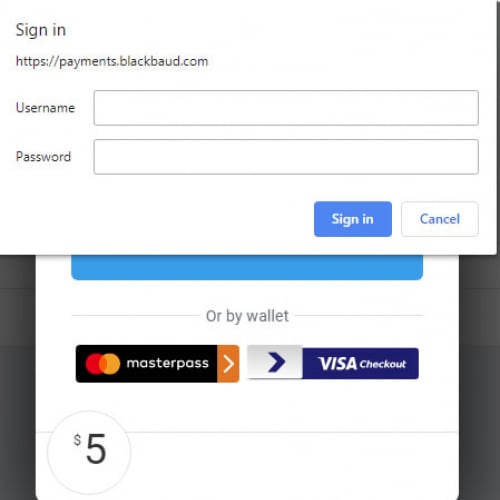




Hi,
We used Blackbaud OpenStoreCardForm to save credit info for Pledge gift with future date. It worked fine before.
Blackbaud_OpenStoreCardForm({
card_token: "@Model.TransactionInfo.card_token",
key: "@Model.PublicKey",
transaction_type: "store_card",
primary_color: "#782F40",
cardholder: cardholder
});
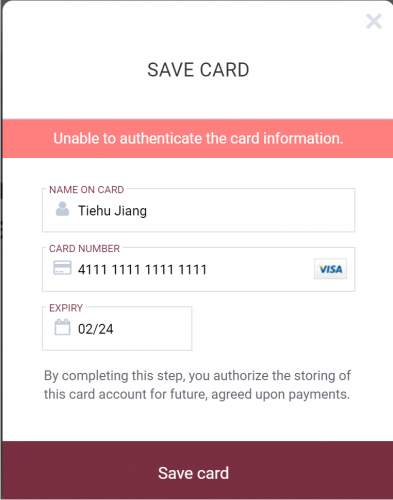
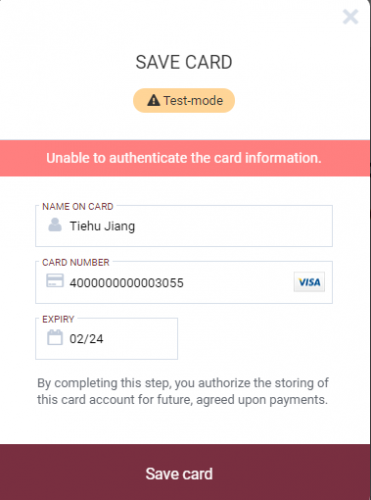
Yesterday we tested it in our staging site. We got “Unable to authenticate the card information” error. (see the Save Card form screen shot). No idea what's going wrong since we have no control to the form. Can you tell us what caused this error message?
Thanks!
-Tiehu Jiang
Comments
-
Hi Tiehu,
Thank you for reaching out with your question! In order to investigate the issue further, do you mind providing some additional information about your test and your staging site? Have you tried to store card with other card numbers, such as 4242424242424242 or 4000000000003055?
-Catherine0 -
Hi, Catherine,
Thanks for reply! I tried the other two card numbers you gave, I got the same error message.
It works fine for one-time gift, recurring gift or pledge gift with starting date is today.
Thanks,
-Tiehu
Below are my scripts. Don't know if we missed some info while calling function Blackbaud_OpenStoreCardForm().
@section Scripts {
<script src='https://payments.blackbaud.com/Checkout/bbCheckout.2.0.js'></script>
<script src="~/js/site.js"></script>
<script type="text/javascript">
$(function () {
checkOutForm();$('#btnReopen').click(function () {
checkOutForm();return false;
});document.addEventListener('checkoutComplete', function(e) {
$('#checkoutPaymentPreCC').css("display","none");
$('#checkoutPaymentPostCC').css("display", "block");
});
});function checkOutForm() {
var amt = '@Model.Cart.TotalAmount';
var firstname = htmlDecode('@Model.Cart.Donor.Firstname');
var lastname = htmlDecode('@Model.Cart.Donor.Lastname');
var cardholder = firstname + ' ' + lastname;
var email = htmlDecode('@Model.Cart.Donor.Email');
var address = htmlDecode('@Model.Cart.Donor.Address');
var city = htmlDecode('@Model.Cart.Donor.City');
var state = htmlDecode('@Model.StateCode');
var country = htmlDecode('@Model.CountryCode');
var zip = htmlDecode('@Model.Cart.Donor.Zip');// loads the Checkout form in the background, but will not display it
var gifttype = '@Model.Cart.GiftFrequency.GiftType';
var isPledgeFutureBilling = '@Model.Cart.GiftFrequency.IsPledgeFutureBilling';
var installAmt = '@Model.Cart.GiftFrequency.InstallmentAmount';var showButton = false;
if (gifttype == "OneTime") {
showButton = true;
}if (gifttype == "Pledge" && isPledgeFutureBilling == 'True') {
Blackbaud_OpenStoreCardForm({
card_token: "@Model.TransactionInfo.card_token",
key: "@Model.PublicKey",
transaction_type: "store_card",
primary_color: "#782F40",
cardholder: cardholder
});
}
else {
// pledge and startdate is today
if (gifttype == "Pledge") {
amt = formatter.format(installAmt);
}Blackbaud_Init({
key: "@Model.PublicKey",
merchant_account_id: "@Model.MerchantAccountId",
client_app_name: "GiveFSU",
transaction_type: "card_not_present",
primary_color: "#782F40",
use_apple_pay: showButton,
use_visa_checkout: showButton,
card_token: '@Model.TransactionInfo.card_token',
});Blackbaud_Open({
amount: amt,
billing_address_email: email,
billing_address_line: address,
billing_address_city: city,
billing_address_state: state,
billing_address_country: country,
billing_address_post_code: zip,
cardholder: cardholder,
use_apple_pay_donate_button: showButton
});
}
}
</script>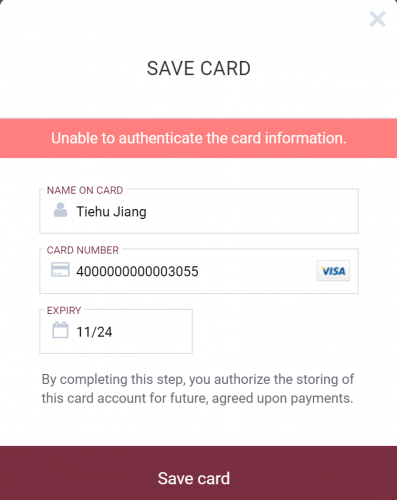 0
0 -
Hi Tiehu,
Do you know what the process mode of the payment configuration you are currently using is, i.e. ‘live’ vs ‘test’?
You can only use a ‘test’ mode payment configuration in order to use a test card number and a ‘live’ mode payment configuration will not allow test card numbers.-Catherine
0 -
Hi, Catherine,
I am not sure what you mean the process mode of the payment configuration, but we do use ‘test’ merchant account id in staging site. Prod site uses the ‘live’ merchant account id.
Thanks,
-Tiehu
0 -
if (gifttype == "Pledge" && isPledgeFutureBilling == 'True') {
Blackbaud_OpenStoreCardForm({
card_token: "@Model.TransactionInfo.card_token",
payment_configuration_id: "@Model.MerchantAccountId",
key: "@Model.PublicKey",
transaction_type: "store_card",
primary_color: "#782F40",
cardholder: cardholder
});
}After I add line below in in Blackbaud_OpenStoreCardForm():
payment_configuration_id: "@Model.MerchantAccountId", (the value passed here is test merchant account id)
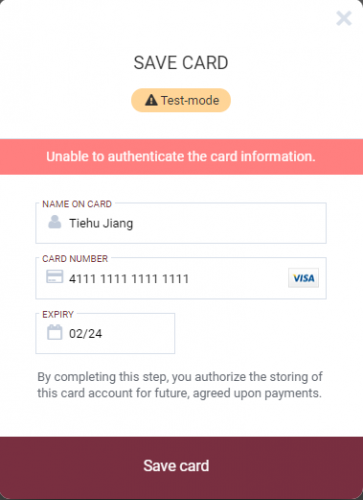
We do see a text ‘Test-mode’ on the Save Card form but still have the same issue.
Also, in this document page Supported transactions - Blackbaud SKY API Developer Portal, I do not see the parameter ‘payment_configuration_id’.
Thanks,
-Tiehu
0 -
Hi Tiehu,
Thank you for trying different parameters combination! ‘payment_configuration_id’ is an optional parameter for Store card info according to the Transaction parameters document. Do you mind trying one more time here, still set the ‘payment_configuration_id’ with the test merchant account id value, but use the 4000000000003055 card number?
-Catherine
0 -
Hi, Catherine,
I got the same error message.
Thanks,
-Tiehu
 0
0 -
Hi Tiehu,
The error log indicates that your request is actually in live mode. Do you mind direct messaging me the merchant account id you used and I will look up to verify its process mode. Thanks!
-Catherine
0

Categories
- All Categories
- New YourCause Community TEST
- New SKY Community TEST
- New Grantmaking TEST Community
- New Altru Test Community
- New bbcon Community - TEST
- 12 Blackbaud Agents for Good™
- New Raiser's Edge NXT Community
- 7 Blackbaud Community Help
- 218 bbcon®
- 1.4K Blackbaud Altru®
- 409 Blackbaud Award Management™ and Blackbaud Stewardship Management™
- 1.2K Blackbaud CRM™ and Blackbaud Internet Solutions™
- 16 donorCentrics®
- 361 Blackbaud eTapestry®
- 2.7K Blackbaud Financial Edge NXT®
- 680 Blackbaud Grantmaking™
- 598 Blackbaud Education Management Solutions for Higher Education
- 3.3K Blackbaud Education Management Solutions for K-12 Schools
- 952 Blackbaud Luminate Online® and Blackbaud TeamRaiser®
- 85 JustGiving® from Blackbaud®
- 7K Blackbaud Raiser's Edge NXT®
- 3.9K SKY Developer
- 257 ResearchPoint™
- 123 Blackbaud Tuition Management™
- 165 Organizational Best Practices
- 247 Member Lounge (Just for Fun)
- 40 Blackbaud Community Challenges
- 37 PowerUp Challenges
- 3 (Closed) PowerUp Challenge: Grid View Batch
- 3 (Closed) PowerUp Challenge: Chat for Blackbaud AI
- 3 (Closed) PowerUp Challenge: Data Health
- 3 (Closed) Raiser's Edge NXT PowerUp Challenge: Product Update Briefing
- 3 (Closed) Raiser's Edge NXT PowerUp Challenge: Standard Reports+
- 3 (Closed) Raiser's Edge NXT PowerUp Challenge: Email Marketing
- 3 (Closed) Raiser's Edge NXT PowerUp Challenge: Gift Management
- 4 (Closed) Raiser's Edge NXT PowerUp Challenge: Event Management
- 3 (Closed) Raiser's Edge NXT PowerUp Challenge: Home Page
- 4 (Closed) Raiser's Edge NXT PowerUp Challenge: Standard Reports
- 4 (Closed) Raiser's Edge NXT PowerUp Challenge: Query
- 822 Community News
- 3.1K Jobs Board
- 57 Blackbaud SKY® Reporting Announcements
- 47 Blackbaud CRM Higher Ed Product Advisory Group (HE PAG)
- 19 Blackbaud CRM Product Advisory Group (BBCRM PAG)