Edits to Finalized Budget Not Showing Up In Budget v Actual Reports





I have finalized my budget and since then made adjustments. When I attempt to run a report, it shows the original finalized budget rather than the original plus adjustments. For example, I have an original finalized budget of $1000. I increase the budget by $1000, creating an adjusted budget of $2000. The audit trail shows the increase and the reason for the increase. When I pull up the budget scenario, it shows the updated amount of $2000. When I run a budget v actual report, it only shows the original budget amount of $1000. What am I doing wrong?
Comments
-
@Mike Gaffney Adjust your report to show the Adjusted Budget instead of Original Budget in that column.
1 -
@Mike Gaffney, Customer Success is hosting two webinars this month on Budgets. The first session, Budget Basics, airs today, 7/14/22 at 2pm ET. We will cover Budget Adjustments specifically! . Here is a link to sign up:
0 -
@Christina Imbriani
Was this session recorded? I was unable to join.0 -
@Mark Eisinger
Thank you Mark for your quick response. It seemed to work when I sent out my initial question in July…but now, it doesn't. I'm going to the help desk.1 -
@Mike Gaffney, yes this session was recorded. You can catch the on-demand recordings.
- Link to Budget Basics
- Link to Budget Advanced
In ref to your original question… I agree with what Mark shared below. Here is pic to show what the Budget Adjustment variable looks like. This is an Income Statement Report.
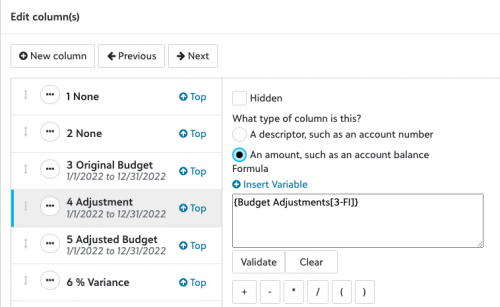
In Content, edit/add column and select the variable {Adjusted Budget}
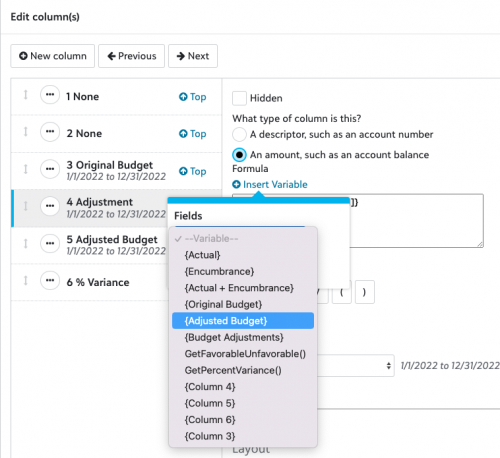
Hopefully thats helpful. We cover all this and other Budget topics in each of the sessions. Feel free to reach out with any other questions.
2






Categories
- All Categories
- New YourCause Community TEST
- New SKY Community TEST
- New Grantmaking TEST Community
- New Altru Test Community
- New bbcon Community - TEST
- 12 Blackbaud Agents for Good™
- New Raiser's Edge NXT Community
- 7 Blackbaud Community Help
- 218 bbcon®
- 1.4K Blackbaud Altru®
- 409 Blackbaud Award Management™ and Blackbaud Stewardship Management™
- 1.2K Blackbaud CRM™ and Blackbaud Internet Solutions™
- 16 donorCentrics®
- 361 Blackbaud eTapestry®
- 2.7K Blackbaud Financial Edge NXT®
- 680 Blackbaud Grantmaking™
- 598 Blackbaud Education Management Solutions for Higher Education
- 3.3K Blackbaud Education Management Solutions for K-12 Schools
- 952 Blackbaud Luminate Online® and Blackbaud TeamRaiser®
- 85 JustGiving® from Blackbaud®
- 7K Blackbaud Raiser's Edge NXT®
- 3.9K SKY Developer
- 257 ResearchPoint™
- 123 Blackbaud Tuition Management™
- 165 Organizational Best Practices
- 247 Member Lounge (Just for Fun)
- 40 Blackbaud Community Challenges
- 37 PowerUp Challenges
- 3 (Closed) PowerUp Challenge: Grid View Batch
- 3 (Closed) PowerUp Challenge: Chat for Blackbaud AI
- 3 (Closed) PowerUp Challenge: Data Health
- 3 (Closed) Raiser's Edge NXT PowerUp Challenge: Product Update Briefing
- 3 (Closed) Raiser's Edge NXT PowerUp Challenge: Standard Reports+
- 3 (Closed) Raiser's Edge NXT PowerUp Challenge: Email Marketing
- 3 (Closed) Raiser's Edge NXT PowerUp Challenge: Gift Management
- 4 (Closed) Raiser's Edge NXT PowerUp Challenge: Event Management
- 3 (Closed) Raiser's Edge NXT PowerUp Challenge: Home Page
- 4 (Closed) Raiser's Edge NXT PowerUp Challenge: Standard Reports
- 4 (Closed) Raiser's Edge NXT PowerUp Challenge: Query
- 822 Community News
- 3.1K Jobs Board
- 57 Blackbaud SKY® Reporting Announcements
- 47 Blackbaud CRM Higher Ed Product Advisory Group (HE PAG)
- 19 Blackbaud CRM Product Advisory Group (BBCRM PAG)