# of emails in your fundraisers' inboxes





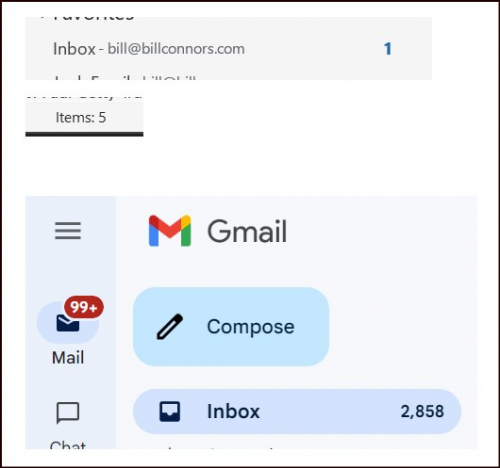
Happy Friday! I'm preparing my bbcon presentation, can you help? I'm looking for screenshots, like those below, that show how many emails, read and unread, are in fundraisers' inboxes. Not yours, thanks, unless you're a frontline fundraiser, but your fundraisers'. Would you be willing to help me out and ask a fundraiser or two if you could grab and send me the counts? I obviously don't want to see the emails themselves, and I don't need to know who the fundraiser is, I'm happy with as little information as that illustrated below. You can IM me through here or you can see my email address in the screenshot below. Thanks!! (the point of this will be revealed in the bbcon presentation, hope you attend ?)
Comments
-
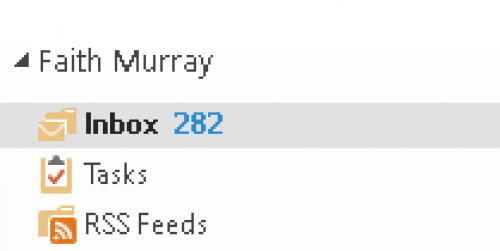
@Bill Connors, you can have one of mine. I'm one of the front-line people at our org. Since I archive my older emails, this represents just my emails from the past 9 months.
In my defense, ? the vast bulk of unread ones emails for me are e-newsletters from places like Nonprofit Pro and Philanthropy Today, and sales pitches that I think I might want to revisit someday but never get around to.
 0
0 -
@Faith Murray Thanks, Faith! Very much appreciate your help!
0 -
@Bill Connors all I know is that # of unread emails in your inbox is making my eye twtich! ?
0 -
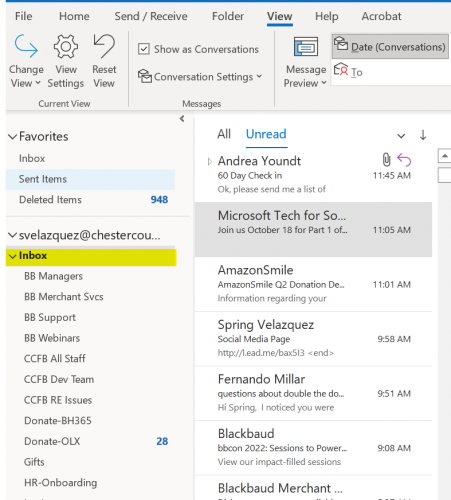
@Spring Velazquez LOL Which one? The Outlook one is due to my adherence to the Zero Inbox methodology. The Gmail account is one I (hopefully) obviously do not really use. ?
1 -
@Bill Connors
The Gmail of course! ? I don't use mine at all anymore but I know that number of uread SPAM/junk is growing and (I know this is true) taunting me.I use Outlook for all email now and the easy steps for creating rules makes my inbox clean as a whistle:
 0
0 -
@Spring Velazquez, wait a minute … creating rules? Didn't realize you could do this in Outlook! What rules do you implement?
0 -
@Faith Murray I use rules all the time and encourage other staff to as well. Example: all the emails from BB go into their own folder “BB Community.” As do the ones to the entire university campus. Generally these are not things I need in my inbox and can look at as time allows.
Rules! Great tool!
3 -
@Faith Murray
Another set of rules I have set up have to do with online donations. As soon as the first one comes in with a new subject line (due to it being a different form) I create an Outlook folder and have them directed there specifically. It can be overwhelming to have those notifications blowing up my inbox especially when a new campaign or appeal drops - this allows me to keep an eye on the number of donations per day and then I can go through them all at once to see if further follow up is needed.1 -
@Spring Velazquez I do the same as well, as well as folders for Blackbaud communication as @JoannStrommen mentions. Folders in Outlook are a lifesaver! I have dozens and dozens of folders.
0














Categories
- All Categories
- New K-12 Community Home (TEST)
- New Higher Education Home Page (Test)
- New Impact Edge Community TEST
- New YourCause Community TEST
- New SKY Community TEST
- New Grantmaking TEST Community
- New Altru Test Community
- New bbcon Community - TEST
- 12 Blackbaud Agents for Good™
- New Raiser's Edge NXT Community
- 8 Blackbaud Community Help
- 222 bbcon®
- 1.4K Blackbaud Altru®
- 410 Blackbaud Award Management™ and Blackbaud Stewardship Management™
- 1.2K Blackbaud CRM™ and Blackbaud Internet Solutions™
- 16 donorCentrics®
- 361 Blackbaud eTapestry®
- 2.7K Blackbaud Financial Edge NXT®
- 687 Blackbaud Grantmaking™
- 604 Blackbaud Education Management Solutions for Higher Education
- 3.3K Blackbaud Education Management Solutions for K-12 Schools
- 954 Blackbaud Luminate Online® and Blackbaud TeamRaiser®
- 85 JustGiving® from Blackbaud®
- 7K Blackbaud Raiser's Edge NXT®
- 4K SKY Developer
- 258 ResearchPoint™
- 123 Blackbaud Tuition Management™
- 165 Organizational Best Practices
- 248 Member Lounge (Just for Fun)
- 40 Blackbaud Community Challenges
- 37 PowerUp Challenges
- 3 (Closed) PowerUp Challenge: Grid View Batch
- 3 (Closed) PowerUp Challenge: Chat for Blackbaud AI
- 3 (Closed) PowerUp Challenge: Data Health
- 3 (Closed) Raiser's Edge NXT PowerUp Challenge: Product Update Briefing
- 3 (Closed) Raiser's Edge NXT PowerUp Challenge: Standard Reports+
- 3 (Closed) Raiser's Edge NXT PowerUp Challenge: Email Marketing
- 3 (Closed) Raiser's Edge NXT PowerUp Challenge: Gift Management
- 4 (Closed) Raiser's Edge NXT PowerUp Challenge: Event Management
- 3 (Closed) Raiser's Edge NXT PowerUp Challenge: Home Page
- 4 (Closed) Raiser's Edge NXT PowerUp Challenge: Standard Reports
- 4 (Closed) Raiser's Edge NXT PowerUp Challenge: Query
- 829 Community News
- 3.1K Jobs Board
- 57 Blackbaud SKY® Reporting Announcements
- 47 Blackbaud CRM Higher Ed Product Advisory Group (HE PAG)
- 19 Blackbaud CRM Product Advisory Group (BBCRM PAG)