Error messages from uploading template to build power automate acknowledgement letter flow




I have been getting error messages when trying to upload the template (step 5 from the attached tutorial) saying my connections aren't going through. But the connections all set up correctly and show connected from the “connections” page. Any thoughts?
Comments
-
Hi @Jennifer Adams, Can you share a screen shot that shows the exact error message?
0 -
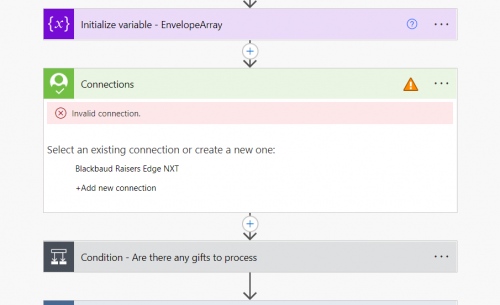
@Ashley Moose Sure. There are multiples and I can see them individually by clicking on “save as new flow” and they all show that they have invalid connections. If I add a new connection, it shows “connected” but then the same errors happen when I try it again.
0 -
@Ashley Moose Sure. There are multiples and I can see them individually by clicking on “save as new flow” and they all show that they have invalid connections. If I add a new connection, it shows “connected” but then the same errors happen when I try it again.
Hey Jennifer, sometimes when importing flows, even if during the initial “Save as new flow” step you've already set all the connections, these individual steps may show invalid connection. If you haven't already, you'll have to review all the pieces to the flow (such as expanding the Condition and other areas), to make sure you've got them all that has the triangle. If you feel like you've “reconnected" them all and are still having the “Invalid connection” error, certainly report back.
0 -
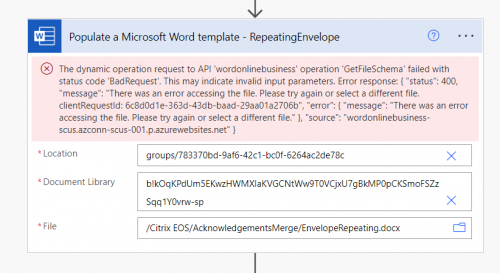
@Glen Hutson I have tried to reconnect and some appear to let me but the two Word conditions continue to give me the following error.
0 -
@Glen Hutson I've also tried to “switch account” in the connections because I've read this issue is often caused by two factor authorization but that did not solve the problem either.
0 -
@Glen Hutson I have tried to reconnect and some appear to let me but the two Word conditions continue to give me the following error.
@Jennifer Adams
That error is that the flow requires access to Sharepoint from which your “template” documents are stored and where the finished merged documents will be saved. You will need to update those references to your Sharepoint Site/directories/etc. You'll need to first click the “X” to the right of the Location and Document Library to then be presented with your specific options.0 -
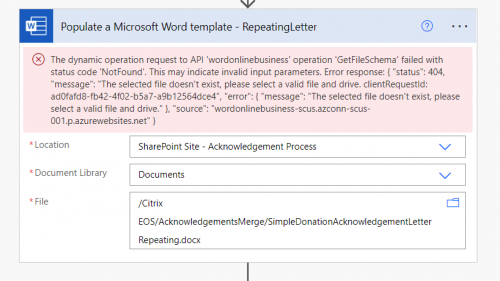
@Glen Hutson Thanks, that's helpful. I don't know much about these programs or how this works. I selected the sharepoint site that I created as instructed in the tutorial, but what should I be choosing for the document library?
0 -
@Glen Hutson Thanks, that's helpful. I don't know much about these programs or how this works. I selected the sharepoint site that I created as instructed in the tutorial, but what should I be choosing for the document library?
Assuming a standard setup, you'll need to upload the Envelope/Letter “templates” into the Documents Library you have selected above, perhaps in a folder underneath. Then you'll click the folder icon in the File line in your screenshot to select the corresponding ones.
0 -
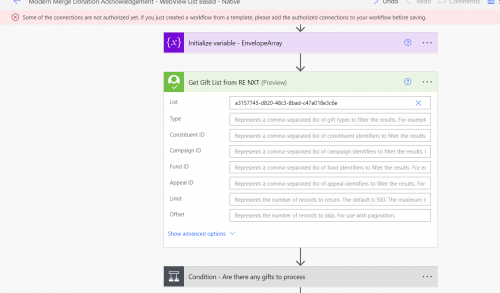
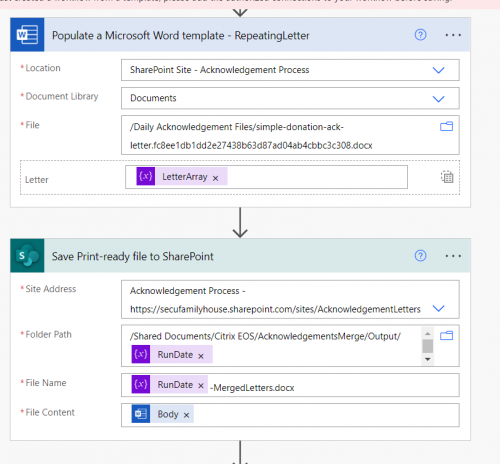
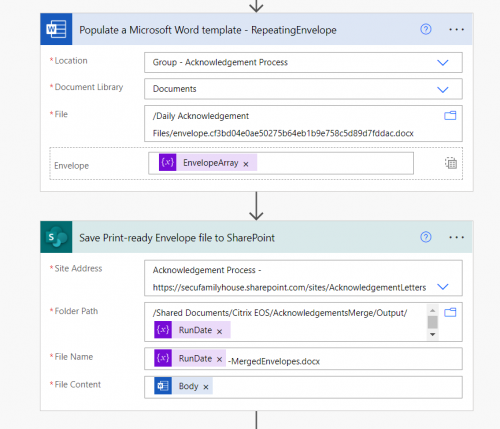
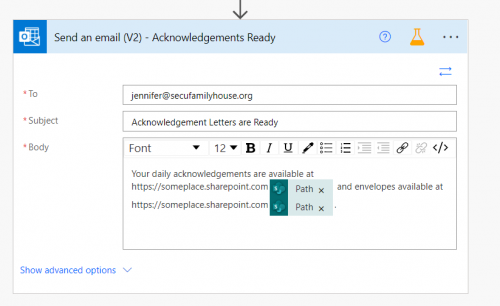
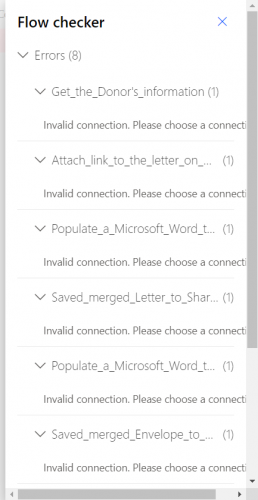
@Glen Hutson Great, thanks that makes sense and I did select those files but still get errors. It's not clear to me if they are on the same connections but when I try the flow checker they appear to be. Here are what the connections look like currently:
0







Categories
- All Categories
- New K-12 Community Home (TEST)
- New Higher Education Home Page (Test)
- New Impact Edge Community TEST
- New YourCause Community TEST
- New SKY Community TEST
- New Grantmaking TEST Community
- New Altru Test Community
- New bbcon Community - TEST
- 12 Blackbaud Agents for Good™
- New Raiser's Edge NXT Community
- 8 Blackbaud Community Help
- 222 bbcon®
- 1.4K Blackbaud Altru®
- 410 Blackbaud Award Management™ and Blackbaud Stewardship Management™
- 1.2K Blackbaud CRM™ and Blackbaud Internet Solutions™
- 16 donorCentrics®
- 361 Blackbaud eTapestry®
- 2.7K Blackbaud Financial Edge NXT®
- 687 Blackbaud Grantmaking™
- 603 Blackbaud Education Management Solutions for Higher Education
- 3.3K Blackbaud Education Management Solutions for K-12 Schools
- 954 Blackbaud Luminate Online® and Blackbaud TeamRaiser®
- 85 JustGiving® from Blackbaud®
- 7K Blackbaud Raiser's Edge NXT®
- 4K SKY Developer
- 258 ResearchPoint™
- 123 Blackbaud Tuition Management™
- 165 Organizational Best Practices
- 248 Member Lounge (Just for Fun)
- 40 Blackbaud Community Challenges
- 37 PowerUp Challenges
- 3 (Closed) PowerUp Challenge: Grid View Batch
- 3 (Closed) PowerUp Challenge: Chat for Blackbaud AI
- 3 (Closed) PowerUp Challenge: Data Health
- 3 (Closed) Raiser's Edge NXT PowerUp Challenge: Product Update Briefing
- 3 (Closed) Raiser's Edge NXT PowerUp Challenge: Standard Reports+
- 3 (Closed) Raiser's Edge NXT PowerUp Challenge: Email Marketing
- 3 (Closed) Raiser's Edge NXT PowerUp Challenge: Gift Management
- 4 (Closed) Raiser's Edge NXT PowerUp Challenge: Event Management
- 3 (Closed) Raiser's Edge NXT PowerUp Challenge: Home Page
- 4 (Closed) Raiser's Edge NXT PowerUp Challenge: Standard Reports
- 4 (Closed) Raiser's Edge NXT PowerUp Challenge: Query
- 829 Community News
- 3.1K Jobs Board
- 57 Blackbaud SKY® Reporting Announcements
- 47 Blackbaud CRM Higher Ed Product Advisory Group (HE PAG)
- 19 Blackbaud CRM Product Advisory Group (BBCRM PAG)