How do I view gift details for gifts in an unapproved batch.
I am unable to see gift details if the gift is still sitting in an unapproved batch. For example, gifts given online using a campaign form may have details about the tribute and related acknowledgement. I cannot access those details unless the batch is approved. The dilemma is that if I approve the batch before the funds are scheduled to disburse, then the GL Post date doesn't align and it becomes messy with accounting. At the same time, I don't want gifts to sit until disbursement without receiving timely acknowledgement. How can I view the details of the gift when it's in an unapproved batch?
Comments
-
@Amber Halstead
Who is downloading the gift information from OLX? I believe that you can see the information you are looking for during that process of downloading the gifts from OLX.0 -
@Amber Halstead
If you're referring to webview gift batches, you can actually edit the gifts (and see tribute info) before approving the batches and you can change the GL POST Date in every gift to match the disbursement.For our department we rename the gift batches to reflect the post date, and whether they're regular or recurring gifts, the description also includes the date of the batch the date range and the amount of the batch (the better to see once approved in dbv). I also make sure that each batch contains gifts with that day so I sometimes have to move gifts to other batches (ex. today as I look, there are 3 gifts dated 12/16 in the 12/17 batch - I'm going to move them to the batch dated 12/16).
It looks a little crazy at first but once you get used to it, it makes sense. And I refuse to allow the gifts to all be moved into a singular batch because there's still too much editing to do with webview gifts and batches, and I don't have time to do global changes every day with them.
So for ex: Our next disbursement date for 12/16-12/22 is 12/28
- For all CC batches between 12/16 and 12/22 we may have 2 batches per day, one for regular gifts, and one for recurring gifts.
- Each batch number will be changed to “2022-12-28-19 NXT CC”
- DISBURSEMENT DATE - DATE OF GIFTS IN BATCH - BATCH LOCATION - GIFT TYPE
- Each batch description will be changed to “2022-12-28-19 NXT CC (12/16-12/28) $1111.22”
- DISBURSEMENT DATE - DATE OF GIFTS IN BATCH - BATCH LOCATION - GIFT TYPE - DISBURSEMENT PERIOD - TOTAL AMOUNT
- NOTE: if the gift for a disbursement period appears in the next month, the month numeric is indicated in parenthesis after the gift date so “2023-01-05-31(12)…” incates that the gift came in on December 31
- DISBURSEMENT DATE - DATE OF GIFTS IN BATCH - BATCH LOCATION - GIFT TYPE - DISBURSEMENT PERIOD - TOTAL AMOUNT
- Before approving the batches I change the Post Date to the disbursement date for that gift date and make any other changes I can in webview - campaign and package if used, and if they didn't populate, soft credit info, clean up tribute info in dbv and anything else that can be done
- Once they are approved I run a validation report and a gift detail and summary report that summarizes by fund then details donors
0 -
@Spring Velazquez
Thank you! This is very helpful. I have not had an opportunity to complete all of the BB University courses. I'm learning my way through. I have not been able to figure out how to change the post date in batches to match the disbursement date. That's exactly what I need to do when approving the batches.It just seems when they are in pending status, I don't have the flexibility to edit any of the gift properties. I like your methodology and naming conventions. I have been moving everything into one batch based on a shared disbursement date, but it's made me feel limited in processing the batch sooner than it disburses. The only reason I haven't is because I can't figure out how to change the post date and other gift edits before approving the batch.
Where within the batch do I work before it's approved to make those changes?
0 -
@Danielle Lifshitz
Thanks for the reply. I'm using the Webview and haven't created any forms or events using OLX. I will try this process in the future.0 -
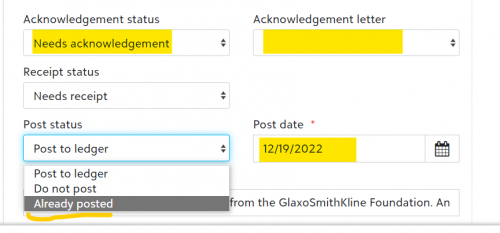
Open an unapproved gift batch then select Edit > Edit Batch Gifts
Open a gift record, then go to the bottom where your acknowledgement, receipt and post info are located. This is where you can change your acknowledgement letter code, post status, post date etc. In webview, Already Posted = Posted in database view. I recommend not changing this until after the batch has been approved. Then you can globally change the to Posted in database view.
My main reason for doing it in that sequence is that certain fields are locked from any changes once posted so you have to take the added step of unposting the gifts, and then making your changes and only then can you make globally changes to the campaign, fund, appeal (I think) and post date. If these fields are grayed out for you either (1) someone else is approving the batches; or (2) you don't have the appropriate security for webview batches.

Hope this helps! If you need more assistance or have more questions don't hesitate to send me an email (I don't get to check here very often). My email is svelazquez@chestercountyfoodbank.org
0
Categories
- All Categories
- 6 Blackbaud Community Help
- 211 bbcon®
- 1.4K Blackbaud Altru®
- 396 Blackbaud Award Management™ and Blackbaud Stewardship Management™
- 1.1K Blackbaud CRM™ and Blackbaud Internet Solutions™
- 15 donorCentrics®
- 360 Blackbaud eTapestry®
- 2.5K Blackbaud Financial Edge NXT®
- 649 Blackbaud Grantmaking™
- 568 Blackbaud Education Management Solutions for Higher Education
- 3.2K Blackbaud Education Management Solutions for K-12 Schools
- 937 Blackbaud Luminate Online® and Blackbaud TeamRaiser®
- 84 JustGiving® from Blackbaud®
- 6.5K Blackbaud Raiser's Edge NXT®
- 3.7K SKY Developer
- 247 ResearchPoint™
- 119 Blackbaud Tuition Management™
- 165 Organizational Best Practices
- 239 The Tap (Just for Fun)
- 34 Blackbaud Community Challenges
- 31 PowerUp Challenges
- 3 (Open) PowerUp Challenge: Data Health
- 3 (Closed) Raiser's Edge NXT PowerUp Challenge: Product Update Briefing
- 3 (Closed) Raiser's Edge NXT PowerUp Challenge: Standard Reports+
- 3 (Closed) Raiser's Edge NXT PowerUp Challenge: Email Marketing
- 3 (Closed) Raiser's Edge NXT PowerUp Challenge: Gift Management
- 4 (Closed) Raiser's Edge NXT PowerUp Challenge: Event Management
- 3 (Closed) Raiser's Edge NXT PowerUp Challenge: Home Page
- 4 (Closed) Raiser's Edge NXT PowerUp Challenge: Standard Reports
- 4 (Closed) Raiser's Edge NXT PowerUp Challenge: Query
- 785 Community News
- 2.9K Jobs Board
- 53 Blackbaud SKY® Reporting Announcements
- 47 Blackbaud CRM Higher Ed Product Advisory Group (HE PAG)
- 19 Blackbaud CRM Product Advisory Group (BBCRM PAG)