Dorm Import Fails





Has anyone successfully run a file import under Dorms > Dorm Enrollment? We have tried multiple different variations of the file and nothing appears to work.
Here is the error message: Multiple Matches:Dorm(dorm_name);No Match:room(building_id,room_number,room_name,school_year_label); Invalid Data: Room assignment exceeds capacity
However, I and other team members have verified the Dorm Name matches. I have a ticket open with support any they haven't provided an answer yet either. Here are things I have tried:
- Dorm Name
- Building ID
- Room Name
- User ID
- Host ID
- Not providing room name or student name as they are optional
- Creating a new room to an already created building
We have two instances of Blackbaud Education Management and neither worked. I have made sure the one student I'm trying to upload is a student and enrolled. There is no one else that is assigned to the room.
Comments
-
Can you show us the actual error?
I have not done this import myself, but sometimes [not always] the error messages are helpful.
Also, there are some imports [e.g. student test scores] where it's a guessing game as to what columns are actually needed. You could try ensuring you've provided values [even bogus ones] for all columns and see if that works.
0 -
More than happy to share some additional details. Based off the import structure, I should have to provide these values:
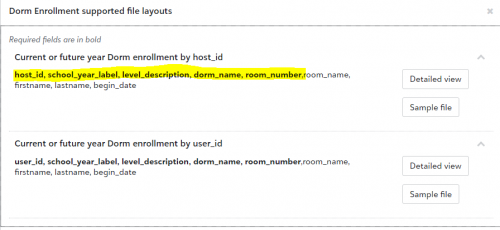
Here is the error message I receive on every file: Multiple Matches:Dorm(dorm_name);No Match:room(building_id,room_number,room_name,school_year_label); Invalid Data: Room assignment exceeds capacity
Here are the six different file combo's I've tried to far:
File 1 host_id school_year_label level_description dorm_name room_number room_name firstname lastname begin_date 557720 2021-2022 Phillips Exeter Academy Amen Hall 413 Amen Hall 413 Jolicia Henry 9/9/2021 *Should work based off sample file. File 2 host_id school_year_label level_description dorm_name room_number room_name firstname lastname begin_date 557720 2021-2022 Phillips Exeter Academy 4059 413 Amen Hall 413 Jolicia Henry 9/9/2021 *Tried used the ID for the Dorm Name verse the Label File 3 host_id school_year_label level_description dorm_name room_number room_name firstname lastname begin_date 557720 2021-2022 Phillips Exeter Academy 4059 413 9/9/2021 *Tried using the Dorm ID for the Dorm Name verse the Label and removed optional fields File 4 user_id school_year_label level_description dorm_name room_number room_name firstname lastname begin_date 5006564 2021-2022 Phillips Exeter Academy 4059 413 9/9/2021 *Tried using the User ID verse the Host ID and Dorm ID for the Dorm Name verse the label and removed optional fields File 5 user_id school_year_label level_description dorm_name room_number room_name firstname lastname begin_date 5006564 2021-2022 Phillips Exeter Academy 4059 700 9/9/2021 *Tried using the User ID verse the Host ID and Dorm ID for the Dorm Name verse the label and creating a new room File 6 user_id school_year_label level_description dorm_name room_number room_name firstname lastname begin_date 5006564 2021-2022 Phillips Exeter Academy Amen Hall 700 9/9/2021 *Tried using the User ID verse the Host ID and creating a new room
Here is a screenshot of the student in question: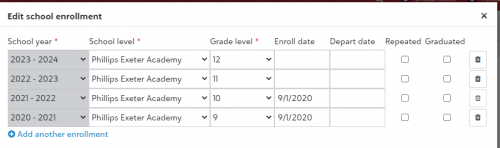
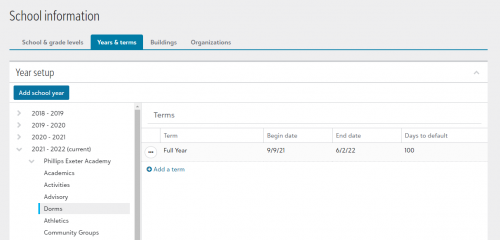
School Year Details:
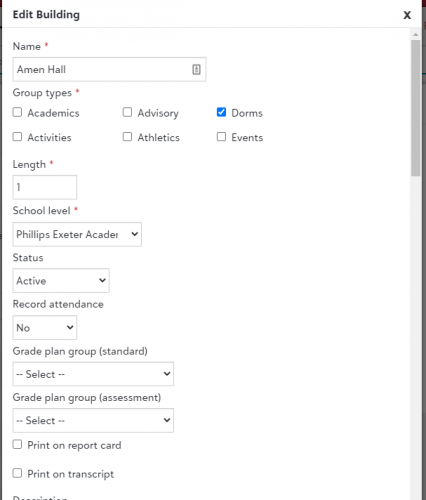
Here is the building details:
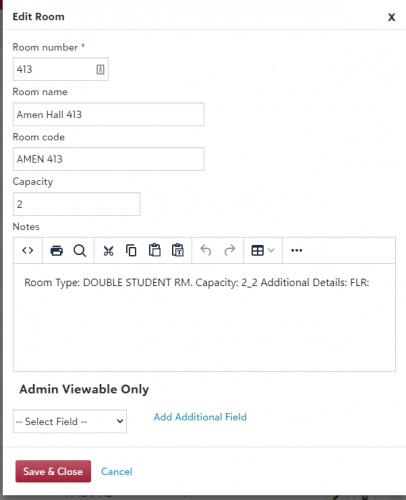
Here is the room details:
 0
0 -
Edit: My bad, I see you are trying different combos.
The error states: Invalid Data: Room assignment exceeds capacity
In your setup of AMEN 413 you have capacity as 2. Looks like your file is trying to put 3 students in there, hence the “exceeds capacity” error.
0 -
@Jamie Cross not a problem! I still haven't been able to import anything. I'm hoping support can help us resolve it.
0 -
I did a quick test and could get a test student imported into one of our dorms. My file looked like this:
user_id school_year_label level_description dorm_name room_number firstname lastname 5835297 2022 - 2023 SPS Armour TBD John Test Grasping at straws a bit, but how about making your year in the import have the extra spaces “2021 - 2022” vs. “2021-2022”?
0 -
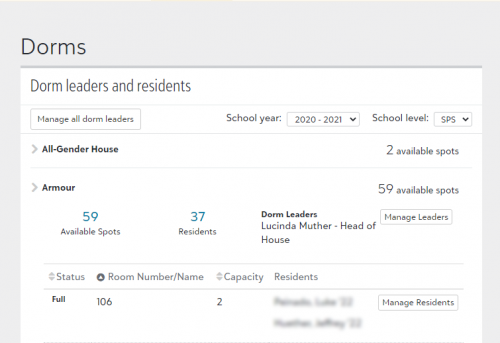
Did another test where I tried importing the student into a room that was already at capacity and got the error message that you show. Are you sure that you are importing into a room that isn't already at capacity?
Dorm setup
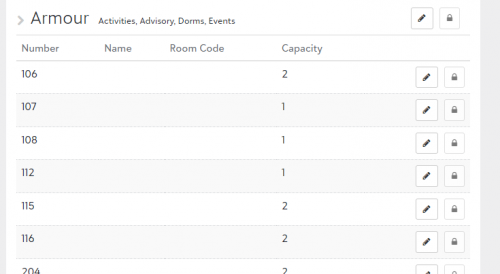
Current state of dorm residents for 2020-2021
Import file
user_id school_year_label level_description dorm_name room_number 5835297 2020 - 2021 SPS Armour 106 Error
status error_msg user_id school_year_label level_description dorm_name room_number Failed Empty:DormResident; Invalid Data: Room assignment exceeds capacity 5835297 2020 - 2021 SPS Armour 106 0 -
@Jamie Cross thanks for the suggestions. I did try to add the spaces in the year and I removed the “begin_date” as I noticed you didn't add it and it wasn't required. I still receive the same error:
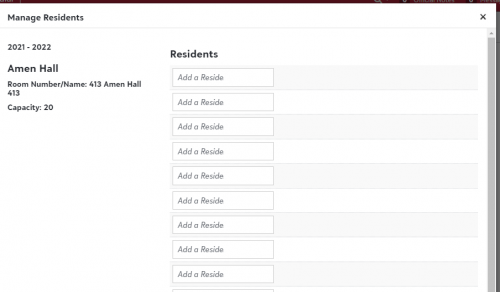
status error_msg user_id school_year_label level_description dorm_name room_number room_name firstname lastname begin_date Failed Multiple Matches:Dorm(dorm_name);No Match:room(building_id,room_number,room_name,school_year_label); Invalid Data: Room assignment exceeds capacity 5006564 2021 - 2022 Phillips Exeter Academy Amen Hall 413 Here is a screenshot of the Room details for this specific year. Support asked me to increase the capacity as a test and as you can see, I put a capacity of 20 with no one actually assigned.
I'm a bit lost as not even support can answer my question and this hasn't been resolved for three weeks now. We are trying to load historical data in the system and our “2021 - 2022” year is our current year. We do have future years (i.e. 2022 2023, 2023 - 2024, etc) setup. I have even tried to change these to make them not publishable. I appreciate the help.
0 -
@Jamie Cross, do you have a room number of “TBD”?
0 -
We do have a TBD room number. The short version of why is to let students know what dorm they are in in early Aug. but not they're actual room number.
So, after further review, I get the following error message when I try to import the student into an available room for 2020-2021 (no one currently in it)
status error_msg user_id school_year_label level_description dorm_name room_number Failed Empty:DormResident; 5835297 2020 - 2021 SPS Armour TBD Notice I don't get the “over capacity” verbiage, however it still failed to import

This same file works when I try it for 2022-2023 which is of course our current academic year.
status error_msg user_id school_year_label level_description dorm_name room_number Passed 5835297 2022 - 2023 SPS Armour TBD I decided to try another test for 2023-2024 to see what happens and lo and behold, error

status error_msg user_id school_year_label level_description dorm_name room_number Failed No Match:room(building_id,room_number,room_name,school_year_label);Match Found:DormResident(user_id,section_id); Invalid Data: Room assignment exceeds capacity 5835297 2023 -2024 SPS Armour TBD
So basically what this tells me is that you can only import dorm information for whatever year you have marked as “Current Year”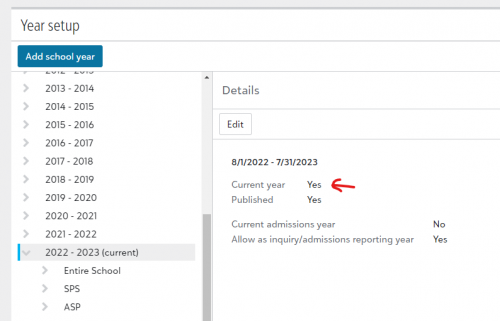
If you are not currently “live” yet, you could experiment be setting 20-21 to the current year and see if the import works.
0 -
@Jamie Cross thanks for the quick follow up.
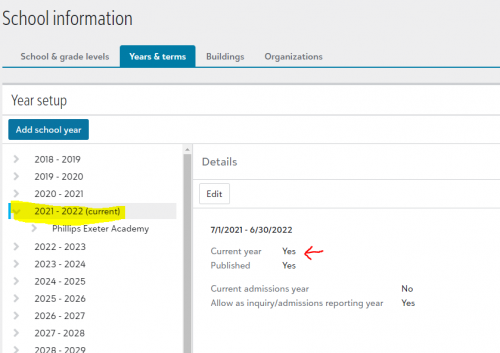
We do have the 2021 - 2022 set as the current year:
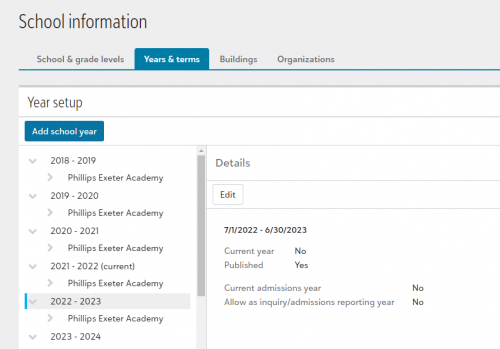
I went through all of the years listed and the rest show a “No” value on the current year field:
 0
0 -
@Lindsey Bryant
Interesting. That kind of tells me they are only allowing you to import into the year where today's date falls in between the date range setup.Can you try to import the exact same data into 2022-2023? I'd even try it without making 2022-2023 the current year and see what happens.
0 -
@Jamie Cross same error, different file structure. It honestly doesn't make sense and at this point, I'm not sure what else to do. I appreciate all of your help.
status error_msg user_id school_year_label level_description dorm_name room_number room_name firstname lastname begin_date Failed Multiple Matches:Dorm(dorm_name);No Match:room(building_id,room_number,room_name,school_year_label);Empty:DormResident; Invalid Data: Room assignment exceeds capacity 5006564 2022 - 2023 Phillips Exeter Academy Amen Hall 413 0 -
@Lindsey Bryant I don't know if this will help you other than as a reassurance that it isn't just you, but I've been trying for the past week to create future enrollments through a data import and I'm getting a very weird SQL error when the file processes. It's not the same as yours, but it's definitely odd, and it makes me wonder if something bigger isn't afoot.
I have a support ticket out and I'll hopefully get an answer sooner rather than later. Support said they couldn't make heads or tails of it on first glance and verified that my csv file is formatted correctly, so the problem is definitely on their end. I'll keep you posted if I hear anything back.
1 -
@Lindsey Bryant bad news: the create future enrollments issue isn't related to this one. My issue is that future enrollments can't be created more than one year in the future, so it was correctly failing even though a bunch of raw code isn't all that helpful in explaining the issue!
0 -
@Brian LeBlanc glad you were able to find an answer. I'm still waiting on next steps. Hopefully once a resolution is provided, I can share with everyone.
0 -
@Lindsey Bryant Did you ever get a resolution on this?
0 -
@Jamie Cross, after three months, support finally was able to confirm the issue and I did verify that I was able to import one row. Here is the response from support:
It appears the problem was the system was returning dorm buildings for current year and any future year. This resulted in buildings being returned for 21-22 and 22-23 and a multiple match exception error to appear when you ran the import because the selected building was returned twice. The development team has updated this so that it returns the buildings only for the selected year of the import so that there are no duplicates. We do suggest that schools only import for one school year at a time (i.e., the one selected in the import dropdown).
1







Categories
- All Categories
- New YourCause Community TEST
- New SKY Community TEST
- New Grantmaking TEST Community
- New Altru Test Community
- New bbcon Community - TEST
- 12 Blackbaud Agents for Good™
- New Raiser's Edge NXT Community
- 7 Blackbaud Community Help
- 218 bbcon®
- 1.4K Blackbaud Altru®
- 409 Blackbaud Award Management™ and Blackbaud Stewardship Management™
- 1.2K Blackbaud CRM™ and Blackbaud Internet Solutions™
- 16 donorCentrics®
- 361 Blackbaud eTapestry®
- 2.7K Blackbaud Financial Edge NXT®
- 680 Blackbaud Grantmaking™
- 598 Blackbaud Education Management Solutions for Higher Education
- 3.3K Blackbaud Education Management Solutions for K-12 Schools
- 952 Blackbaud Luminate Online® and Blackbaud TeamRaiser®
- 85 JustGiving® from Blackbaud®
- 7K Blackbaud Raiser's Edge NXT®
- 3.9K SKY Developer
- 257 ResearchPoint™
- 123 Blackbaud Tuition Management™
- 165 Organizational Best Practices
- 247 Member Lounge (Just for Fun)
- 40 Blackbaud Community Challenges
- 37 PowerUp Challenges
- 3 (Closed) PowerUp Challenge: Grid View Batch
- 3 (Closed) PowerUp Challenge: Chat for Blackbaud AI
- 3 (Closed) PowerUp Challenge: Data Health
- 3 (Closed) Raiser's Edge NXT PowerUp Challenge: Product Update Briefing
- 3 (Closed) Raiser's Edge NXT PowerUp Challenge: Standard Reports+
- 3 (Closed) Raiser's Edge NXT PowerUp Challenge: Email Marketing
- 3 (Closed) Raiser's Edge NXT PowerUp Challenge: Gift Management
- 4 (Closed) Raiser's Edge NXT PowerUp Challenge: Event Management
- 3 (Closed) Raiser's Edge NXT PowerUp Challenge: Home Page
- 4 (Closed) Raiser's Edge NXT PowerUp Challenge: Standard Reports
- 4 (Closed) Raiser's Edge NXT PowerUp Challenge: Query
- 822 Community News
- 3.1K Jobs Board
- 57 Blackbaud SKY® Reporting Announcements
- 47 Blackbaud CRM Higher Ed Product Advisory Group (HE PAG)
- 19 Blackbaud CRM Product Advisory Group (BBCRM PAG)