Is there a report by account that shows the description field?





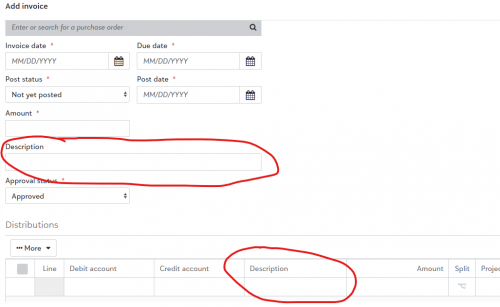
I'm using FENXT web view. In both the Add Invoice screen and the Credit Card Activity screen there is a description field in the “upper” section and a description field on the Distribution line. Is there a report I can run that for any given account I can see both of those description fields? This is the Add Invoice screen:
This is the Credit Card Activity screen:
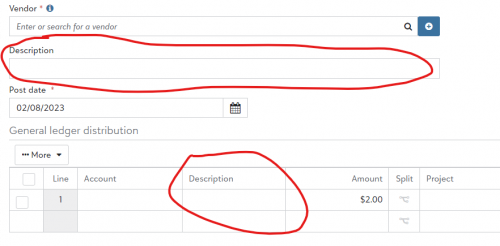
We desperately need a report that shows for whatever account we're reporting on, what did we enter in both of those description fields?
Comments
-
@Jay Cole
The only report that may show you some of this would be the General Ledger Report. Now to do this, that means changing the setup of the Posting Information for Invoices in AP, and that would only affect new postings. Anything previously posted would not be retroactively affected. But in the Posting Information in AP>Configuration, you can set up what information is put into the posting of invoices, so you can have invoice descriptions and Line item distribution descriptions as well. The large caveat is this Journal Reference field is limited to 55/60 characters. Then the rest is cut off. So whatever you can fit in that field is what can show on the GL report itself since that is what's in the GL Report.1 -
@Jay Cole I would add to Kevin's guidance, that if you export to excel, you can then widen the column to see the entire description.
1 -
@Kevin Brazell I assume the configuration is in database view? When we started FENXT in 2020 we went straight to web view and have done little to nothing in database view. Since the fields are on the screen, I wonder if the Configuration is already set up correctly.
Here's a screen shot of a GL Detail/Account Summary report:

The “Reference” shows the vendor, but not what's in the Description fields. I wonder if something needs to change in how our report is built?
0 -
@Jay Cole Correct. DB view >AP>Configuration>Posting Information. Until they move it to webview, it's controlled in DB view currently.
1 -
@Jay Cole
Were you able to accomplish this? We are at some issue now, To me this is a key feature, and seems that no one has needed it before in my organization. The "Reference" column seem to be a default detail by the software, but I truly need the description from both spots, just like you marked. I also realized that prior invoices' description box can be added or edited and wonder if you're done that and be able to see a better report for past and future. Will description be displayed only in Database view? query? How you run it?0 -
@Katherine Ramos I finally called Blackbaud Support directly and they were able to provide something close. In Database View I select Accounts Payable, then Query, then I created a template for the various accounts I want to run reports for.

You would click New, then build the query you desire. On the Criteria tab under Query Fields, I selected Account Number and Post Date to see the data for this year:

On the next “Output” tab, I searched through the various fields to come up with Account Description, Post date, Vendor Name, then the key fields of Description and Line Item Description, followed lastly by Amount, and added them to the results grid in that order.
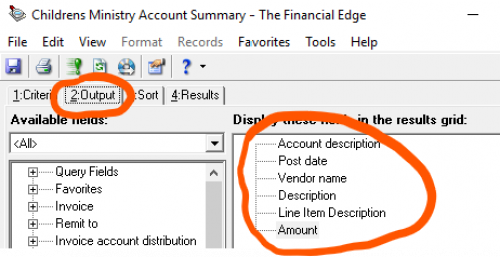
The third tab, Sort, I chose to sort by Post date (Ascending) to have the oldest first, and finally the Results tab gives you the report in a grid. I exported that to Excel and formatted it to a readable font and format for presentation.
The one limitation is this report is really a supplemental to the regular Account Summary report in Web View. It only shows transactions that are part of Accounts Payable…it does not include account activity from General Ledger, Cash Management (i.e., credit card returns), or other postings…only A/P. So, I have been sending both the Account Summary report to my ministry leaders as well as this Query report with the additional fields and explaining the difference between reports.
I'm sincerely hoping that since Blackbaud announced they're moving all Database View functions into the Web View arena of usage, they will make the Description and Line item Description fields available as options in the report. The data is there, it's just having the ability to put it all into one usable report. Hope this helps!
0 -
@Katherine Ramos
Your information helped understand better, and actually I improve my GL detail report from Database view. But even when filling up the description in the body of invoices still not shown in report of GL. Thanks a lot, Also my reference, notes, and more description of the body of my journal is not showing in my GL report I built with all those to be displayed in more columns. Only shows the Journal reference which goes on top of the new journal you are entering1










Categories
- All Categories
- New K-12 Community Home (TEST)
- New Higher Education Home Page (Test)
- New Impact Edge Community TEST
- New YourCause Community TEST
- New SKY Community TEST
- New Grantmaking TEST Community
- New Altru Test Community
- New bbcon Community - TEST
- 12 Blackbaud Agents for Good™
- New Raiser's Edge NXT Community
- 8 Blackbaud Community Help
- 222 bbcon®
- 1.4K Blackbaud Altru®
- 410 Blackbaud Award Management™ and Blackbaud Stewardship Management™
- 1.2K Blackbaud CRM™ and Blackbaud Internet Solutions™
- 16 donorCentrics®
- 361 Blackbaud eTapestry®
- 2.7K Blackbaud Financial Edge NXT®
- 687 Blackbaud Grantmaking™
- 603 Blackbaud Education Management Solutions for Higher Education
- 3.3K Blackbaud Education Management Solutions for K-12 Schools
- 954 Blackbaud Luminate Online® and Blackbaud TeamRaiser®
- 85 JustGiving® from Blackbaud®
- 7K Blackbaud Raiser's Edge NXT®
- 4K SKY Developer
- 258 ResearchPoint™
- 123 Blackbaud Tuition Management™
- 165 Organizational Best Practices
- 248 Member Lounge (Just for Fun)
- 40 Blackbaud Community Challenges
- 37 PowerUp Challenges
- 3 (Closed) PowerUp Challenge: Grid View Batch
- 3 (Closed) PowerUp Challenge: Chat for Blackbaud AI
- 3 (Closed) PowerUp Challenge: Data Health
- 3 (Closed) Raiser's Edge NXT PowerUp Challenge: Product Update Briefing
- 3 (Closed) Raiser's Edge NXT PowerUp Challenge: Standard Reports+
- 3 (Closed) Raiser's Edge NXT PowerUp Challenge: Email Marketing
- 3 (Closed) Raiser's Edge NXT PowerUp Challenge: Gift Management
- 4 (Closed) Raiser's Edge NXT PowerUp Challenge: Event Management
- 3 (Closed) Raiser's Edge NXT PowerUp Challenge: Home Page
- 4 (Closed) Raiser's Edge NXT PowerUp Challenge: Standard Reports
- 4 (Closed) Raiser's Edge NXT PowerUp Challenge: Query
- 829 Community News
- 3.1K Jobs Board
- 57 Blackbaud SKY® Reporting Announcements
- 47 Blackbaud CRM Higher Ed Product Advisory Group (HE PAG)
- 19 Blackbaud CRM Product Advisory Group (BBCRM PAG)