Skills Based Report Card





Hello! Our lower elementary grades use a skills-based report card. Right now, this is done manually for every student in a spreadsheet - which is time consuming and tedious. Does anyone use a skills-based report card through blackbaud? I would love to see an example and learn more about setting this up for our school.
Thank you!
Amy Welsh
awelsh@davidsonacademy.com
Comments
-
@Amy Welsh We do. I began using Blackbaud for our Lower School Report Cards in 2017. I'd be happy to meet with you online if you're interested. I've attached an example2nd grade PR.pdf. -Katherine
0 -
@Katherine Nolte That would be so helpful!! Thank you so much! Feel free to reach out anytime: awelsh@davidsonacademy.com
0 -
@Katherine Nolte If possible, I would love to learn from you as well! We are attempting to do this beginning in 2023-34 as well and although I have a structure in place from our initial consultation with BB, there is more work that I need to do so would appreciate any insights you may have. I can be reached at mstanton@raleighschool.org. Thanks!
0 -
@Amy Welsh Hi all! We are in the same situation. We are doing the report cards manually using docs and spreadsheets, and I would love to switch to BB for next year. Ideally, maybe also use the Gradebook feature in the future as well. I did all the eLearning courses (more than once) but it's super confusing. I think I'm finally understanding it, but I still have a lot of questions. I would love to be in touch with all of you, and share our learnings.
Thank you!!!
Mariana Lemcovich
0 -
We currently use the assessment report card in Blackbaud for grades 1-3. We are in deep conversation about standards based report cards and, it seems to me that I can tweak the assessment report card to be a standards (or skills) based one. We are also seriously contemplating the competency-based gradebook (mastery) piece, which enables the tracking of standards/skills with multiple ways to do it. This might work better than a spreadsheet. The competency-based gradebook is currently not connected to the report card, but I'm sure it will be. I hope it's soon.
0 -
Hi Mariana,
I can totally agree with you that setting up the grading and assessment report cards can be very confusing. Happy to try and answer questions but since I'm relatively new at it, my insight may be limited. I was lucky in that even though we didn't have a plan to use these features initially we had the forethought to have our BB consultant set them up when we launched a few years ago ‘just in case’. At this time we are planning on only using the system for end of term grades and the progress report - we will not be using the Gradebook.
Feel free to reach out at mstanton@raleighschool.org.
Mary Stanton
0 -
We have used the Old Report Card Builder since 2016 and are working on switching to the new one. It is helpful that you already have the skills in a spreadsheet. I believe you can import them into Blackbaud. It's been a long time since I did this, so I don't remember all the details. I'm in the process of learning it all again.
0 -
@Katherine Nolte I came across your example report card which was super helpful to see as we're trying to switch from the OLD report cards to the “new” ones.
We're trying to avoid a multipage report card so it's not incredibly long. However, unless I'm missing something, I can't figure out how to break up the courses listed unless I tell them to add a page break. Is that what you do? You have the page breaks so they'll separate out? Does that make sense? If you can add any insight, I'd appreciate it. Thanks.Betsy
sidebottomb@ashleyhall.org0 -
@Betsy Sidebottom
I think I understand what you are asking. I have attached a screenshot of my settings. Does that help? -Katherine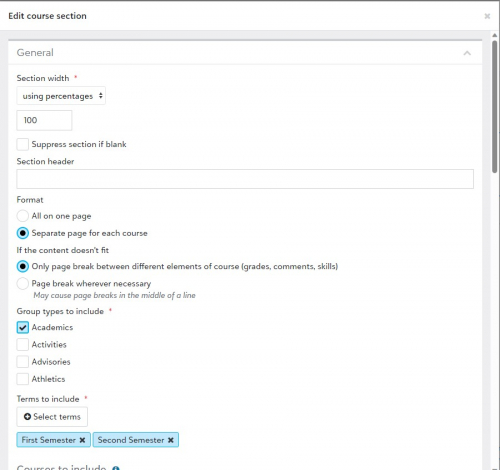 0
0 -
@Katherine Nolte
Thank you so much. We'll continue to work on this today and follow your settings too. I was just hoping I could figure out how to add a horizontal line break between courses within a page instead of having to use a page break. But perhaps these settings do that. Thanks again for your tip.0 -
@Katherine Nolte
Hey Katherine, I have another question. I noticed that you have a course summary listed above each of your assessments. If possible, can you explain how/where you're pulling that course summary from? Below is an image from your shared example. How did you get the annual course summary to appear? Thanks again for your insight!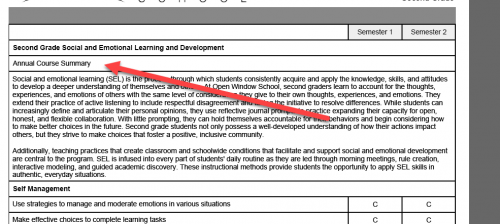 0
0 -
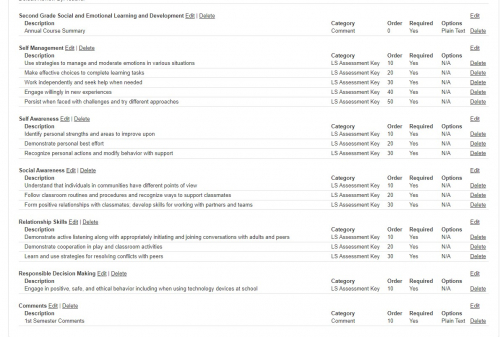
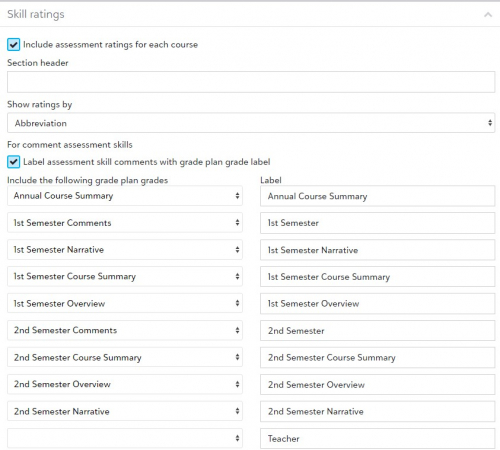
@Betsy Sidebottom I have attached 2 images of my settings in the Report Card setup and Grade Plan setup. Hopefully that helps you.
 1
1











Categories
- All Categories
- New K-12 Community Home (TEST)
- New Higher Education Home Page (Test)
- New Impact Edge Community TEST
- New YourCause Community TEST
- New SKY Community TEST
- New Grantmaking TEST Community
- New Altru Test Community
- New bbcon Community - TEST
- 12 Blackbaud Agents for Good™
- New Raiser's Edge NXT Community
- 8 Blackbaud Community Help
- 222 bbcon®
- 1.4K Blackbaud Altru®
- 410 Blackbaud Award Management™ and Blackbaud Stewardship Management™
- 1.2K Blackbaud CRM™ and Blackbaud Internet Solutions™
- 16 donorCentrics®
- 361 Blackbaud eTapestry®
- 2.7K Blackbaud Financial Edge NXT®
- 687 Blackbaud Grantmaking™
- 603 Blackbaud Education Management Solutions for Higher Education
- 3.3K Blackbaud Education Management Solutions for K-12 Schools
- 954 Blackbaud Luminate Online® and Blackbaud TeamRaiser®
- 85 JustGiving® from Blackbaud®
- 7K Blackbaud Raiser's Edge NXT®
- 4K SKY Developer
- 258 ResearchPoint™
- 123 Blackbaud Tuition Management™
- 165 Organizational Best Practices
- 248 Member Lounge (Just for Fun)
- 40 Blackbaud Community Challenges
- 37 PowerUp Challenges
- 3 (Closed) PowerUp Challenge: Grid View Batch
- 3 (Closed) PowerUp Challenge: Chat for Blackbaud AI
- 3 (Closed) PowerUp Challenge: Data Health
- 3 (Closed) Raiser's Edge NXT PowerUp Challenge: Product Update Briefing
- 3 (Closed) Raiser's Edge NXT PowerUp Challenge: Standard Reports+
- 3 (Closed) Raiser's Edge NXT PowerUp Challenge: Email Marketing
- 3 (Closed) Raiser's Edge NXT PowerUp Challenge: Gift Management
- 4 (Closed) Raiser's Edge NXT PowerUp Challenge: Event Management
- 3 (Closed) Raiser's Edge NXT PowerUp Challenge: Home Page
- 4 (Closed) Raiser's Edge NXT PowerUp Challenge: Standard Reports
- 4 (Closed) Raiser's Edge NXT PowerUp Challenge: Query
- 829 Community News
- 3.1K Jobs Board
- 57 Blackbaud SKY® Reporting Announcements
- 47 Blackbaud CRM Higher Ed Product Advisory Group (HE PAG)
- 19 Blackbaud CRM Product Advisory Group (BBCRM PAG)