Reporting Split Gifts Accurately





My office, including myself, is very new to most of the features on NXT. Currently when reporting out amount in gifts for specific funds the reporting isn't accurate as it is showing the full gift amount for a split gift and not the portion allotted to the fund. Is there something I'm missing in how to get reports/lists to pull only the portion of a split gift that is related. For example pulling a report for Annual Fund we have a 15k gift that is split 5k to Annual Fund and the rest to a restricted fund but it shows the full 15k in the totals for Annual Fund when I pull a report on that fund.
Any tricks here I'm missing?
Comments
-
@Rebekah Church I find it best to use the Database View reports like the Gift Detail & Summary or Fund reports. They will split the gifts. Reporting in RE NXT is still not that reliable.
9 -
@Rebekah Church I use the Gift Detail & Summary report that @Joe Moretti mentioned weekly. I even have a few different ones based on what I need rather than changing a ton of the filters.
Going forward, you could consider entering the gifts separately instead of splitting them. I actually started doing this after reading and hearing several people voice concerns of split gifts and accurate reporting. It means a little extra data entry but makes things a little easier for you, too, in the long run, especially if you're running queries and pull the gift amount instead of the split amount. Having the gifts entered separately would also then prompt separate acknowledgement letters, depending on how you have that set up. Since the web view reports pull gift amount those would more accurately reflect your totals.
0 -
@Miki Martin
Yes, entering the split gift as separate gifts is the way to go. Your reports will be clean then!! Blackbaud said this was an issue years ago….3 -
@Miki Martin
Entering them as separate gifts has been on the top of my list, but currently we have a policy of how to enter those that would need to change (and would requiring convincing of another department to allow that change) but this definitely helps!2 -
@Rebekah Church At previous org, I did not use split gifts.
Current org we do. Yes, some reporting is easier but it's a trade. Entering as split gifts increases your number of gifts but decreases the average size, greatest gift and like data. Here, we want to have more accurate info on largest gifts and number.
Just keep in mind, to have one thing, it affects other things. ?
4 -
@Rebekah Church
I use the Gift Detail and Summary Report in database view. It will list all your funds, and if you want a report of only one fund, you can do that easily with the filters tab.0 -
@Rebekah Church
We have gotten NXT Insight reports to accurately show split gift amounts. Admittedly I am aware of all the pitfalls on the double counting of split gifts, so I think you do have to be careful when using NXT reports.
I recommend starting with your Gift configurations in Control Panel/Settings/Giving Analysis and ensure you have the proper gift types displayed in the Received Revenue, Committed Revenue, and Recognition categories.
Then in Report Builder, when using any Gift insights, be sure to use the Gift Amount because it automatically pulls from the “splitgift” data set and should use the CFA for each split. Also you will need to filter specifically on Gift is Received Revenue=True so that it is not adding any non-revenue gift amounts (i.e. Pledge, Recurring Gift, etc.)
I hope I am not forgetting anything, but that seems to be what works and they usually match my Database Gift Detail and Summary Reports.4 -
@Keith Wilson Thank you for this. I believe the team that set up our recording of gifts did not do it in a way that unfortunately will allow this to work as they do not have a separate gift type for split gifts, they simply split them when they entered them in the database view, which is very unfortunate as our new team leader wants real time, updated dashboards available for him to always to log in and see.
0 -
@Keith Wilson Thank you for this. I believe the team that set up our recording of gifts did not do it in a way that unfortunately will allow this to work as they do not have a separate gift type for split gifts, they simply split them when they entered them in the database view, which is very unfortunate as our new team leader wants real time, updated dashboards available for him to always to log in and see.
@Rebekah Church: There is no separate gift type for split gifts, as you can't edit that table. Perhaps a subtype could be added, but the solution that @Keith Wilson mentioned has nothing to do with that. I believe that the insights he suggested will use the split gift values correctly. Maybe you can make a screenshot of the gift configurations table? I'd also think that there are times where you may have to check the filters on the dashboard/insight to verify that things are being shown correctly.
2 -
Hi, Keith! Would you be willing to give more explanation on your Insight report? I asked support about it, but they could not duplicate your steps and said more information was needed about the Insight report.
Thanks, Rachel
0 -
@Rachel McClure
I’m not entirely sure how much help this will be, but I am happy to share what I can. Start with NXT Control panel and go to Settings and then Giving Analysis. Look at your gift type settings in each of the 3 Received revenue, Committed revenue, and Recognition categories.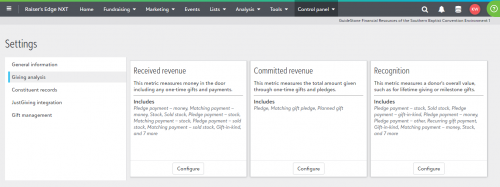
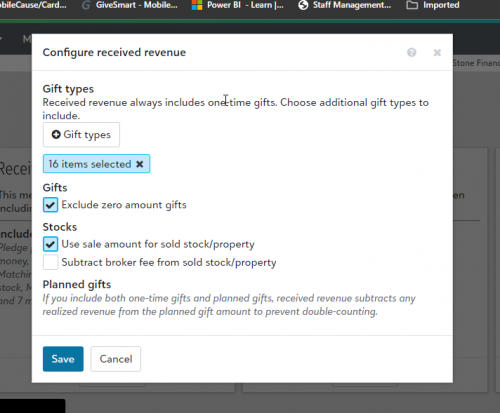
Our settings for Received revenue includes the following:
- Pledge payment – money
- Matching payment – money
- Stock
- Sold stock
- Pledge payment – stock
- Matching payment – stock
- Pledge payment – sold stock
- Matching payment – sold stock
- Gift-in-kind*
- Pledge payment – gift-in-kind
- Matching payment – gift-in-kind
- Other
- Pledge payment – other
- Matching payment – other
- Recurring gift payment
(*Note our organization uses the Gift-in-kind gift type for something other than it’s intended use, so use your own judgement before selecting that one.)
From Analysis / Report Builder, our Gifts received reports general apply the following:
- Sum of Gift amount, note the Gift amount dataset automatically uses the “giftsplit” metric
- Gift is received revenue, all except false
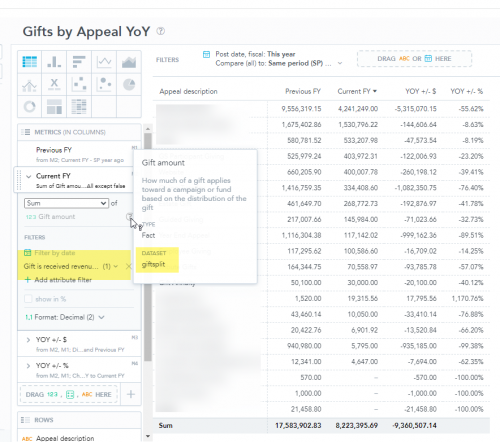
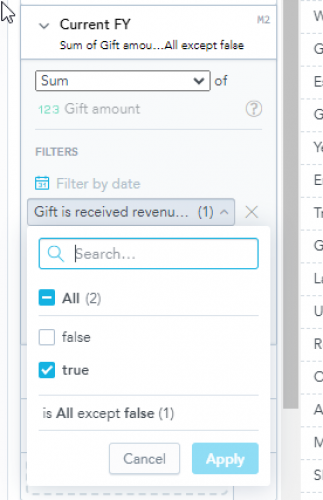
Our split gifts are usually recorded as “Split Gifts”, not separate entries for each split as some orgs do. Sometimes the split is between funds, but other times it splits across an appeal both going to the same fund. Using these report settings, I have not seen any miscalculations either way. The numbers are in line with the gift detail and summary reports pulled from database view.
Please let me know how it goes. ?
1 -
@Keith Wilson
Thank you for the information! Does your organization, by chance, have the Insight Designer feature?0 -
@Rachel McClure
Yes, we did purchase the Insight Designer add on.1 -
Does anyone know if the Gift Detail and Summary Reports that are now in NXT still allow for reporting split gifts separately? I have a gift that is split between two different packages and I want it to show up on two different reports. I have a query that looks for gifts with the package ID, so the query contains only one part of the split gift. When I run the Gift Detail and Summary Report in NXT though, the entire gift is displaying on the report. Is there a way to have just one part of the gift on the report, even if it only differs in the package ID? For example -
Split 1 is Fund = X; Appeal = Y; Package = A
Split 2 is Fund = X; Appeal = Y; Package = B
I want two separate gift summary reports, one for Package A and one for Package B. Is this possible?
0 -
query will group the gifts that are going to be used in the report, you have to use the report's option to make any specific segmentation. However, unfortunately, there is no such option for Package. There is only filtering option for Campaign, Fund, Appeal, but not Package. So you are out of luck trying to use the Gift Detail and Summary Report.
For this need, you will need to run query export and then use excel (or power bi, or other reporting type tool) to segment the report by package.
0

























Categories
- All Categories
- New K-12 Community Home (TEST)
- New Higher Education Home Page (Test)
- New Impact Edge Community TEST
- New YourCause Community TEST
- New SKY Community TEST
- New Grantmaking TEST Community
- New Altru Test Community
- New bbcon Community - TEST
- 12 Blackbaud Agents for Good™
- New Raiser's Edge NXT Community
- 8 Blackbaud Community Help
- 222 bbcon®
- 1.4K Blackbaud Altru®
- 410 Blackbaud Award Management™ and Blackbaud Stewardship Management™
- 1.2K Blackbaud CRM™ and Blackbaud Internet Solutions™
- 16 donorCentrics®
- 361 Blackbaud eTapestry®
- 2.7K Blackbaud Financial Edge NXT®
- 687 Blackbaud Grantmaking™
- 604 Blackbaud Education Management Solutions for Higher Education
- 3.3K Blackbaud Education Management Solutions for K-12 Schools
- 954 Blackbaud Luminate Online® and Blackbaud TeamRaiser®
- 85 JustGiving® from Blackbaud®
- 7K Blackbaud Raiser's Edge NXT®
- 4K SKY Developer
- 258 ResearchPoint™
- 123 Blackbaud Tuition Management™
- 165 Organizational Best Practices
- 248 Member Lounge (Just for Fun)
- 40 Blackbaud Community Challenges
- 37 PowerUp Challenges
- 3 (Closed) PowerUp Challenge: Grid View Batch
- 3 (Closed) PowerUp Challenge: Chat for Blackbaud AI
- 3 (Closed) PowerUp Challenge: Data Health
- 3 (Closed) Raiser's Edge NXT PowerUp Challenge: Product Update Briefing
- 3 (Closed) Raiser's Edge NXT PowerUp Challenge: Standard Reports+
- 3 (Closed) Raiser's Edge NXT PowerUp Challenge: Email Marketing
- 3 (Closed) Raiser's Edge NXT PowerUp Challenge: Gift Management
- 4 (Closed) Raiser's Edge NXT PowerUp Challenge: Event Management
- 3 (Closed) Raiser's Edge NXT PowerUp Challenge: Home Page
- 4 (Closed) Raiser's Edge NXT PowerUp Challenge: Standard Reports
- 4 (Closed) Raiser's Edge NXT PowerUp Challenge: Query
- 829 Community News
- 3.1K Jobs Board
- 57 Blackbaud SKY® Reporting Announcements
- 47 Blackbaud CRM Higher Ed Product Advisory Group (HE PAG)
- 19 Blackbaud CRM Product Advisory Group (BBCRM PAG)