Help with Gift Mapping to Correct Account Number RE/FE Reconciliation





Hi, when we select Credit Card Payment (acct# 1041) during gift entry, the gift is still mapping to Cash (1040.) Any thoughts on how to correct this?
Comments
-
@Trent Smither
Are you adding Credit Card Payment to the Gift Subtype or the Pay Method?Pay Method is not a field that influences the GL Distribution, which is why many organizations - yours included - use the Gift Subtype field to funnel gifts to the correct GL. That is likely to be the culprit here - check the gifts that are mapping incorrectly and see what (if any) Gift Subtype is in place.
Karen
3 -
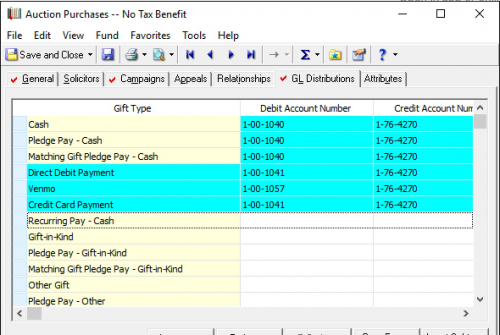
To follow up on this 100% correct answer, the screenshot you provided indicates that the only place you have credit card GL codes stored is as a gift subtype associated with matching gift pay-cash. To set this up correctly, you would need this entry under cash, pledge payment, and recurring gift pay cash as well. In fact you probably don't need that entry at all where it currently lives because I personally can't think of a scenario where you're entering a matching gift payment as a credit card transaction.
So your gift entry data structure would most often be:
Gift type: Cash
Gift Subtype: Credit Card payment
And finally, you'd need to set up this data structure on each fund that could be associated with a credit card payment, otherwise you'll just end up with the cash GL codes again.
5 -
@Ryan Hyde
Excellent catch Ryan! Thanks for adding some really helpful context.Karen
0 -
To follow up on this 100% correct answer, the screenshot you provided indicates that the only place you have credit card GL codes stored is as a gift subtype associated with matching gift pay-cash. To set this up correctly, you would need this entry under cash, pledge payment, and recurring gift pay cash as well. In fact you probably don't need that entry at all where it currently lives because I personally can't think of a scenario where you're entering a matching gift payment as a credit card transaction.
So your gift entry data structure would most often be:
Gift type: Cash
Gift Subtype: Credit Card payment
And finally, you'd need to set up this data structure on each fund that could be associated with a credit card payment, otherwise you'll just end up with the cash GL codes again.
@Ryan Hyde How do you know that the subtype is mapping only to Matching Gift Pledge Pay - Cash? Because of the blue highlight?
If, yes. How do I correctly add a subtype? Thank you!
0 -
@Karen Diener I am trying to sort this out now. I wasn't even aware that you could screw this up so thank you for pointing this out.
0 -
@Trent Smither
Yeah, the visual feedback on this screen is not the best. If the line is in blue, that means it's a subtype. When it's a subtype, it's only related to the yellow line above it, bypassing all other blue lines. So the nearest yellow line above this is matching gift pay-cash, meaning the only gift type these GL codes are associated with is matching gift payments. Obviously, this is not useful, now that you're aware of it.To get these in the right place, right click on the gray box to the left of any gift type this needs to be associated with and click “insert row”. Again, the usual suspects are cash, pay-cash, and recurring gift pay-cash, though you may have other use cases you need to account for as well.
If this were designed correctly, the subtypes would be tab indented underneath each type to make it obvious how they functioned.
1 -
@Ryan Hyde Extremely helpful, thank you. So how do I get the credit card subtype to map to a credit card account? Which gift type would you associate this with? Other Gift?
IS there a way to add a CC Payment subtype under the Cash gift type and include the correct Debit Acct Number? Feels like I tried that with the Matching Gift Pledge Pay – Cash and it routed to the Gift Type debit acct# not the subtype debit acct#.0 -
@Trent Smither
Yeah, just right click on the gray box to the left of “Cash," click “add row," and then enter your debit and credit account information. I wouldn't put this stuff on gift type other. Cash does not mean physical paper tender - it just means currency that is not associated with a pre-existing pledge or recurring gift.I would also add lines for pledge pay-cash and recurring gift pay-cash. Those are things that could potentially be paid via credit card now or in the future.
When that's set up, then all gifts with a type of “cash” and a subtype of “credit card payment” will have the correct GL numbers. If they don't, then check your setup again because that's the expected behavior.
1 -
@Ryan Hyde Seems to be working. Thank you!
1 -
@Trent Smither
Happy to help! And remember, you have to do this for each fund that may be paid into via credit card transactions. But you can copy your data from one fund to the next. You'll just need to update the credit account number to match the fund you're editing if you go that route.2 -
@Ryan Hyde Yep, I'm sure this will uncover more places to correct and more work, but I am thrilled to understand it. Thank you so much.
0 -
@Karen Diener I am trying to sort this out now. I wasn't even aware that you could screw this up so thank you for pointing this out.
We are all always learning - you and everyone before you!
0







Categories
- All Categories
- New YourCause Community TEST
- New SKY Community TEST
- New Grantmaking TEST Community
- New Altru Test Community
- New bbcon Community - TEST
- 12 Blackbaud Agents for Good™
- New Raiser's Edge NXT Community
- 7 Blackbaud Community Help
- 218 bbcon®
- 1.4K Blackbaud Altru®
- 409 Blackbaud Award Management™ and Blackbaud Stewardship Management™
- 1.2K Blackbaud CRM™ and Blackbaud Internet Solutions™
- 16 donorCentrics®
- 361 Blackbaud eTapestry®
- 2.7K Blackbaud Financial Edge NXT®
- 680 Blackbaud Grantmaking™
- 598 Blackbaud Education Management Solutions for Higher Education
- 3.3K Blackbaud Education Management Solutions for K-12 Schools
- 952 Blackbaud Luminate Online® and Blackbaud TeamRaiser®
- 85 JustGiving® from Blackbaud®
- 7K Blackbaud Raiser's Edge NXT®
- 3.9K SKY Developer
- 257 ResearchPoint™
- 123 Blackbaud Tuition Management™
- 165 Organizational Best Practices
- 247 Member Lounge (Just for Fun)
- 40 Blackbaud Community Challenges
- 37 PowerUp Challenges
- 3 (Closed) PowerUp Challenge: Grid View Batch
- 3 (Closed) PowerUp Challenge: Chat for Blackbaud AI
- 3 (Closed) PowerUp Challenge: Data Health
- 3 (Closed) Raiser's Edge NXT PowerUp Challenge: Product Update Briefing
- 3 (Closed) Raiser's Edge NXT PowerUp Challenge: Standard Reports+
- 3 (Closed) Raiser's Edge NXT PowerUp Challenge: Email Marketing
- 3 (Closed) Raiser's Edge NXT PowerUp Challenge: Gift Management
- 4 (Closed) Raiser's Edge NXT PowerUp Challenge: Event Management
- 3 (Closed) Raiser's Edge NXT PowerUp Challenge: Home Page
- 4 (Closed) Raiser's Edge NXT PowerUp Challenge: Standard Reports
- 4 (Closed) Raiser's Edge NXT PowerUp Challenge: Query
- 822 Community News
- 3.1K Jobs Board
- 57 Blackbaud SKY® Reporting Announcements
- 47 Blackbaud CRM Higher Ed Product Advisory Group (HE PAG)
- 19 Blackbaud CRM Product Advisory Group (BBCRM PAG)