Full page add in for all custom reports in RENXT





Has anyone been able to create a full page add in? My goal is to create a page add in that then houses all of my powerBI reports instead of having them scattered throughout the home page. The instructions for Page Host SPA seem straightforward but it's not working for me. Any advice would be appreciated!
Comments
-
@Torie Wright
I created it to do exactly that as well.The way I have it is, I created a Power Automate flow that is triggered by HTTP, which return a webpage that has the component needed for loading in RE NXT. Then add a full page add-in to the Home page under Task.
To do this, you need to add 2 add-ins:
- Add an add-in that is of Navigation > Page (Preview)
- Add-in name is important, so consider this carefully as it will be used by 2nd add-in
- Add-in URL is the URL of my HTTP triggered Power Automate flow
- Add another add-in that is of Home Page > Development Office Home Action (Preview)
- Add-in name is not important
- Add-in URL = https://app.blackbaud.com/addin-page-host-button?appId=YOUR-SKY-APPLICATION-ID&pageName=ADD-IN-NAME-FROM-ABOVE&title=TITLE-YOU-WANT&svcid=renxt
1 - Add an add-in that is of Navigation > Page (Preview)
-
@Torie Wright
Another approach you can consider that doesn't involve Power Automate is to use the Page Host SPA in conjunction with the Power BI Host SPA.- First, build your Power BI report itself.
- Next, register a “Page” add-in as described in the documentation - this essentially defines a new page in the system that can be accessed in the browser using the Page Host SPA route naming convention (described here).
The Add-in URL you specify can leverage the Power BI Host SPA's /tile route. I know that may not be intuitive since you want a full-page experience, not a tile experience. It works, but means you'll also want to provide a sufficiently large value for the `height` query parameter (since this route is normally intended for tile add-ins where the height is constrained).
The Power BI Host SPA doesn't currently define a /page route (which would be useful in full-page scenarios where you don't want to explicitly provide a height) but this could be a feature enhancement that Blackbaud adds in the future.
Tagging @Ben Wong and @Heather McLean and @Ashley Moose for visibility and in case they have additional thoughts.
Hope this helps!
1 -
Here's a few screenshot of what I have in case you want to build to it.
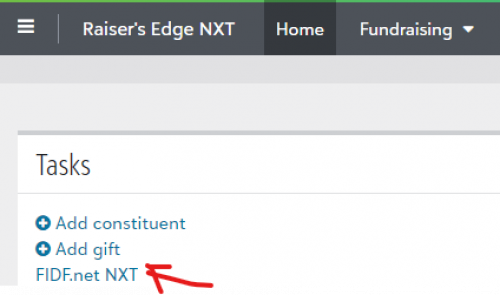
FIDF.net NXT is the name we gave to our custom reporting tool 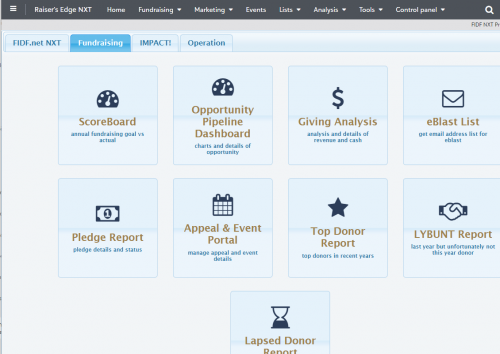
Tab to group various BI reports, within each tab are reports in button with icon, title and description. When clicked on, the menu goes away (tab remains) and the specific BI report is displayed 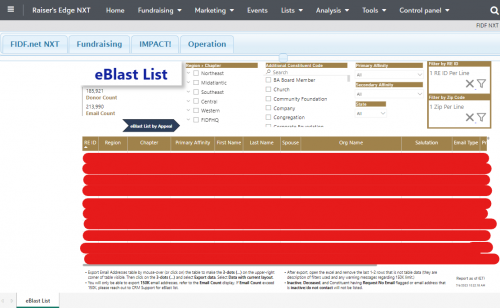 0
0







Categories
- All Categories
- New K-12 Community Home (TEST)
- New Higher Education Home Page (Test)
- New Impact Edge Community TEST
- New YourCause Community TEST
- New SKY Community TEST
- New Grantmaking TEST Community
- New Altru Test Community
- New bbcon Community - TEST
- 12 Blackbaud Agents for Good™
- New Raiser's Edge NXT Community
- 8 Blackbaud Community Help
- 222 bbcon®
- 1.4K Blackbaud Altru®
- 410 Blackbaud Award Management™ and Blackbaud Stewardship Management™
- 1.2K Blackbaud CRM™ and Blackbaud Internet Solutions™
- 16 donorCentrics®
- 361 Blackbaud eTapestry®
- 2.7K Blackbaud Financial Edge NXT®
- 687 Blackbaud Grantmaking™
- 604 Blackbaud Education Management Solutions for Higher Education
- 3.3K Blackbaud Education Management Solutions for K-12 Schools
- 954 Blackbaud Luminate Online® and Blackbaud TeamRaiser®
- 85 JustGiving® from Blackbaud®
- 7K Blackbaud Raiser's Edge NXT®
- 4K SKY Developer
- 258 ResearchPoint™
- 123 Blackbaud Tuition Management™
- 165 Organizational Best Practices
- 248 Member Lounge (Just for Fun)
- 40 Blackbaud Community Challenges
- 37 PowerUp Challenges
- 3 (Closed) PowerUp Challenge: Grid View Batch
- 3 (Closed) PowerUp Challenge: Chat for Blackbaud AI
- 3 (Closed) PowerUp Challenge: Data Health
- 3 (Closed) Raiser's Edge NXT PowerUp Challenge: Product Update Briefing
- 3 (Closed) Raiser's Edge NXT PowerUp Challenge: Standard Reports+
- 3 (Closed) Raiser's Edge NXT PowerUp Challenge: Email Marketing
- 3 (Closed) Raiser's Edge NXT PowerUp Challenge: Gift Management
- 4 (Closed) Raiser's Edge NXT PowerUp Challenge: Event Management
- 3 (Closed) Raiser's Edge NXT PowerUp Challenge: Home Page
- 4 (Closed) Raiser's Edge NXT PowerUp Challenge: Standard Reports
- 4 (Closed) Raiser's Edge NXT PowerUp Challenge: Query
- 829 Community News
- 3.1K Jobs Board
- 57 Blackbaud SKY® Reporting Announcements
- 47 Blackbaud CRM Higher Ed Product Advisory Group (HE PAG)
- 19 Blackbaud CRM Product Advisory Group (BBCRM PAG)