Adding fields to a Filtered List Gifts?





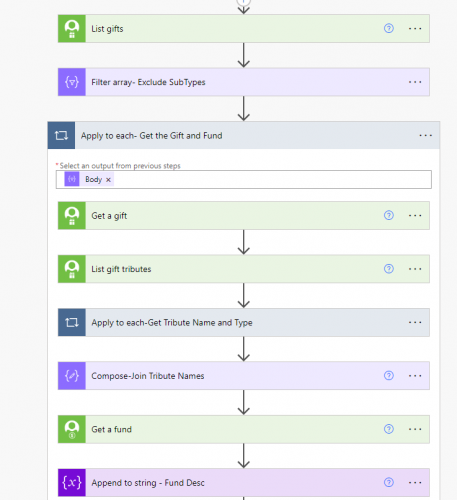
I have a flow that looks at the List Gifts then I filter it to take out specific gift types that we don't want to send receipts to.
I then grab the Fund Description and the Tribute Names for each gift. I want to add the Fund Description and the Tribute Name fields into the Filtered array. I need it in the Filter Array- Exclude SubTypes because later on in the flow I limit that array by ID number so I get all the gifts a person gives into one array which I call Filter- Gifts per person.
I've tried everything from two composes with Add Property but it only adds one at a time not both into the array. I've tried Appending to Array but that only gives me the 2 fields, not with the fields added to the array.
I've also tried taking the fields and putting them into their own Gift Digest array and then adding it later on in the flow and it just keeps adding everyone's gifts into the array.
Ultimately I want to send one email receipt if someone gives multiple gifts in one day which includes Fund Description and Honor/Memorial names.
Here's the first part of my flow
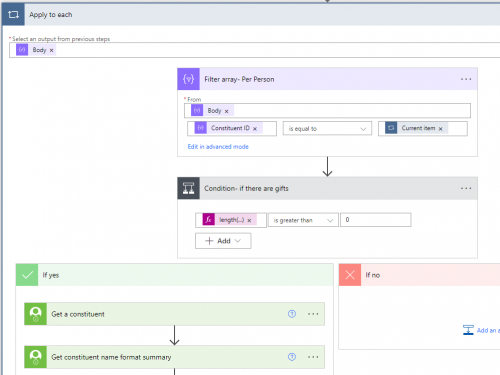
The second part of my flow where I filter the array by ConsID and pull the constituent information- sends the email.
Thanks anyone,
Carol Grant
Comments
-
@Carolyn Grant Take a look at my post here - https://community.blackbaud.com/forums/viewtopic/586/64069
In that post I am doing the same thing you are talking about, but also making the column header have an incrementing value such as Name1, Name2, etc. You can ignore all of the information about the incrementing pieces and the integer variable. The piece about using the Object variables with the Add Property expressions should give you what you need. Let me know if you have any questions!
0 -
@Carolyn Grant
how do you want your email to look? are you populating a word doc and turn into PDF to send as attachment? or are you putting the info directly on the email body?You may not need to get complicated with “modifying” a json object depending on what you trying to achieve
0 -
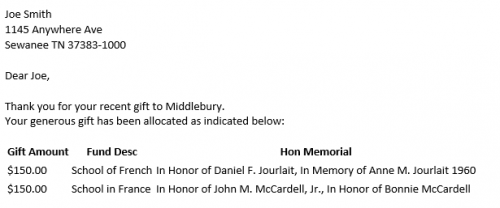
@Alex Wong- I want to send an email from Outlook that looks like this but for all of yesterday's gifts that “qualify”. This works using a Gift Array for the Gift information but for only one person. When I run it for 20 gifts the Gift Table shows every gift even when I set the variable to null. I'll keep plugging away.
Yes, my table could look prettier….
 0
0 -
@Ashley Moose- Hi Ashley I have read your post a “million times” and I feel like it could work. I even came across another post from the same person but I can't seem to plug in the correct values. Let me try it again today without the incrementing/integer variables and I'll post what my flow looks like and the error I get.
0 -
@Carolyn Grant
There are a few ways you can create the “gift table” in the middle there. i'll list 2. (by the way, you are outputing fund description, which can potentially be 1-many relationship, 1 gift split to multiple fund, you will need to take care of that too using various expression such as join()NOTE: I would choose option #2 below myself, as it will provide better flexibility. However, it does require you to have a little more HTML CSS skill but not need to learn how to manipulate json object.
1) use a json object (array of gift) that has single dimension properites and then use the Create HTML Table action available in flow.
2) use a string variable that re-create the HTML needed to generate the table, then loop through each gift and append to the string variable the info to show.
a HTML table basic format is
<TABLE>
<TR>
<TD></TD>
</TR>
</TABLE>
your string variable can begin by having <TABLE><TR><TD>gift amount</TD><TD>Fund Desc</TD><TD>Hon Memorial</TD></TR>
THis will give you the table with a header row (i'm not putting any styling in).
Then loop through your gift, and append to the string variable <TR><TD>@{dynamic content of gift amount}</TD><TD>@{dynamic content of fund description}</TD><TD>@{dynamic content of honor memorial}</TD></TR>
When you are done (outside of your apply to each gift loop), append to the string variable once more </TABLE>
0 -
Hi @Alex Wong- I'm trying your first suggestion and I think my issue is that it is not a single dimension and I need help figuring out how to do that.
1) use a json object (array of gift) that has single dimension properties and then use the Create HTML Table action available in flow.
Here's my Append to Array - Gift Array
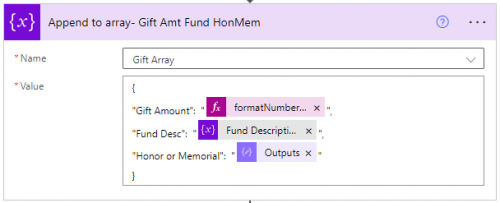
Gift Amount = formatNumber(outputs('Get_a_gift')?['body/amount/value'],'C2')
Fund Desc = a string variable (I don't need a join because we have a 1-1 Fund to Gift relationship)
Honor Memorial= a join output of Tribute Names
Do I need to put something like below? Is that what you meant or will this work like above?
item ()?('Applytoeach')['outputs('Get_a_gift')?['body/amount/value'] for gift amount. I have no idea how to do this with the Honor Memorials
0 -
@Carolyn Grant
going to need more info:the Append to array- Gift Amt Fund HonMem action looks fine to me. The question is where do you have this action in your flow, when are you “clearing” the array variable for your next “donor". Where are you having the “create html table” action and what that action looks like.
Few other note, which can make your flow more effieicent (and less SKY API calls):
Any reason why you are calling the Get a gift action? (the gift list endpoing should give you everything you need already.
in your Apply to each- Get the Gift and Fund action, I don't think you need the Apply to each-Get Tribute Name and Type loop. What is the expected output you want from this? You can probably do this with a Select action and join() expression.
I'm not understanding why you have the Append to string - Fund Desc action. As you said, you have a 1-1 gift/fund relationship, so you are not worry about 1 gift having mulitple fund. Then a simple Get a fund action on the first split's fund will give you the fund description that you need to put in the array variable.
0 -
@Carolyn Grant - Would you be willing to share this flow and how you got it working during User Group tomorrow?
0 -
@Heather McLean- sure I can share what I have so far tomorrow.
0 -
@Carolyn Grant - Sweet!
0 -
@Heather McLean
Please remind me where and when is the user group?0 -










Categories
- All Categories
- New K-12 Community Home (TEST)
- New Higher Education Home Page (Test)
- New Impact Edge Community TEST
- New YourCause Community TEST
- New SKY Community TEST
- New Grantmaking TEST Community
- New Altru Test Community
- New bbcon Community - TEST
- 12 Blackbaud Agents for Good™
- New Raiser's Edge NXT Community
- 8 Blackbaud Community Help
- 222 bbcon®
- 1.4K Blackbaud Altru®
- 410 Blackbaud Award Management™ and Blackbaud Stewardship Management™
- 1.2K Blackbaud CRM™ and Blackbaud Internet Solutions™
- 16 donorCentrics®
- 361 Blackbaud eTapestry®
- 2.7K Blackbaud Financial Edge NXT®
- 687 Blackbaud Grantmaking™
- 604 Blackbaud Education Management Solutions for Higher Education
- 3.3K Blackbaud Education Management Solutions for K-12 Schools
- 954 Blackbaud Luminate Online® and Blackbaud TeamRaiser®
- 85 JustGiving® from Blackbaud®
- 7K Blackbaud Raiser's Edge NXT®
- 4K SKY Developer
- 258 ResearchPoint™
- 123 Blackbaud Tuition Management™
- 165 Organizational Best Practices
- 248 Member Lounge (Just for Fun)
- 40 Blackbaud Community Challenges
- 37 PowerUp Challenges
- 3 (Closed) PowerUp Challenge: Grid View Batch
- 3 (Closed) PowerUp Challenge: Chat for Blackbaud AI
- 3 (Closed) PowerUp Challenge: Data Health
- 3 (Closed) Raiser's Edge NXT PowerUp Challenge: Product Update Briefing
- 3 (Closed) Raiser's Edge NXT PowerUp Challenge: Standard Reports+
- 3 (Closed) Raiser's Edge NXT PowerUp Challenge: Email Marketing
- 3 (Closed) Raiser's Edge NXT PowerUp Challenge: Gift Management
- 4 (Closed) Raiser's Edge NXT PowerUp Challenge: Event Management
- 3 (Closed) Raiser's Edge NXT PowerUp Challenge: Home Page
- 4 (Closed) Raiser's Edge NXT PowerUp Challenge: Standard Reports
- 4 (Closed) Raiser's Edge NXT PowerUp Challenge: Query
- 829 Community News
- 3.1K Jobs Board
- 57 Blackbaud SKY® Reporting Announcements
- 47 Blackbaud CRM Higher Ed Product Advisory Group (HE PAG)
- 19 Blackbaud CRM Product Advisory Group (BBCRM PAG)