How to track "potential speaker" or "potential Exec Committee"




I am brand new to RE NXT but not to databases and technology. I am struggling to see how I can enter my own “custom tag” (or something similar) and then be able to search on it. Example 1: alums have offered to speak on campus (note if they have spoken, it's noted in Attributes in database view and as a custom field in NXT). Example 2: Alum is potential for a member on our Exec Committee (note if they have already served on the executive committee it's noted in Attributes in database view and as a custom field in NXT).
My question is for prospects. I want to be able to go into RE and somehow search for “prospectivespeaker2023” which would indicate I made this note/tag/whatever in 2023 so if it's really old, at least I know (thinking about future me). I would then get a list of the consituents with this note/tag/whatever. I assume this would be in the List view, which I have played around with but haven't been able to figure out how to create something that I would then be able to select when creating my list.
It seems like I have to create a custom field and then some categories and then I could enter the data, and then I could search for it in List View. Is there a better way?
Thank you in advance. Day 8 on this system.
Comments
-
@Liz Babb
You are in the right track. RE is very flexible, but with the flexibility, means you are in control of how you want to store information.Generally for “tagging” constituent record, you can use constituent code or constituent attribute (custom fields in NXT). There is no “definitive” answer to which to use, it's kind of up to you. (there are some who say use constituent code for some of the most important tagging on the constituent.
with constituent code, you can add from and to date
with attribute, you can have a date, and comment
In the route of constituent code, you can add new entries into constituent code table to be selected directly via webview's Control Panel > Tables
in the route of constituent attribute, you will need to go into database view > Configuration > Attribute to add new attributes
there are better support for reporting and insight dashboard with constituent code, and a lot less capability with constituent attribute, however, if you are only needing to create a constituent list and filter on the values of the attribute, that is supported.
1 -
@Liz Babb Can't say enough on how important having that date they expressed interest is. We are in midst of contacting list from an Excel sheet with no dates to see if still interested.
As mentioned you could do attribute/custom field or constituent code. Notes is another option but not as easily searched/filtered.
Constituent code generally is “why is this record in our db?/what is their relation?”. It is very easy to add constit codes and then 5-10 years down the road find yourself in the midst of a code clean up because the list has gotten unwieldy. I also consider is this information relevant to a significant # of records in our database? Is this info relevant to only a dozen people in our db of 50K records? If so, is it significant enough to use a code (example of small group - board of directors).
I would opt for an attribute/custom field. You can make the category broader, say ‘Volunteer Interest.’ Create a table for the description: different types like ‘Prospective Speaker,’ ‘Event Registration Table,’ etc. Use the date field for date you enter info and in comments you can put more info, ‘Electrical Engineering,’ ‘Homecoming.’
A table for the description will allow quick and clean filtering. Some features do work more easily in db view for creating lists at this point.(I'm assuming you do not have the Volunteer module.)
0 -
@JoAnn Strommen Thank you very much.
0 -
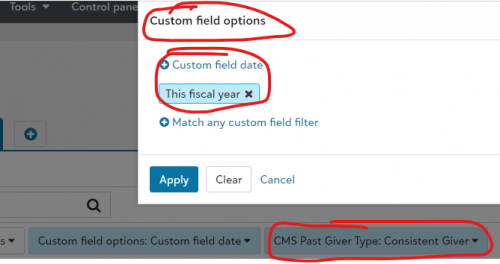
@Alex Wong “however, if you are only needing to create a constituent list and filter on the values of the attribute, that is supported.” That sounds promising. I need to figure out how to run a list on attribute (custom field) in NXT.
0 -
@Alex Wong @JoAnn Strommen Just created list on attribute of “alumnae executive committee” hoping to be able to narrow it down to current members, but I see that you cannot put a date range in for attribute. So for example, I get a list of 119 people, all of whom have that attribute, but only 11 of them are current members. I cannot delete from the list dynamically to create my own “immediate list”. So I guess I'm back to exporting a list to excel which I really don't want to have to do. How do others handle this? Next month I want to run this list and be able to see update such as gave their gift etc.
0 -
@Liz Babb So what data did you record in your attribute? Did you put something that can be filtered on to separate out your ‘current’ members?
Web view list filtering has limitations but you can do more detailed filtering with criteria in database view, IMO. If you have data you can filter on, try creating your query in db view.1








Categories
- All Categories
- New K-12 Community Home (TEST)
- New Higher Education Home Page (Test)
- New Impact Edge Community TEST
- New YourCause Community TEST
- New SKY Community TEST
- New Grantmaking TEST Community
- New Altru Test Community
- New bbcon Community - TEST
- 12 Blackbaud Agents for Good™
- New Raiser's Edge NXT Community
- 8 Blackbaud Community Help
- 222 bbcon®
- 1.4K Blackbaud Altru®
- 411 Blackbaud Award Management™ and Blackbaud Stewardship Management™
- 1.2K Blackbaud CRM™ and Blackbaud Internet Solutions™
- 16 donorCentrics®
- 361 Blackbaud eTapestry®
- 2.7K Blackbaud Financial Edge NXT®
- 688 Blackbaud Grantmaking™
- 604 Blackbaud Education Management Solutions for Higher Education
- 3.3K Blackbaud Education Management Solutions for K-12 Schools
- 954 Blackbaud Luminate Online® and Blackbaud TeamRaiser®
- 85 JustGiving® from Blackbaud®
- 7.1K Blackbaud Raiser's Edge NXT®
- 4K SKY Developer
- 258 ResearchPoint™
- 123 Blackbaud Tuition Management™
- 165 Organizational Best Practices
- 249 Member Lounge (Just for Fun)
- 40 Blackbaud Community Challenges
- 37 PowerUp Challenges
- 3 (Closed) PowerUp Challenge: Grid View Batch
- 3 (Closed) PowerUp Challenge: Chat for Blackbaud AI
- 3 (Closed) PowerUp Challenge: Data Health
- 3 (Closed) Raiser's Edge NXT PowerUp Challenge: Product Update Briefing
- 3 (Closed) Raiser's Edge NXT PowerUp Challenge: Standard Reports+
- 3 (Closed) Raiser's Edge NXT PowerUp Challenge: Email Marketing
- 3 (Closed) Raiser's Edge NXT PowerUp Challenge: Gift Management
- 4 (Closed) Raiser's Edge NXT PowerUp Challenge: Event Management
- 3 (Closed) Raiser's Edge NXT PowerUp Challenge: Home Page
- 4 (Closed) Raiser's Edge NXT PowerUp Challenge: Standard Reports
- 4 (Closed) Raiser's Edge NXT PowerUp Challenge: Query
- 829 Community News
- 3.1K Jobs Board
- 57 Blackbaud SKY® Reporting Announcements
- 47 Blackbaud CRM Higher Ed Product Advisory Group (HE PAG)
- 19 Blackbaud CRM Product Advisory Group (BBCRM PAG)