Enroll Group in Academics-Ability to highlight students to carry over instead of all or only one at a time




The Scheduler doesn't work for our unique situation so I need to enroll students as a group into class sections. It would save a great deal of time to be able to highlight specific student and then carry them over at once instead of having to do so one student at a time. Will this ever be possible or am I just missing something?
Comments
-
@Selina Zubia
Please consider posting this as an idea in the Idea Bank section of the user community atThere, other users can vote for your idea and add comments. Product management reviews the ideas regularly as they play roadmaps for future product enhancements. They'll mark which ideas are under consideration and which have been implemented.
You can post a link to your idea in this discussion thread to draw more attention to your idea.
Would this be like cohorts that stay together as sub-groups each year? So that the same group of kids who took English 2 also take English 3 together, etc? And also that the group that takes English 2 together might also have Geometry at the same time too?
0 -
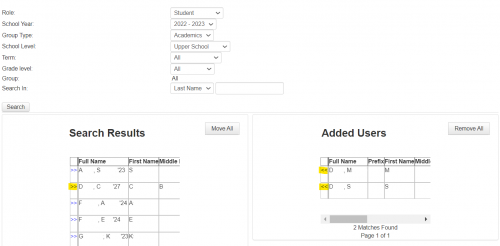
In enroll group, you can query the database with the filter options at the top of the page. You can then Move All, however you do have the option to select only specific students by clicking the double arrows to the left of the student's name in search results. This bumps only those students to the right side under “Added Users” so that you're not having to select either an individual student or All.
0 -
@Kristen Duval Thanks!!
0







Categories
- All Categories
- New K-12 Community Home (TEST)
- New Higher Education Home Page (Test)
- New Impact Edge Community TEST
- New YourCause Community TEST
- New SKY Community TEST
- New Grantmaking TEST Community
- New Altru Test Community
- New bbcon Community - TEST
- 12 Blackbaud Agents for Good™
- New Raiser's Edge NXT Community
- 8 Blackbaud Community Help
- 222 bbcon®
- 1.4K Blackbaud Altru®
- 410 Blackbaud Award Management™ and Blackbaud Stewardship Management™
- 1.2K Blackbaud CRM™ and Blackbaud Internet Solutions™
- 16 donorCentrics®
- 361 Blackbaud eTapestry®
- 2.7K Blackbaud Financial Edge NXT®
- 687 Blackbaud Grantmaking™
- 603 Blackbaud Education Management Solutions for Higher Education
- 3.3K Blackbaud Education Management Solutions for K-12 Schools
- 954 Blackbaud Luminate Online® and Blackbaud TeamRaiser®
- 85 JustGiving® from Blackbaud®
- 7K Blackbaud Raiser's Edge NXT®
- 4K SKY Developer
- 258 ResearchPoint™
- 123 Blackbaud Tuition Management™
- 165 Organizational Best Practices
- 248 Member Lounge (Just for Fun)
- 40 Blackbaud Community Challenges
- 37 PowerUp Challenges
- 3 (Closed) PowerUp Challenge: Grid View Batch
- 3 (Closed) PowerUp Challenge: Chat for Blackbaud AI
- 3 (Closed) PowerUp Challenge: Data Health
- 3 (Closed) Raiser's Edge NXT PowerUp Challenge: Product Update Briefing
- 3 (Closed) Raiser's Edge NXT PowerUp Challenge: Standard Reports+
- 3 (Closed) Raiser's Edge NXT PowerUp Challenge: Email Marketing
- 3 (Closed) Raiser's Edge NXT PowerUp Challenge: Gift Management
- 4 (Closed) Raiser's Edge NXT PowerUp Challenge: Event Management
- 3 (Closed) Raiser's Edge NXT PowerUp Challenge: Home Page
- 4 (Closed) Raiser's Edge NXT PowerUp Challenge: Standard Reports
- 4 (Closed) Raiser's Edge NXT PowerUp Challenge: Query
- 829 Community News
- 3.1K Jobs Board
- 57 Blackbaud SKY® Reporting Announcements
- 47 Blackbaud CRM Higher Ed Product Advisory Group (HE PAG)
- 19 Blackbaud CRM Product Advisory Group (BBCRM PAG)