Accessing hosted files in Azure with SFTP-SSH connector?





I have a lot of flows set up to access my hosted files and everything has been working well, but we were moved to Azure last week and now it's all fallen apart on me. I used my new FTP credentials and I'm connected, but the directory I'm being presented with is unrecognizable and I have yet to find where my hosted files live. Has anyone been through this after migrating to Azure? Does it look very different than it did previously?
Comments
-
I have a lot of flows set up to access my hosted files and everything has been working well, but we were moved to Azure last week and now it's all fallen apart on me. I used my new FTP credentials and I'm connected, but the directory I'm being presented with is unrecognizable and I have yet to find where my hosted files live. Has anyone been through this after migrating to Azure? Does it look very different than it did previously?
Hi Shelby,
In Azure, the file structure / requirements for FTP do change. When setting up your exports, on the left side of the “Export File Name” box, you should see a “Tenant File Share UNC Path” item. Once you click on that, you'll see an FTP folder. In order to access anything from an FTP client / Power Automate, it has to be in that folder. That's represented by the yellow outlines below.
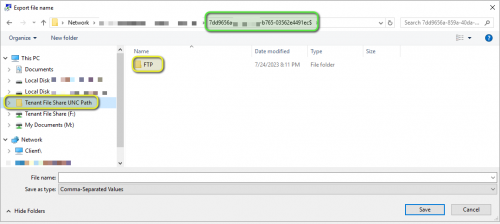
That means the path you need to put into the SSFTP-SSH Action changes as well. The path is now “/C:/FTPHome/CRAZY_STRING_OF_CHARCTERS_ENDING_IN_$/FTP/” . Where “CRAZY_STRING_OF_CHARCTERS_ENDING_IN_$” is what you'd see highlighted in green in the navigation bar (specific to your account). It's at the end of the folder path in the Export file name dialog box and it ends in an $. You'll need to copy that last bit of the folder path, not including the “\\”, but do include the “$”.
2 -
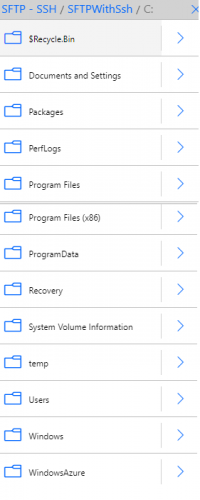
@Glen Hutson Thanks, Glen! That's helpful about needing things to be within the folder named FTP and not in the level above. The trouble I'm running into is that FTPHome doesn't appear in the C: when I'm connected in Power Automate. I'm seeing drives for C:
 and X: and FTPHome doesn't appear in any of them. Do I have to type the path in manually or should I see in through navigation?
 0
0 -
@Shelby Lewis
you can't use the user interface to “select” the folder, you just have to enter/type/copy/paste it directly.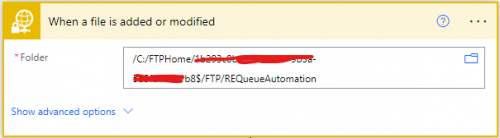 2
2 -
@Alex Wong Thanks, Alex! Super helpful. Support has no idea about this stuff and it's way different than it looked before, so I appreciate your assistance.
0







Categories
- All Categories
- New K-12 Community Home (TEST)
- New Higher Education Home Page (Test)
- New Impact Edge Community TEST
- New YourCause Community TEST
- New SKY Community TEST
- New Grantmaking TEST Community
- New Altru Test Community
- New bbcon Community - TEST
- 12 Blackbaud Agents for Good™
- New Raiser's Edge NXT Community
- 8 Blackbaud Community Help
- 222 bbcon®
- 1.4K Blackbaud Altru®
- 410 Blackbaud Award Management™ and Blackbaud Stewardship Management™
- 1.2K Blackbaud CRM™ and Blackbaud Internet Solutions™
- 16 donorCentrics®
- 361 Blackbaud eTapestry®
- 2.7K Blackbaud Financial Edge NXT®
- 687 Blackbaud Grantmaking™
- 603 Blackbaud Education Management Solutions for Higher Education
- 3.3K Blackbaud Education Management Solutions for K-12 Schools
- 954 Blackbaud Luminate Online® and Blackbaud TeamRaiser®
- 85 JustGiving® from Blackbaud®
- 7K Blackbaud Raiser's Edge NXT®
- 4K SKY Developer
- 258 ResearchPoint™
- 123 Blackbaud Tuition Management™
- 165 Organizational Best Practices
- 248 Member Lounge (Just for Fun)
- 40 Blackbaud Community Challenges
- 37 PowerUp Challenges
- 3 (Closed) PowerUp Challenge: Grid View Batch
- 3 (Closed) PowerUp Challenge: Chat for Blackbaud AI
- 3 (Closed) PowerUp Challenge: Data Health
- 3 (Closed) Raiser's Edge NXT PowerUp Challenge: Product Update Briefing
- 3 (Closed) Raiser's Edge NXT PowerUp Challenge: Standard Reports+
- 3 (Closed) Raiser's Edge NXT PowerUp Challenge: Email Marketing
- 3 (Closed) Raiser's Edge NXT PowerUp Challenge: Gift Management
- 4 (Closed) Raiser's Edge NXT PowerUp Challenge: Event Management
- 3 (Closed) Raiser's Edge NXT PowerUp Challenge: Home Page
- 4 (Closed) Raiser's Edge NXT PowerUp Challenge: Standard Reports
- 4 (Closed) Raiser's Edge NXT PowerUp Challenge: Query
- 829 Community News
- 3.1K Jobs Board
- 57 Blackbaud SKY® Reporting Announcements
- 47 Blackbaud CRM Higher Ed Product Advisory Group (HE PAG)
- 19 Blackbaud CRM Product Advisory Group (BBCRM PAG)