updating an action via power automate




Hello brains,
Would anyone be able to help me out with my PA flow? I am trying to build a very simple flow that finds actions based on an NXT list and updates them to completed. The flow runs successfully but nothing happens to the actions in RE. There are definitely results in the list.
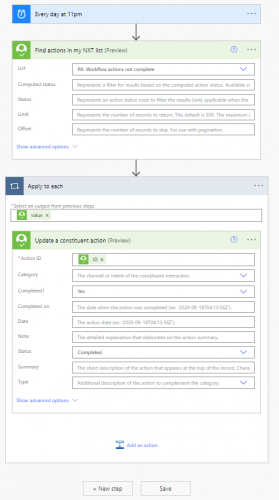
Any help welcomed! I can always go back to running a global change in DB view but was hoping not to have to do that!
Many thanks 
Comments
-
@Jenny Mulcock
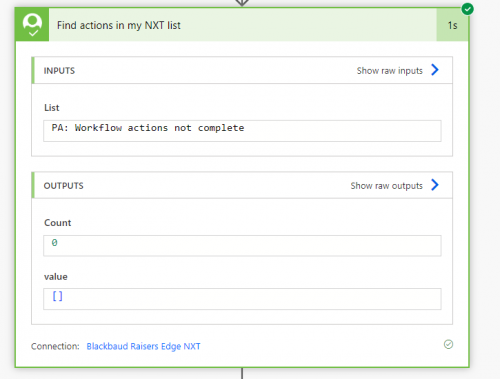
you said your flow runs, so first thing to check is go into the flow that completed, and check the actions to see if the output is your desired output. The first one to check is the “find action in my nxt list” and see if the output has an array of constituent action. If the output is just [], that means your “apply to each” is not going to have anything to work withif you do have output from the list, then go into your Apply to each and check the update a constituent action and see what output is there.
1 issue that is possible, which would be pretty bad, is you use the wrong “ID” field for “Action ID” to locate which action to update, can you “mouseover" the ID dynamic field and see what it is (youc an highlight the ID field and copy it and paste here.
2 -
@Jenny Mulcock another thing to check is how the concept of action “completed” is configured in your instance of Raiser's Edge. The system supports two models: one is a simple boolean (Yes/No) field typically represented as a checkbox in the UI, and the other is a more complex representation using the action status code tables (where you indicate which action status table entries semantically mean “Completed”). Here is a link to the documentation in case it helps.
0 -
@Ben Lambert
from the look of the action screenshot, I think the “Yes” and “Completed” is a drop down selection that was selected, rather than typed in. So that should be ok.1 -
@Alex Wong thank you for this, I'll check it and see what I can find.
0 -
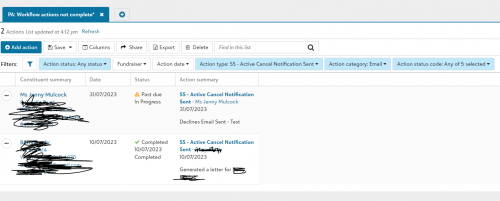
Hi @Alex Wong, I've done what you suggested and it turns out there are no actions found in the ‘Find actions from my list’ step of the flow. The thing is, there are definitely actions in that list, so I'm confused as to why they wouldn't be coming through in the flow. I haven't added any additional criteria so it's a bit baffling!
Do you have any suggestions at this point? It's such a simple flow I really don't know what I could be doing wrong!
0 -
@Jenny Mulcock
you are saying there are definitely actions in the list, and from the screenshot, it seems like you saved a constituent action list in RE NXT that you are pulling up. what is the filter used on that list in NXT?Can you provide additional screenshots on the flow run info? also screenshot on the filter used on the list in NXT webview and the expected # of results
1 -
0
-
0
-
Hey @Alex Wong, thank you so much for your help, I've actually been able to get it working, it just turned out my list was corrupt! The flow is now working perfectly!
2







Categories
- All Categories
- New K-12 Community Home (TEST)
- New Higher Education Home Page (Test)
- New Impact Edge Community TEST
- New YourCause Community TEST
- New SKY Community TEST
- New Grantmaking TEST Community
- New Altru Test Community
- New bbcon Community - TEST
- 12 Blackbaud Agents for Good™
- New Raiser's Edge NXT Community
- 8 Blackbaud Community Help
- 222 bbcon®
- 1.4K Blackbaud Altru®
- 410 Blackbaud Award Management™ and Blackbaud Stewardship Management™
- 1.2K Blackbaud CRM™ and Blackbaud Internet Solutions™
- 16 donorCentrics®
- 361 Blackbaud eTapestry®
- 2.7K Blackbaud Financial Edge NXT®
- 687 Blackbaud Grantmaking™
- 603 Blackbaud Education Management Solutions for Higher Education
- 3.3K Blackbaud Education Management Solutions for K-12 Schools
- 954 Blackbaud Luminate Online® and Blackbaud TeamRaiser®
- 85 JustGiving® from Blackbaud®
- 7K Blackbaud Raiser's Edge NXT®
- 4K SKY Developer
- 258 ResearchPoint™
- 123 Blackbaud Tuition Management™
- 165 Organizational Best Practices
- 248 Member Lounge (Just for Fun)
- 40 Blackbaud Community Challenges
- 37 PowerUp Challenges
- 3 (Closed) PowerUp Challenge: Grid View Batch
- 3 (Closed) PowerUp Challenge: Chat for Blackbaud AI
- 3 (Closed) PowerUp Challenge: Data Health
- 3 (Closed) Raiser's Edge NXT PowerUp Challenge: Product Update Briefing
- 3 (Closed) Raiser's Edge NXT PowerUp Challenge: Standard Reports+
- 3 (Closed) Raiser's Edge NXT PowerUp Challenge: Email Marketing
- 3 (Closed) Raiser's Edge NXT PowerUp Challenge: Gift Management
- 4 (Closed) Raiser's Edge NXT PowerUp Challenge: Event Management
- 3 (Closed) Raiser's Edge NXT PowerUp Challenge: Home Page
- 4 (Closed) Raiser's Edge NXT PowerUp Challenge: Standard Reports
- 4 (Closed) Raiser's Edge NXT PowerUp Challenge: Query
- 829 Community News
- 3.1K Jobs Board
- 57 Blackbaud SKY® Reporting Announcements
- 47 Blackbaud CRM Higher Ed Product Advisory Group (HE PAG)
- 19 Blackbaud CRM Product Advisory Group (BBCRM PAG)