Custom Fields





Maybe it's a Monday, but I am struggling to bring back several custom fields at one time. Do I have to create a variable for each one and then filter the custom field for each specific field and then populate each variable? Seems like a lot of back and forth to retrieve some data. Any help would be appreciated.
Comments
-
@Bob Rickards
I don't know what you trying to do with your flow so it's a bit hard to understand your post. What do you mean by variable for each, etc.For retrieving gift custom fields, there are only a few options:
- Retrieve all custom fields of a single gift by gift system id
- Retrieve all custom fields of all gifts
- there is a category query filter you can specify a specific gift custom field category to retrieve, but you can ONLY specify 1 category.
0 -
@Alex Wong Let me explain…we have a brick form that takes in several pieces of information in several different fields. So a simple brick might have four fields associated with it: Name on Brick, Message line 1, Message line 2, and key indicator. In one week, we may get three of these. I am trying to right a report that will pull back all three at one time with all the important information.
1 -
@Bob Rickards
what is a “brick form”? what kind of form platform are you using (i.e. Microsoft form?)what is your gift custom field “config”? I'm assuming you have 4 separate custom field category: name on brick, message line 1, message line 2, and key indicator and all 4 is configured to allow “multiple”?
0 -
@Alex Wong We are using RE NXT forms. The ‘brick’ form I am talking about is a form that allows someone to purchase a memorial brick. So we collect information like, who is the brick for etc. We use standard form fields like ‘Text Field 1’ and ‘Text Field 2’. I am looking at pulling these fields back as separate columns or concatenating them to make one long field of data.
0 -
@Bob Rickards
Ok, sounds like you are using RE NXT Donation Form.I'm assuming in the form design you are using Fields > Custom fields
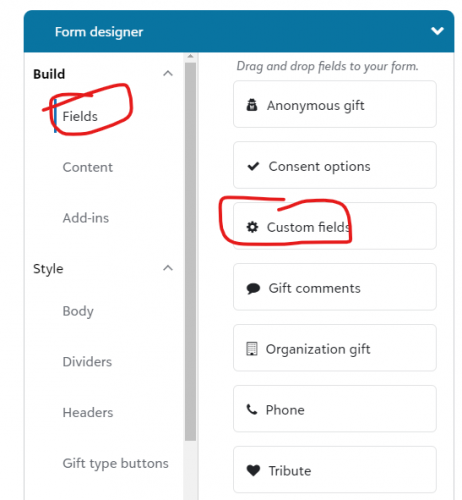
then whatever the custom fields category you selected will be what is stored in the gift in RE NXT.
Going back to your OP, which said someething about pulling the custom fields and populating variable, assuming you are trying to create a flow, can you explain what you want this flow to do?
0 -
@Alex Wong When I pull List Gift Custom Fields and filter on the item. In raw data I see this…
{
"id": "881529",
"category": "Text Line 1",
"parent_id": "421022",
"type": "Text",
"value": "Michael M. Ullstrup",
"text_value": "Michael M. Ullstrup"
},
{
"id": "881530",
"category": "Text Line 2",
"parent_id": "421022",
"type": "Text",
"value": "Education is the foundation",
"text_value": "Education is the foundation"
},
{
"id": "881531",
"category": "Text Line 3",
"parent_id": "421022",
"type": "Text",
"value": "for which we stand upon.",
"text_value": "for which we stand upon."
},
{
"id": "881532",
"category": "Text Line 4",
"parent_id": "421022",
"type": "Text",
"value": "Devoted to family and",
"text_value": "Devoted to family and"
},
{
"id": "881533",
"category": "Text Line 5",
"parent_id": "421022",
"type": "Text",
"value": "friends, and loved by all.",
"text_value": "friends, and loved by all."
},
{
"id": "881534",
"category": "Text Line 6",
"parent_id": "421022",
"type": "Text",
"value": "1957-2023",
"text_value": "1957-2023"
},
{
"id": "881535",
"category": "Brick Selection",
"parent_id": "421022",
"type": "CodeTableEntry",
"value": "Alum",
"codetableentry_value": "Alum"
},
I would like to pull each of the text value fields and concatenate them into…

The variable would be:
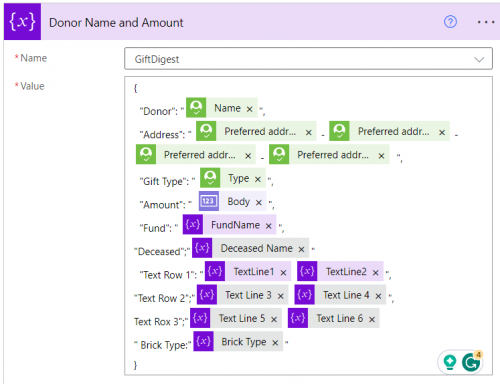 0
0 -
@Bob Rickards
you can either use 6 Filter and select action, or a apply to each with a swtich action on the category and assign the variable.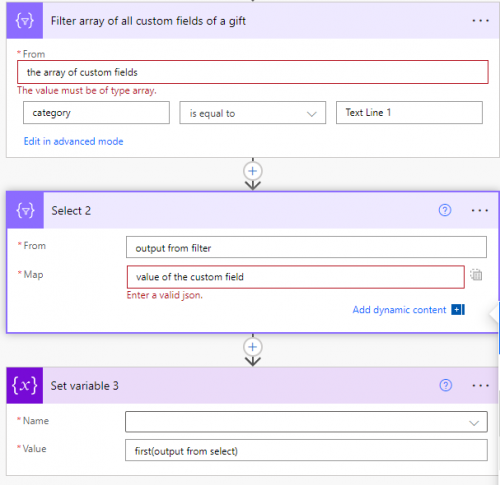
filter select set 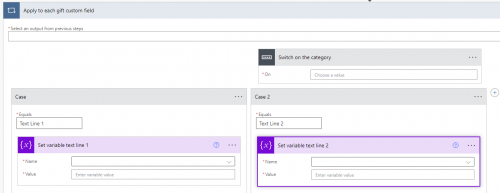
Apply to each custom fields method Generally I would prefer Filter/Select if there is a lot of “not relevent” data in the array (i.e. if gift has 50 custom fields not related to the operation you trying to do). However, I can't imagine you having that many gift custom fields in a single gift, so an Apply to Each > switch method is likely better
0 -
@Alex Wong Thanks for all the help…but I am still struggling. Not sure why this will not work.
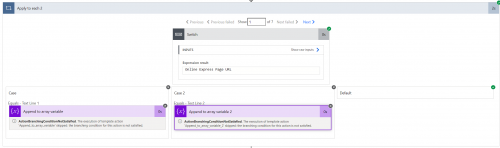
Is there not a way to get each of these fields for every gift?
0 -
@Bob Rickards
I did up this quick flow for you to show how I would do it. It's hard to read your screenshot you posted. From list gifts you want to list gift custom fields then put the Gift ID in there from the List Gifts. Then filter the array based on the Category or Type of the Custom Field. You would have to do this for each Custom Field.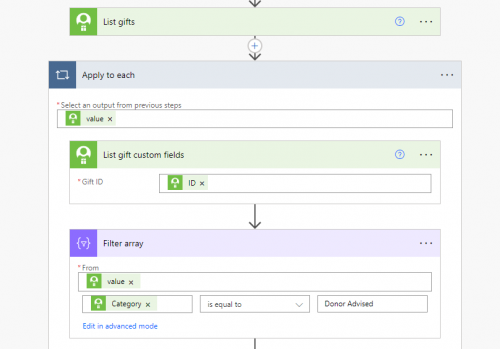 1
1 -
@Bob Rickards
hopefully this gives you a better look at what you can setup. your screenshot is too blur for me to see your errors.Apply to each gift list the single gift custom fields Apply to each custom fields swtich on category case of category 1 case of category 2 case of category 3 set var for category 1 value set var for category 2 value set var for category 3 value 1 -
this method will works as well, the only reason I said to use the apply to each and switch is that there are 6 or 7 custom fields he is targetting, which means he will have to do 6 or 7 Filter action for each he wants to get value for.
0 -
@Alex Wong @Carol Grant Sorry, but still getting errors. What am I missing? Alex, I followed what you suggested.
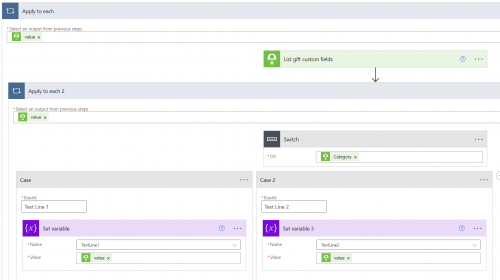 0
0 -
@Bob Rickards
please post your error screenshot and copy the text of the error into the post as screenshot is blurred out when not in the “right dimension” on community0 -
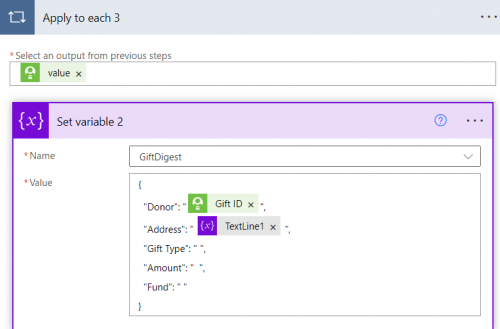
@Alex Wong BadRequest. The variable 'GiftDigest' of type 'Array' cannot be initialized or updated with value of type 'Object'. The variable 'GiftDigest' only supports values of types 'Array'.
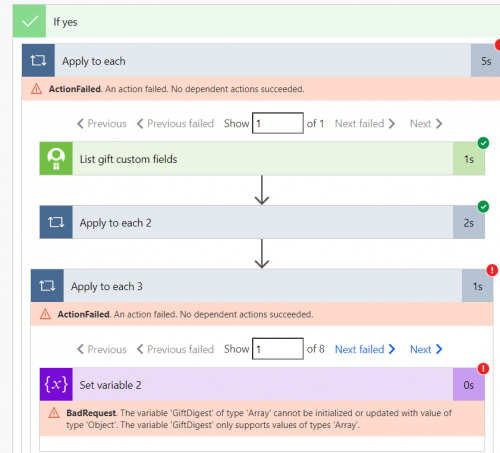
What are you using to capture screenshots? I am using a snipping tool…interesting that it shows up blurry.0 -
@Bob Rickards
screenshot being blurry is not you, it is Blackbaud's Community posting problem, I like to use “small” section of screenshot with multiple screenshot so text comes up clearer, but Blackbaud need to fix this, not us users.The error is saying there is a GiftDigest variable, which was initialized as an Array. However, you are setting the variable with an Object. The previous screenshot you sent was setting variable TextLine1 and TextLine2 inside the Apply to each 2 loop, but your error is in the Apply to each 3 loop.
Meaning, you are still not providing info on the erorr you are having now. Screenshot the apply to each 3 loop and the actions in it (in the edit mode) so we can see what you are doing.
0 -
0
-
@Bob Rickards
first, you are using set var, which “set” the variable to be what you give it as value, you give a “object” to an array variable, that's why the error. use append to string/array variable action instead2nd, you have an apply to each 3 that shouldn't be there. I'm going to assume your apply to each 2 is good otherwise, you won't have got to the next action. Meaning your custom field apply to each and switch statement is working. the apply to each 3 is likely what power automate put in for you when you selected the wrong dynamic field in your set variable step. completely delete the apply to each 3 action, add a append to string/array variable action after the apply to each 2 action, and make sure you put the right dynamic field in the value box.
0 -
@Alex Wong Sorry about the delay here on this topic…it is funny how other things pop up and move projects like this to the back of the line. Ok…I got the flow to run, except this is my return.

Even though I am returning this.
{
"Donor": "@{items('Apply_to_each')?['constituent_id']}",
"Text": "@{variables('TextLine1')}",
"Text2": "@{variables('TextLine2')}"
}It does not seem to be pulling out the Text Field 1 data. Any ideas?
0 -
@Bob Rickards
In your “set variable” step inside the switch, you are setting the “object” of the attribute, which contains everything from parent_id to value, to category, etc. Meaning you selected the wrong dynamic content.You need to only set the value of the custom field.
0 -
@Alex Wong Thanks So MUCH!!! This list forum owes you a ton. Keep up the good work!
1 -
@Bob Rickards - Do you want to continue workshopping this or share at User Group tomorrow?
0 -
@Heather McLean Appreciate the offer…but I am still working out the kinks. So maybe later…
0











Categories
- All Categories
- New K-12 Community Home (TEST)
- New Higher Education Home Page (Test)
- New Impact Edge Community TEST
- New YourCause Community TEST
- New SKY Community TEST
- New Grantmaking TEST Community
- New Altru Test Community
- New bbcon Community - TEST
- 12 Blackbaud Agents for Good™
- New Raiser's Edge NXT Community
- 8 Blackbaud Community Help
- 222 bbcon®
- 1.4K Blackbaud Altru®
- 411 Blackbaud Award Management™ and Blackbaud Stewardship Management™
- 1.2K Blackbaud CRM™ and Blackbaud Internet Solutions™
- 16 donorCentrics®
- 361 Blackbaud eTapestry®
- 2.7K Blackbaud Financial Edge NXT®
- 688 Blackbaud Grantmaking™
- 604 Blackbaud Education Management Solutions for Higher Education
- 3.3K Blackbaud Education Management Solutions for K-12 Schools
- 954 Blackbaud Luminate Online® and Blackbaud TeamRaiser®
- 85 JustGiving® from Blackbaud®
- 7.1K Blackbaud Raiser's Edge NXT®
- 4K SKY Developer
- 258 ResearchPoint™
- 123 Blackbaud Tuition Management™
- 165 Organizational Best Practices
- 249 Member Lounge (Just for Fun)
- 40 Blackbaud Community Challenges
- 37 PowerUp Challenges
- 3 (Closed) PowerUp Challenge: Grid View Batch
- 3 (Closed) PowerUp Challenge: Chat for Blackbaud AI
- 3 (Closed) PowerUp Challenge: Data Health
- 3 (Closed) Raiser's Edge NXT PowerUp Challenge: Product Update Briefing
- 3 (Closed) Raiser's Edge NXT PowerUp Challenge: Standard Reports+
- 3 (Closed) Raiser's Edge NXT PowerUp Challenge: Email Marketing
- 3 (Closed) Raiser's Edge NXT PowerUp Challenge: Gift Management
- 4 (Closed) Raiser's Edge NXT PowerUp Challenge: Event Management
- 3 (Closed) Raiser's Edge NXT PowerUp Challenge: Home Page
- 4 (Closed) Raiser's Edge NXT PowerUp Challenge: Standard Reports
- 4 (Closed) Raiser's Edge NXT PowerUp Challenge: Query
- 829 Community News
- 3.1K Jobs Board
- 57 Blackbaud SKY® Reporting Announcements
- 47 Blackbaud CRM Higher Ed Product Advisory Group (HE PAG)
- 19 Blackbaud CRM Product Advisory Group (BBCRM PAG)