Online Express - Tax Receipts & E-Cards




Hi all,
My organization recently upgraded from RE7 to NXT and switched from using Luminate Online donation forms to Online Express. We are having a few challenges with the below and wondering if anyone has any advice:
1 - Tax Receipts - the tax receipts are emailed automatically to the donor after their payment goes through and the system usually auto creates the receipt/receipt number. Problem is, we can't actually see the receipt (and in some cases the receipt number doesn't auto populate in our batch and we don't have a way to verify what receipt number went to them). Is there a way to see the receipts that are sent out to our donors and get them from the system?
2 - E-Cards - Previously with Luminate, when someone donated and set up a tribute/memorial gift, they had an option to send an e-card to someone. Is there a way to setup a similar thing in OE, via something already in OE or a plug-in attachment to OE?
Thanks for any help!
Comments
-
@Dayna Burghall Don't know about e-card. Have not heard about that as an option in OLX or NetC.
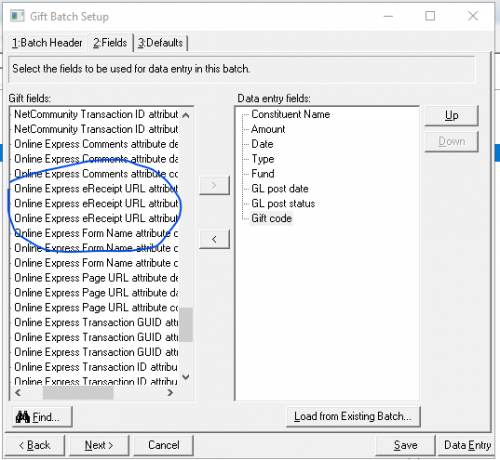
The link to the receipt should be captured as a gift attribute. You can add this field to batch or access on individual gift record. Link that will pull the PDF they received. Works in NetC and I think it's the same for OLX.
Check an existing gift for the attribute and see. For receipt #, it could be not showing due to your OLX page setup. Others have more experience with that and can help with that.Screenshop is gift batch attribute options to include in batch
 2
2 -
@Dayna Burghall
I can only answer the second question about e-cards, and unfortunately it is to say that it is not possible.Many of my clients do not use the receipting function specifically, and design their email confirmation with the appropriate language to serve as the receipt. I believe the confirmation may include a link to the receipt but I definitely could be mistaken. Hopefully someone has a more definitive answer to that question!
Karen
0 -
@JoAnn Strommen Thank you - this helps tremendously!!
0 -
@Karen Diener
Thanks for confirming - I couldn't find anything on it and thought that may be the case - darn!0 -
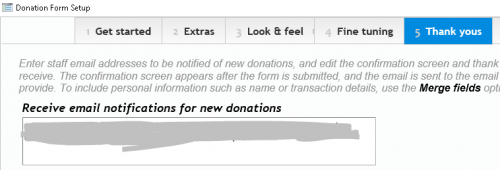
1 - It's not an exact copy of the receipt, but on the "Thank you's section of the Online Express form itself, you can add in extra emails for whomever you want notified of the gift.
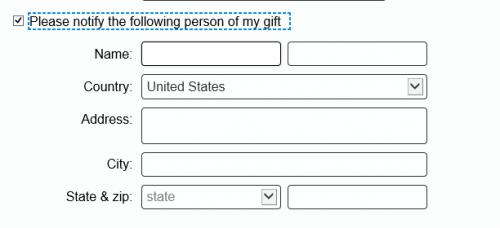
2 - I am unaware of a way to set up automated e-cards. I assume you are already using the “Tribute gift” option in the forms, which allows donors to include a recipient address for snail mail cards. You could edit the text in the form block (blue below) to state: “If you prefer to send an e-card, please enter an email address under the ”Address" line." Then you would have to send the e-cards manually, or else export the data into a third party service (if there is one).
 0
0 -
@Faith Murray
Thank you for the suggestions!0 -
@Faith Murray Rather then using the Address line, we use gift attributes: Name of Tribute, Email or Mail, Email Address or Mail Address, Personal Message to the Acknowledgee, etc.
It looks a bit clunkier on the form but makes querying tribute gifts to send cards/e-cards much easier!
0











Categories
- All Categories
- New K-12 Community Home (TEST)
- New Higher Education Home Page (Test)
- New Impact Edge Community TEST
- New YourCause Community TEST
- New SKY Community TEST
- New Grantmaking TEST Community
- New Altru Test Community
- New bbcon Community - TEST
- 12 Blackbaud Agents for Good™
- New Raiser's Edge NXT Community
- 8 Blackbaud Community Help
- 222 bbcon®
- 1.4K Blackbaud Altru®
- 410 Blackbaud Award Management™ and Blackbaud Stewardship Management™
- 1.2K Blackbaud CRM™ and Blackbaud Internet Solutions™
- 16 donorCentrics®
- 361 Blackbaud eTapestry®
- 2.7K Blackbaud Financial Edge NXT®
- 687 Blackbaud Grantmaking™
- 604 Blackbaud Education Management Solutions for Higher Education
- 3.3K Blackbaud Education Management Solutions for K-12 Schools
- 954 Blackbaud Luminate Online® and Blackbaud TeamRaiser®
- 85 JustGiving® from Blackbaud®
- 7K Blackbaud Raiser's Edge NXT®
- 4K SKY Developer
- 258 ResearchPoint™
- 123 Blackbaud Tuition Management™
- 165 Organizational Best Practices
- 248 Member Lounge (Just for Fun)
- 40 Blackbaud Community Challenges
- 37 PowerUp Challenges
- 3 (Closed) PowerUp Challenge: Grid View Batch
- 3 (Closed) PowerUp Challenge: Chat for Blackbaud AI
- 3 (Closed) PowerUp Challenge: Data Health
- 3 (Closed) Raiser's Edge NXT PowerUp Challenge: Product Update Briefing
- 3 (Closed) Raiser's Edge NXT PowerUp Challenge: Standard Reports+
- 3 (Closed) Raiser's Edge NXT PowerUp Challenge: Email Marketing
- 3 (Closed) Raiser's Edge NXT PowerUp Challenge: Gift Management
- 4 (Closed) Raiser's Edge NXT PowerUp Challenge: Event Management
- 3 (Closed) Raiser's Edge NXT PowerUp Challenge: Home Page
- 4 (Closed) Raiser's Edge NXT PowerUp Challenge: Standard Reports
- 4 (Closed) Raiser's Edge NXT PowerUp Challenge: Query
- 829 Community News
- 3.1K Jobs Board
- 57 Blackbaud SKY® Reporting Announcements
- 47 Blackbaud CRM Higher Ed Product Advisory Group (HE PAG)
- 19 Blackbaud CRM Product Advisory Group (BBCRM PAG)