How to post grades on marking periods





Hi,
I'm sure it's an easy step but I can't find any literature besides setting up marking periods.
Before we had 4 terms/quarters set up in Core and just calculated grades at the end of each term here:
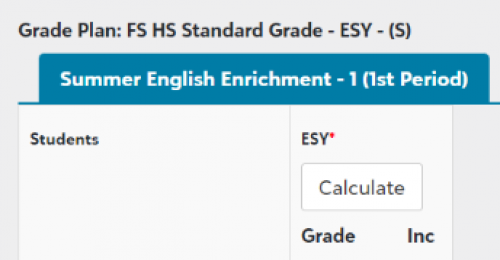
This year we moved to having 2 terms/semesters and dividing each semester into quarter marking periods which to my understanding is a snapshot of the semester grade, but still would go on report cards.
If I go onto Faculty I'm still seeing the grade due date as the end of the semester. Where would teachers go to “post” grades for the quarter marking period (half-way through the semester)?
We have this set up in Gradebook settings:
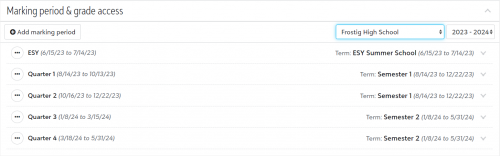
Appreciate any help! Just trying to understand.
Comments
-
@Nathan Ong Hi Nathan. You will need to set up new grade plans in order to calculate grades to what I assume you want to show on report cards. If this is what you are trying to do you will need to do this under Academics-Grading Setup-School year setup. I assume you already have your grade plan groups set up but if not then you will need to start there. Let me know if you have any more questions about grade plans…but be specific because there are so many redundant words that it is hard to know what is what
 . screen shots help!!2
 -
@Vanessa Noe Oh, that makes sense, thank you! We currently have this which is why I'm assuming the grade due date is showing up at the end of the semester/December.
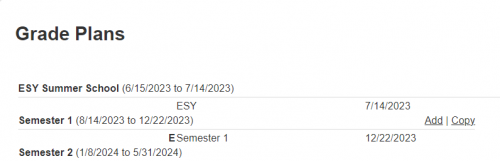
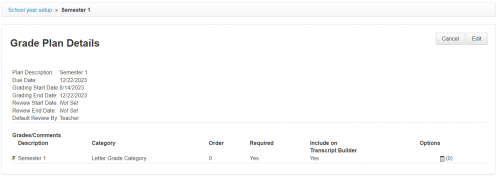
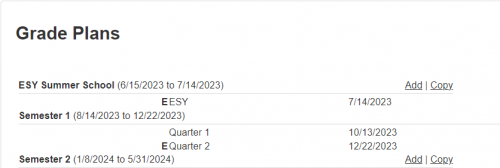
So Instead of F Semester 1, I should have two terms group for Quarter 1, Quarter 2 (and have Quarter 2 be F/Final Grade) all under the Semester 1 group like this?
 0
0 -
@Nathan Ong yes! Exactly!
0


Categories
- All Categories
- New K-12 Community Home (TEST)
- New Higher Education Home Page (Test)
- New Impact Edge Community TEST
- New YourCause Community TEST
- New SKY Community TEST
- New Grantmaking TEST Community
- New Altru Test Community
- New bbcon Community - TEST
- 12 Blackbaud Agents for Good™
- New Raiser's Edge NXT Community
- 8 Blackbaud Community Help
- 222 bbcon®
- 1.4K Blackbaud Altru®
- 410 Blackbaud Award Management™ and Blackbaud Stewardship Management™
- 1.2K Blackbaud CRM™ and Blackbaud Internet Solutions™
- 16 donorCentrics®
- 361 Blackbaud eTapestry®
- 2.7K Blackbaud Financial Edge NXT®
- 687 Blackbaud Grantmaking™
- 604 Blackbaud Education Management Solutions for Higher Education
- 3.3K Blackbaud Education Management Solutions for K-12 Schools
- 954 Blackbaud Luminate Online® and Blackbaud TeamRaiser®
- 85 JustGiving® from Blackbaud®
- 7K Blackbaud Raiser's Edge NXT®
- 4K SKY Developer
- 258 ResearchPoint™
- 123 Blackbaud Tuition Management™
- 165 Organizational Best Practices
- 248 Member Lounge (Just for Fun)
- 40 Blackbaud Community Challenges
- 37 PowerUp Challenges
- 3 (Closed) PowerUp Challenge: Grid View Batch
- 3 (Closed) PowerUp Challenge: Chat for Blackbaud AI
- 3 (Closed) PowerUp Challenge: Data Health
- 3 (Closed) Raiser's Edge NXT PowerUp Challenge: Product Update Briefing
- 3 (Closed) Raiser's Edge NXT PowerUp Challenge: Standard Reports+
- 3 (Closed) Raiser's Edge NXT PowerUp Challenge: Email Marketing
- 3 (Closed) Raiser's Edge NXT PowerUp Challenge: Gift Management
- 4 (Closed) Raiser's Edge NXT PowerUp Challenge: Event Management
- 3 (Closed) Raiser's Edge NXT PowerUp Challenge: Home Page
- 4 (Closed) Raiser's Edge NXT PowerUp Challenge: Standard Reports
- 4 (Closed) Raiser's Edge NXT PowerUp Challenge: Query
- 829 Community News
- 3.1K Jobs Board
- 57 Blackbaud SKY® Reporting Announcements
- 47 Blackbaud CRM Higher Ed Product Advisory Group (HE PAG)
- 19 Blackbaud CRM Product Advisory Group (BBCRM PAG)