Email output only shows HREF coding and is missing hyperlinks





I'm in the final stages of completing a flow using Power Automate which sends an email when an Opportunity is missing the Likelihood field. It all works.
Now I've decided to improve the email to have hyperlinks back to the Constituent record and also the Opportunity record. Unfortunately the two columns come back showing me the code, not the field that links to the record.
Here is a screen shot of the two columns from the email which should have hyperlinking. The blue highlight is all I really want to show (the Const Name and Opp Name):
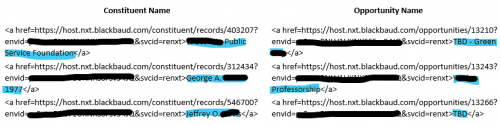
Unfortunately the hyperlinking isn't working.
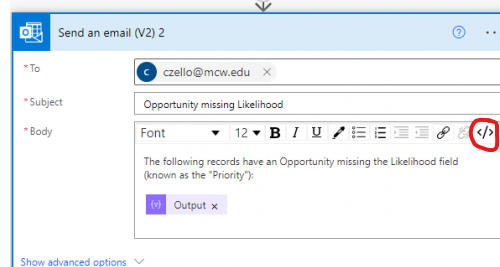
This is my step in my flow:
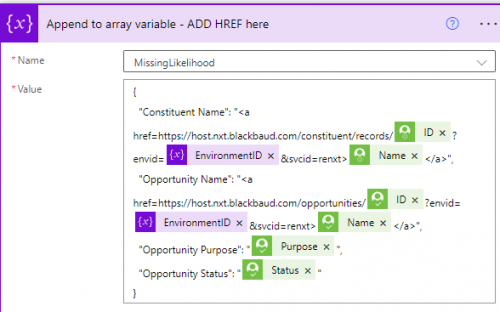
Thoughts?
Thank you.
Comments
-
@Chris Zello
you will need to show us your “send email action”.Though I'm going to suspect that the email action was not in “edit html” mode, but just normal editing mode.
0 -
@Alex Wong Here are the two steps right after the Appeal to array variable:
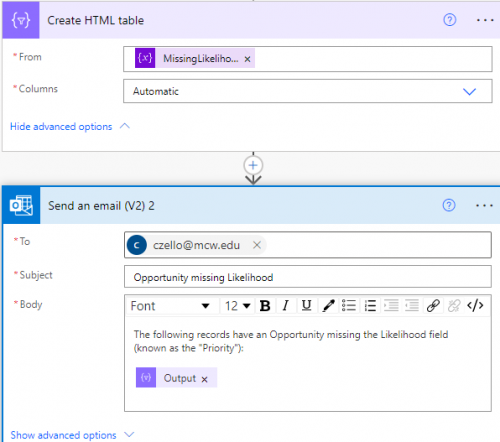
There is nothing indicated in the advanced options of Send An Email.
0 -
0
-
@Alex Wong Here are the two steps right after the Appeal to array variable:
There is nothing indicated in the advanced options of Send An Email.
A couple of things I run into sometimes in regards to HTML in HTML tables, and inserting them in additional content areas:
Even though you have the total value enclosed in quotes, will still need to put a single quote ( ' ) before the http and after renxt.
There can also be a tendency to try to encode special characters which throughs off the HTML rendering. I often have to wrap the “Create HTML Table” in a series of replaces to rectify that:
replace(replace(replace(replace(body('Create_HTML_table'), '<', '<'), '>', '>'), '"', '"'), '^', ' ')
This replaces the encoded characters with what they're meant to be. It also does a final replace to switch ^ out for a space. This trick helps as when you choose the ‘custom option’ in the Create HTML tables, you can't put in spaces. If you put a ^ between words (such as in the heading), this will also replace it with a space.
1 -
@Alex Wong It is still giving me the same output in the email sent when I test.
Maybe there is something else I need to do? After I click the HTML editing mode, then what do I do? I see how the input now becomes:
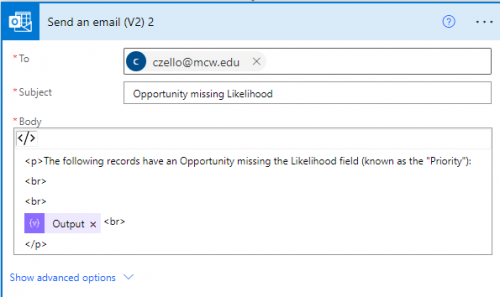
Although I save the flow, it simply shows non-HTML when I return to it.
0 -
@Glen Hutson
what you mention about putting the link in quote is good practice and should be done, however, it is not needed. HTML is quite flexible. (but for better coding practice, do add the single quote as Glen said)
the replace you indicated for “^" with “ ” (space) is good to have if he defines his own custom column name and put in the ^ as separate for words in the custom header. He doesn't do that so it's going to use the JSON's property name as the header, which will already have space.
@Chris Zello so basically you will use this expression in your send email step, but yes.. you want to make sure you clicked on the </> button
replace(replace(replace(body('Create_HTML_table'), '<', '<'), '>', '>'), '"', '"')0 -
@Glen Hutson
what you mention about putting the link in quote is good practice and should be done, however, it is not needed. HTML is quite flexible. (but for better coding practice, do add the single quote as Glen said)the replace you indicated for “^" with “ ” (space) is good to have if he defines his own custom column name and put in the ^ as separate for words in the custom header. He doesn't do that so it's going to use the JSON's property name as the header, which will already have space.
@Chris Zello so basically you will use this expression in your send email step, but yes.. you want to make sure you clicked on the </> button
replace(replace(replace(body('Create_HTML_table'), '<', '<'), '>', '>'), '"', '"')I have seen instances in which without the ‘ , the HTML doesn’t render correctly. As far as the ^ , I always leave it in my replaces so I don't have to remember to include it it depending on the scenario. It shouldn't cause a problem if it's part of the replace and not needed, unless there is a random intentional ^ .
1 -
@Glen Hutson Sorry, you've totally lost me.
0 -
You're putting HTML characters into an array that then goes into the Create HTML table. That create HTML table tries to do you a favor in converting special characters like ‘<’ in such a way that so that it actually renders at face value and not the HTML.
Instead of inserting the Output of the HTML Table in the email directly directly, insert the following expression where you want the table to show up:
replace(replace(replace(replace(body('Create_HTML_table'), '<', '<'), '>', '>'), '"', '"'), '^', ' ')
That should make it so things render the correct way.
1 -
@Chris Zello - Do you want to continue workshopping this tomorrow at User Group?
0 -
@Heather McLean Yes, that would be fine with me, if time permits.
0










Categories
- All Categories
- New K-12 Community Home (TEST)
- New Higher Education Home Page (Test)
- New Impact Edge Community TEST
- New YourCause Community TEST
- New SKY Community TEST
- New Grantmaking TEST Community
- New Altru Test Community
- New bbcon Community - TEST
- 12 Blackbaud Agents for Good™
- New Raiser's Edge NXT Community
- 8 Blackbaud Community Help
- 222 bbcon®
- 1.4K Blackbaud Altru®
- 410 Blackbaud Award Management™ and Blackbaud Stewardship Management™
- 1.2K Blackbaud CRM™ and Blackbaud Internet Solutions™
- 16 donorCentrics®
- 361 Blackbaud eTapestry®
- 2.7K Blackbaud Financial Edge NXT®
- 687 Blackbaud Grantmaking™
- 603 Blackbaud Education Management Solutions for Higher Education
- 3.3K Blackbaud Education Management Solutions for K-12 Schools
- 954 Blackbaud Luminate Online® and Blackbaud TeamRaiser®
- 85 JustGiving® from Blackbaud®
- 7K Blackbaud Raiser's Edge NXT®
- 4K SKY Developer
- 258 ResearchPoint™
- 123 Blackbaud Tuition Management™
- 165 Organizational Best Practices
- 248 Member Lounge (Just for Fun)
- 40 Blackbaud Community Challenges
- 37 PowerUp Challenges
- 3 (Closed) PowerUp Challenge: Grid View Batch
- 3 (Closed) PowerUp Challenge: Chat for Blackbaud AI
- 3 (Closed) PowerUp Challenge: Data Health
- 3 (Closed) Raiser's Edge NXT PowerUp Challenge: Product Update Briefing
- 3 (Closed) Raiser's Edge NXT PowerUp Challenge: Standard Reports+
- 3 (Closed) Raiser's Edge NXT PowerUp Challenge: Email Marketing
- 3 (Closed) Raiser's Edge NXT PowerUp Challenge: Gift Management
- 4 (Closed) Raiser's Edge NXT PowerUp Challenge: Event Management
- 3 (Closed) Raiser's Edge NXT PowerUp Challenge: Home Page
- 4 (Closed) Raiser's Edge NXT PowerUp Challenge: Standard Reports
- 4 (Closed) Raiser's Edge NXT PowerUp Challenge: Query
- 829 Community News
- 3.1K Jobs Board
- 57 Blackbaud SKY® Reporting Announcements
- 47 Blackbaud CRM Higher Ed Product Advisory Group (HE PAG)
- 19 Blackbaud CRM Product Advisory Group (BBCRM PAG)