HELP Power BI access to FE NXT API




Hello, I am a Power BI user who has had luck getting data via API from other applications, however each API has it's own set of challenges. I have created a ‘subscription’ and defined a general application and gotten the following keys:
Primary access key
Secondary access key
Application ID (OAuth client_id)
Primary application secret (OAuth client_secret)
Secondary application secret (OAuth client_secret)
However, when I run a sample API call https://api.sky.blackbaud.com/accountspayable/v1/departments
Request headers
Header | Required | Type | Description |
Bb-Api-Subscription-Key | Property is required | string | Subscription key which provides access to this API. Found in your Profile. |
Authorization | Property is required | string | OAuth 2.0 access token obtained from Blackbaud OAuth 2.0 Service. Supported grant types: Authorization code. |
in Postman this is the error I get
{
"statusCode": 401,
"message": "The required Authorization header was missing or invalid, or the token has expired",
"status": 401,
"title": "The required Authorization header was missing or invalid, or the token has expired"
}
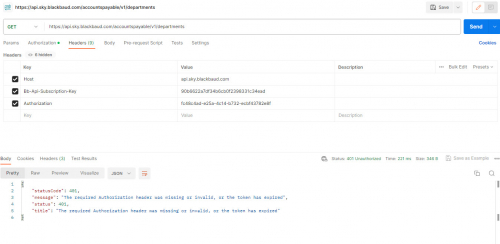
I'm sure this is something basic with the authentication string--I am not clear where I am supposed to find the access token?
Please help? Power BI allows to make all sorts of REST API http calls but it takes time to figure out the exact set of headers and strings to get what is needed.
Comments
-
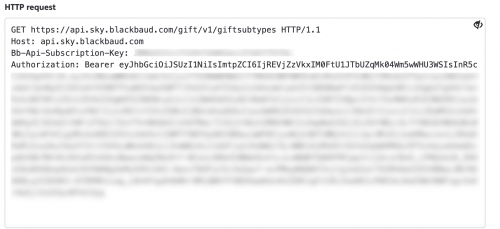
Hey @Robert Derby, since the SKY API uses the OAuth2 protocol, authentication to the API requires a Bearer token in the authorization header, like below. That token is good for, I believe, 60 mins. Then it needs to be exchanged for a refresh token. The Power BI custom connector for NXT handles all of the authentication and has FE endpoints available on (though limited right now).
 0
0 -
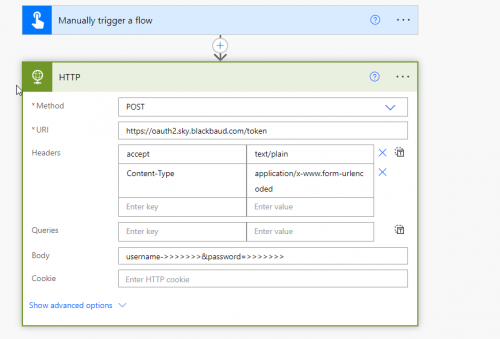
Hi @Matt Thacker , I believe the Power BI Custom Connector is going to be out of date for my needs so I am trying to do this via Power Automate. If I understand (and I really don't), I would use the Power Automate HTTP POST to request a token from the token URL with my username and password as below---
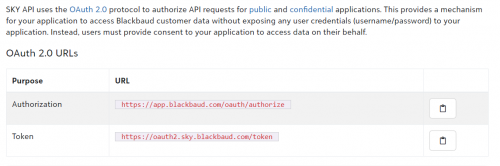
However, I am not clear what I need to do with the authorization URL also? And what is the redirect URI I need in the application? I don't have an app I am creating for this. My goal here is to get Power Automate to dump some API call data into the dataverse that I can use Power BI to report against on a regular refresh schedule.
 0
0 -
@Robert Derby, if you're going to use Power Automate, it'll be a lot easier. Blackbaud has its own custom HTTP request action on one of their connectors. This one will handle all authentication for you and allows you to hit any endpoint on the SKY API (except for Merchant Services).
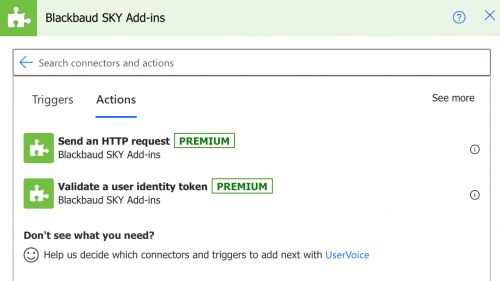 1
1




Categories
- All Categories
- New K-12 Community Home (TEST)
- New Higher Education Home Page (Test)
- New Impact Edge Community TEST
- New YourCause Community TEST
- New SKY Community TEST
- New Grantmaking TEST Community
- New Altru Test Community
- New bbcon Community - TEST
- 12 Blackbaud Agents for Good™
- New Raiser's Edge NXT Community
- 8 Blackbaud Community Help
- 222 bbcon®
- 1.4K Blackbaud Altru®
- 411 Blackbaud Award Management™ and Blackbaud Stewardship Management™
- 1.2K Blackbaud CRM™ and Blackbaud Internet Solutions™
- 16 donorCentrics®
- 361 Blackbaud eTapestry®
- 2.7K Blackbaud Financial Edge NXT®
- 688 Blackbaud Grantmaking™
- 604 Blackbaud Education Management Solutions for Higher Education
- 3.3K Blackbaud Education Management Solutions for K-12 Schools
- 954 Blackbaud Luminate Online® and Blackbaud TeamRaiser®
- 85 JustGiving® from Blackbaud®
- 7.1K Blackbaud Raiser's Edge NXT®
- 4K SKY Developer
- 258 ResearchPoint™
- 123 Blackbaud Tuition Management™
- 165 Organizational Best Practices
- 249 Member Lounge (Just for Fun)
- 40 Blackbaud Community Challenges
- 37 PowerUp Challenges
- 3 (Closed) PowerUp Challenge: Grid View Batch
- 3 (Closed) PowerUp Challenge: Chat for Blackbaud AI
- 3 (Closed) PowerUp Challenge: Data Health
- 3 (Closed) Raiser's Edge NXT PowerUp Challenge: Product Update Briefing
- 3 (Closed) Raiser's Edge NXT PowerUp Challenge: Standard Reports+
- 3 (Closed) Raiser's Edge NXT PowerUp Challenge: Email Marketing
- 3 (Closed) Raiser's Edge NXT PowerUp Challenge: Gift Management
- 4 (Closed) Raiser's Edge NXT PowerUp Challenge: Event Management
- 3 (Closed) Raiser's Edge NXT PowerUp Challenge: Home Page
- 4 (Closed) Raiser's Edge NXT PowerUp Challenge: Standard Reports
- 4 (Closed) Raiser's Edge NXT PowerUp Challenge: Query
- 829 Community News
- 3.1K Jobs Board
- 57 Blackbaud SKY® Reporting Announcements
- 47 Blackbaud CRM Higher Ed Product Advisory Group (HE PAG)
- 19 Blackbaud CRM Product Advisory Group (BBCRM PAG)