Query results don't match the list or export





I've not had RE doing this before. The bulk mailings we do each month, the exported number matches the number shown in the query. Until today.
I tried running this as dynamic and as static to see if it would change and it did not. Both queries show 13, 723 number of records pulled.

When I, or partner relations, export the query (also when I scroll/page down to the end) it shows there are 6,544 records.
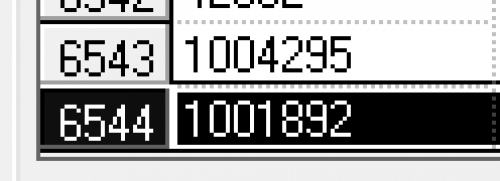
We don't want a large number of records excluded. Does anyone know why there is such a large variance? I've not found a solution searching knowledgebase articles yet.
Comments
-
@Dana Burton
Query and Export differences in rows exported usually means 1 thing, in query, you are criteria-ing, outputing, or sorting by a 1-many field.look in query in the 3 tabs and see if there's anything there that is a 1-many relationship (i.e. 1 gift having multiple soft creidt, multiple campaign/fund/appeal/package, multiple gift solicitor, multiple attribute, etc)
4 -
@Dana Burton To see if a record is displaying multiple times in your query, sort by name, ID or field that is only on a record once and see if ‘John Anderson' is listed multiple times. As @Alex Wong cited, a 1-to-many field in criteria, output or sort could inflate the # of records in the query. First thing for troubleshooting is to see if that's the cause for the different #s.
It's possible that your export criteria could reduce # of records say if you're using HOH vs. pulling both records. Is it the same export template or did you create a new one for the mailing?
3 -
@Alex Wong and @JoAnn Strommen, these are the filters set. This is for Partner Relations to do a mass email. I added for the primary phone to be checked to eliminate duplicate names, rather than every email we have for a person - which worked great. Or so I thought.
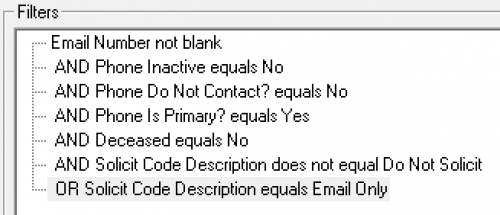
When exporting the results (as we do with other mailings,) there was a significant change in results - which I am unsure why. My output is very simple - name, constituent id, primary salutation, and email address.I've also scrolled the list more than once and did not see any names listed more than once.
Thank you so much for brainstorming with me!
0 -
@Dana Burton phone types are one-to-many. I love all the advice you have received so far.
Try this: Save your query. Dump all your output and run it again. Does your number match? Then close the query without saving!
Also, can you share how you are handling HOH processing in the Export as @JoAnn Strommen mentioned.
2 -
@Dana Burton
You are hitting problem that we are talking about: 1 to many relationship not handled properly.- Email Number not blank will give you 1 row for every email address a constituent record has that's not blank, which in itself is already producing multiple rows for each constituent record.
- Solicit Code is also a 1-many relationship, as a constituent can have multiple solicit code, so this will further mulitple # of record rows produced.
While I don't know your query intention on the Solicit Code, but it looks like it may be wrong
Note that:
A and B and C or D
is not the same as
A and B and (C or D)
You may need to use some paranthesis or simply just do 1 Solicit Code filter and not 2. Use either one-of or not-one-of operation and select the ones you want/don't want.
Query can be more powerful than Export when you are very aware of what can be 1-many relationship and filter/output accordingly and dedup in Excel consciously knowing what you looking for to dedup your list. If you are not strong with Query, I recommend you use Query for filtering ONLY and use Export to output the info you want.
4 -
@Dana Burton As @Alex Wong pointed out you have many filters that could/will create more than one row in the query.
Phone # not active - line for every inactive number phone and/or email
Phone Do not contact equals no - line for every phone/email without DNCUse your query as a grouping tool - refine the email pulled in the Export function. There you can exclude the DNC, select type, export if it's primary…..
2 -
@Dana Burton, while the others have addressed the parenthetical grouping – A and B or C vs. A and (C or
 – allow me to add more context. In your list below: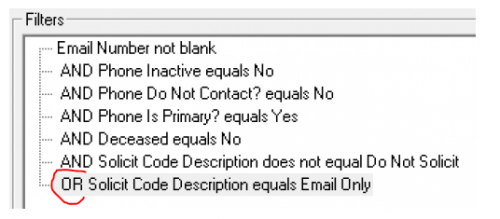
This OR at the bottom in essence cancels out all your other criteria. All a record has to have is a solicit code “Email Only” and it will pull whether it is marked primary, inactive, etc or not.
Also, I question whether these criteria are really getting you what you want. Many of them are conflicting as written. You have “Phone is Primary” AND “Phone Not Inactive”, which seems redundant since a phone should not be marked as both in a clean database. The “Phone not inactive” filter will exclude anyone with a cellphone or landline marked Inactive, even if they have a viable email address. Also, you included “Deceased equals No”, when that is already a checkbox option at the top of your query.
I don't know the goal of your list, but just throwing it out there, I'd propose the following process. This will get you a list of people with active, solicitable emails.
Pull a broad query. The query is unable to filter as precisely as you are trying to do.
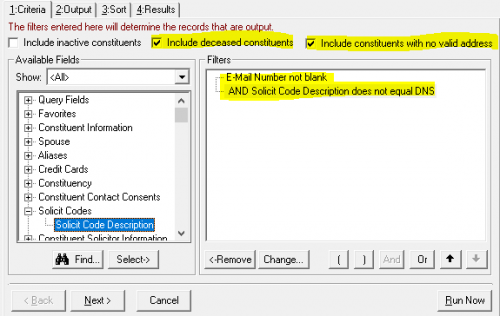
Then, include certain output fields in your export:
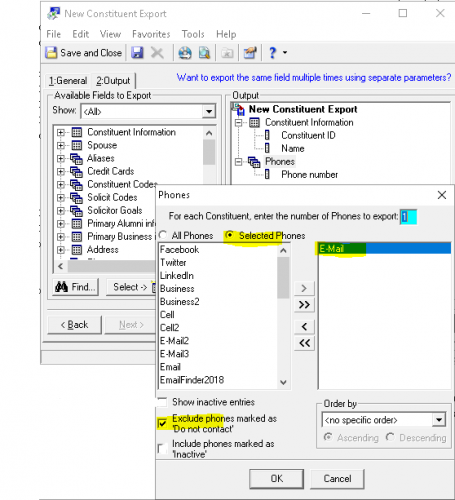
Some lines of your export may be blank in the Email column if the donor only has an Inactive email type. Sort these out and remove any blanks, to get your final list. I strongly suggest keeping your email types clean and having a specific email type for active emails, to minimize this issue.
3 -
@Faith Murray, this is actually what I had done yesterday before leaving. It hadn't even occurred to me to build the query then use export - rather than export the query. ? Thank you all for your help! (Doing my job and learning everyone else's!)
1












Categories
- All Categories
- New YourCause Community TEST
- New SKY Community TEST
- New Grantmaking TEST Community
- New Altru Test Community
- New bbcon Community - TEST
- 12 Blackbaud Agents for Good™
- New Raiser's Edge NXT Community
- 7 Blackbaud Community Help
- 218 bbcon®
- 1.4K Blackbaud Altru®
- 409 Blackbaud Award Management™ and Blackbaud Stewardship Management™
- 1.2K Blackbaud CRM™ and Blackbaud Internet Solutions™
- 16 donorCentrics®
- 361 Blackbaud eTapestry®
- 2.7K Blackbaud Financial Edge NXT®
- 680 Blackbaud Grantmaking™
- 598 Blackbaud Education Management Solutions for Higher Education
- 3.3K Blackbaud Education Management Solutions for K-12 Schools
- 952 Blackbaud Luminate Online® and Blackbaud TeamRaiser®
- 85 JustGiving® from Blackbaud®
- 7K Blackbaud Raiser's Edge NXT®
- 3.9K SKY Developer
- 257 ResearchPoint™
- 123 Blackbaud Tuition Management™
- 165 Organizational Best Practices
- 247 Member Lounge (Just for Fun)
- 40 Blackbaud Community Challenges
- 37 PowerUp Challenges
- 3 (Closed) PowerUp Challenge: Grid View Batch
- 3 (Closed) PowerUp Challenge: Chat for Blackbaud AI
- 3 (Closed) PowerUp Challenge: Data Health
- 3 (Closed) Raiser's Edge NXT PowerUp Challenge: Product Update Briefing
- 3 (Closed) Raiser's Edge NXT PowerUp Challenge: Standard Reports+
- 3 (Closed) Raiser's Edge NXT PowerUp Challenge: Email Marketing
- 3 (Closed) Raiser's Edge NXT PowerUp Challenge: Gift Management
- 4 (Closed) Raiser's Edge NXT PowerUp Challenge: Event Management
- 3 (Closed) Raiser's Edge NXT PowerUp Challenge: Home Page
- 4 (Closed) Raiser's Edge NXT PowerUp Challenge: Standard Reports
- 4 (Closed) Raiser's Edge NXT PowerUp Challenge: Query
- 822 Community News
- 3.1K Jobs Board
- 57 Blackbaud SKY® Reporting Announcements
- 47 Blackbaud CRM Higher Ed Product Advisory Group (HE PAG)
- 19 Blackbaud CRM Product Advisory Group (BBCRM PAG)