Export Sent Email Column Data




Greetings! I am working in NXT Web View in the Sent Emails screen under Marketing. Is it possible to export the data shown on this page as an Excel spreadsheet? Would need columns with the headers: Email Name, Status, Subject, List, Date, Recipients, Opens, Clicks, Transactions, Bounces, Unsubscribes. In these columns I would need the data shown. I am attaching a photo of this to illustrate.
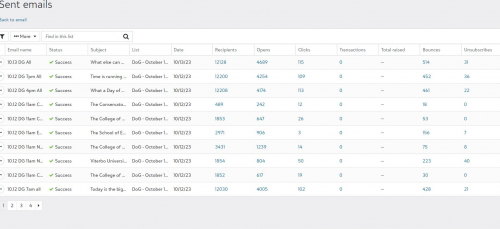
From what I have read, there is no way to export data related to emails. But I want to be certain before I move forward.
Thank you for any light you can shed on this.
Comments
-
@Diane Duresky To my knowledge there is no option to export this kind of information.
1 -
@Joe Moretti Thanks so much for the rapid reply! Much appreciated.
0 -
@Diane Duresky - Joe is correct. The only way to create this would be to do it manually.
1 -
@Diane Duresky You don't have to manually type the information though. You can highlight the information and then paste it into an Excel spreadsheet or even into Word. It does paste as a table but doesn't bring over the header titles. You might have to do some clean up and you can only copy one page at a time, but is much easier than typing everything out.
3 -
@Diane Duresky I'm just curious to know how you want to use the information? Carrie's suggestion is a good one, and the only possibility I'm aware of, but I think it depends highly on what you need to do with the information.
If you need it to be exportable, I would definitely add that to the Idea Bank if it does not already exist. Blackbaud does pay attention to the ideas and votes there.
2 -
@Karen DienerOne of my supervisors is looking to present our data on actions related to our emails and she is first aiming for the higher level numbers such as the header categories. We can do the copy/paste, but she was asking if there is any type of export shortcut. If there is a request for further diving into the data, we can drill down and look at that as well. Thanks much!
0 -
@Diane Duresky Support can send you a file if you ask - very frustrating. How does your company deal with these? We usually mark all Hard Bounces as Inactive and then Soft Bounces we are hesitant to remove
0 -
@Jesse Calagna Can you tell me more about how you distinguish between hard and soft bounces? Do you know if there's anyway to see why an email bounced?
0 -
@Britley Ranstadler If you go into Email history on someone NXT record you can see if it was Hard or Soft Bounce but not a reason.
1


















Categories
- All Categories
- New K-12 Community Home (TEST)
- New Higher Education Home Page (Test)
- New Impact Edge Community TEST
- New YourCause Community TEST
- New SKY Community TEST
- New Grantmaking TEST Community
- New Altru Test Community
- New bbcon Community - TEST
- 12 Blackbaud Agents for Good™
- New Raiser's Edge NXT Community
- 8 Blackbaud Community Help
- 222 bbcon®
- 1.4K Blackbaud Altru®
- 410 Blackbaud Award Management™ and Blackbaud Stewardship Management™
- 1.2K Blackbaud CRM™ and Blackbaud Internet Solutions™
- 16 donorCentrics®
- 361 Blackbaud eTapestry®
- 2.7K Blackbaud Financial Edge NXT®
- 687 Blackbaud Grantmaking™
- 603 Blackbaud Education Management Solutions for Higher Education
- 3.3K Blackbaud Education Management Solutions for K-12 Schools
- 954 Blackbaud Luminate Online® and Blackbaud TeamRaiser®
- 85 JustGiving® from Blackbaud®
- 7K Blackbaud Raiser's Edge NXT®
- 4K SKY Developer
- 258 ResearchPoint™
- 123 Blackbaud Tuition Management™
- 165 Organizational Best Practices
- 248 Member Lounge (Just for Fun)
- 40 Blackbaud Community Challenges
- 37 PowerUp Challenges
- 3 (Closed) PowerUp Challenge: Grid View Batch
- 3 (Closed) PowerUp Challenge: Chat for Blackbaud AI
- 3 (Closed) PowerUp Challenge: Data Health
- 3 (Closed) Raiser's Edge NXT PowerUp Challenge: Product Update Briefing
- 3 (Closed) Raiser's Edge NXT PowerUp Challenge: Standard Reports+
- 3 (Closed) Raiser's Edge NXT PowerUp Challenge: Email Marketing
- 3 (Closed) Raiser's Edge NXT PowerUp Challenge: Gift Management
- 4 (Closed) Raiser's Edge NXT PowerUp Challenge: Event Management
- 3 (Closed) Raiser's Edge NXT PowerUp Challenge: Home Page
- 4 (Closed) Raiser's Edge NXT PowerUp Challenge: Standard Reports
- 4 (Closed) Raiser's Edge NXT PowerUp Challenge: Query
- 829 Community News
- 3.1K Jobs Board
- 57 Blackbaud SKY® Reporting Announcements
- 47 Blackbaud CRM Higher Ed Product Advisory Group (HE PAG)
- 19 Blackbaud CRM Product Advisory Group (BBCRM PAG)