User can't get into the system





We are new to Blackbaud, and one of our users is unable to get all the way into the system - for some reason she can only see Blackbaud University, etc, not NXT or the database view. I am an Admin and assumed I could fix that for her, but when I look at her name, it shows that she's active but gives me no other option than to add her as an Admin. We don't want to give her Admin access, just the ability to get into NXT and the database. Any idea what the problem is?
Comments
-
@Brent Miller Do you have a screenshot of her browser after she logs in? I think this might be user error, but what page does she see when she logs in?
0 -
@Dariel Dixon thanks for getting back to me! When she signs in, instead of getting the normal screen the rest of us get (where you get the 3 stacked ‘hamburger’ lines in the upper left corner so you can pick RE NXT, etc), she just gets a screen that says her name and gives her the option of Profile, Training, or Help & Support. No way to get to anything else, such as RE NXT, database view, etc, and we don't see any way around it…
0 -
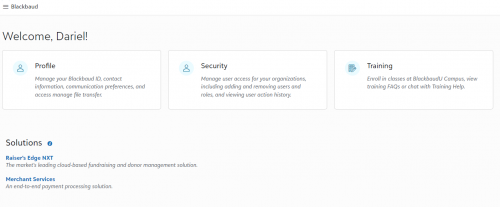
@Brent Miller So something like this… She should still have the menu bar though. Has she tried a different browser with the same results? I feel like I've had this happen before, but can remember what the issue was. Has support been able to assist?
If she has the menu bar, the solutions should be there as well. I don't know if this is a cache or cookies issue.
0 -
@Brent Miller
check if she has been given access to the solution. She will not have menu to access RE NXT if she was not given any access role or supervisor or platform admin access.2 -
@Brent Miller Make sure her computer also has Citrix on it.
1 -
@Brent Miller - Agree with @Alex Wong, it sounds like she is on the org account but hasn't been invited to the particular product/solution yet.
0 -
@Dariel Dixon yes, it is very similar to that, except without the 3 stacked lines to the left of the Blackbaud logo at the top, and without the Solutions listed at the bottom. I hadn't contacted support yet, but can if that would be the way to go
0 -
@Alex Wong she is listed as a user when I look at the Admin page, and her status is Active, so we thought we had set her up correctly (her line on the Admin page looks exactly like the other users, and they all have access to RE NXT). When I click on the 3 lines next to her name on the Admin page, to Edit User, the only choice it gives me is to add her as an Admin, so I'm not sure how else to give her any access that she might not have?
0 -
@Joe Moretti yes, we downloaded Citrix to her laptop so she should be covered there
0 -
@Brent Miller
next to the user, under RE NXT column..does it say User or Admin ?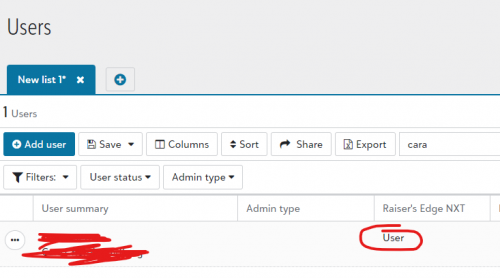 0
0 -
@Brent Miller If she's active, make sure she is tied to a Raiser's Edge security group (manage roles and final permission area). RE NXT roles (security) are based upon Raiser's Edge security group permissions. Best of luck.
1 -
@Alex Wong she can't get that far into the system. She gets a screen similar to what Dariel Dixon posted below, except without the 3 stacked lines to the left of the Blackbaud logo at the top, and without the Solutions listed at the bottom. No mention on her screen of RE NXT or any way to get into it, like the rest of us in the office can
0 -
@Annette Rurka that may be the problem. Our Implementation Consultant/Project Manager set all that up for us during conversion, so I'm wondering if he accidentally did something differently on her than he did for the rest of us. I'm just not sure how to make her like the rest of us…
0 -
@Brent Miller
The screenshot I show you is on YOUR login (or someone with admin access to set security role on user), NOT for the user that doesn't currently have access to RE NXT.Have someone with admin access to RE NXT, go to Control Panel > Users and look up the user that does not have access to RE NXT and see if she has been given User rights to RE NXT.
2 -
@Alex Wong okay sorry, I misunderstood (we're new at this, lol). I went to that screen and next to her name in that column it is blank - it does not say Admin or User. So that definitely seems to be the problem - how do I fix that for her? Thanks for your help!
0 -
@Brent Miller
If you are the environment admin for RE NXT (or Blackbaud solution as a whole), you can assign her permission (roles) to access RE NXT.If you are not the admin that normally do this, meaning whoever did it, missed a step, ask them to fix it by assigning her permission to access RE NXT.
0 -
@Brent Miller This happened to me yesterday! I added a new user with the same privileges as my other users and she could only access Giving Search. I chatted with support and was told it was an issue on Blackbaud's end and they would fix it and let us know. This morning she was able to login and has access to everything.
0 -
@Alex Wong yes, I am the environmental admin. However, our Implementation Consultant/Project Manager set all that up for us during conversion, so I'm not sure how to assign her permission. When I go to that screen you sent me the shot of, there are 3 dots to the left of her name where I can ‘manage users’ - is that where I do it? I tried it there, but can't get it to work…or maybe I'm in the wrong place?
0 -
@Brent Miller
Go to Control Panel menu at the top on RE NXT and select Users.Then search for a user (any other user) that you want this new person to have “simliar” access rights. Click on the 3-dots in the front of the user's name, and select “Manage Roles”.
In the Raiser's Edge NXT section, note the various “checkbox” that was checked and the “drop down selection of role” that was defined. In the “Security groups” box, note the “Security groups” that is assigned. This is the database view user account and security group assignment.
Then “Cancel” out from the bottom-left corner of the screen, and search fro the user that need RE NXT access. click on the 3-dots and select “Manage Roles”. Check all the same checkboxes and select the same drop down choice. In the “Security groups” box, if it's missing the user account, search for it / create it, and then select the same security groups
0






















Categories
- All Categories
- New K-12 Community Home (TEST)
- New Higher Education Home Page (Test)
- New Impact Edge Community TEST
- New YourCause Community TEST
- New SKY Community TEST
- New Grantmaking TEST Community
- New Altru Test Community
- New bbcon Community - TEST
- 12 Blackbaud Agents for Good™
- New Raiser's Edge NXT Community
- 8 Blackbaud Community Help
- 222 bbcon®
- 1.4K Blackbaud Altru®
- 410 Blackbaud Award Management™ and Blackbaud Stewardship Management™
- 1.2K Blackbaud CRM™ and Blackbaud Internet Solutions™
- 16 donorCentrics®
- 361 Blackbaud eTapestry®
- 2.7K Blackbaud Financial Edge NXT®
- 687 Blackbaud Grantmaking™
- 604 Blackbaud Education Management Solutions for Higher Education
- 3.3K Blackbaud Education Management Solutions for K-12 Schools
- 954 Blackbaud Luminate Online® and Blackbaud TeamRaiser®
- 85 JustGiving® from Blackbaud®
- 7K Blackbaud Raiser's Edge NXT®
- 4K SKY Developer
- 258 ResearchPoint™
- 123 Blackbaud Tuition Management™
- 165 Organizational Best Practices
- 248 Member Lounge (Just for Fun)
- 40 Blackbaud Community Challenges
- 37 PowerUp Challenges
- 3 (Closed) PowerUp Challenge: Grid View Batch
- 3 (Closed) PowerUp Challenge: Chat for Blackbaud AI
- 3 (Closed) PowerUp Challenge: Data Health
- 3 (Closed) Raiser's Edge NXT PowerUp Challenge: Product Update Briefing
- 3 (Closed) Raiser's Edge NXT PowerUp Challenge: Standard Reports+
- 3 (Closed) Raiser's Edge NXT PowerUp Challenge: Email Marketing
- 3 (Closed) Raiser's Edge NXT PowerUp Challenge: Gift Management
- 4 (Closed) Raiser's Edge NXT PowerUp Challenge: Event Management
- 3 (Closed) Raiser's Edge NXT PowerUp Challenge: Home Page
- 4 (Closed) Raiser's Edge NXT PowerUp Challenge: Standard Reports
- 4 (Closed) Raiser's Edge NXT PowerUp Challenge: Query
- 829 Community News
- 3.1K Jobs Board
- 57 Blackbaud SKY® Reporting Announcements
- 47 Blackbaud CRM Higher Ed Product Advisory Group (HE PAG)
- 19 Blackbaud CRM Product Advisory Group (BBCRM PAG)