Help with adding Power Automate Error Handling to my flows.





Thank you so much for the #bbdevdays recording on how to improve the management of Power Automate error handling. I am working on setting up one flow to use as a template as you suggested and I'm having issues with the link not working correctly. I am optimistic you can tell me what I missed in my expression.
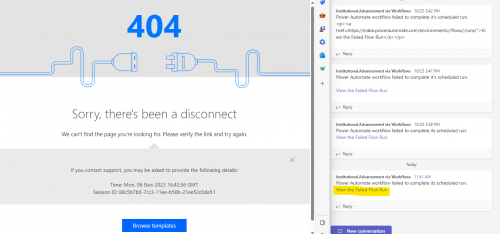
Here is a image of the error I get when I click the link in my Teams post:
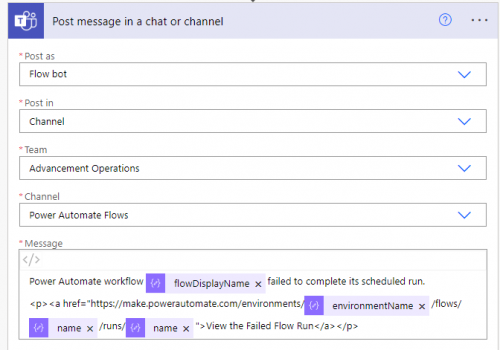
Here is a snapshot of my html code that I used in the flow:
I would appreciate your guidance on how I can get this link to work. This is such a value add to the process!
Comments
-
@Hallie Guiseppe
with just the screenshot, very hard to tell what you did wrong. I imagine you used the wrong “name” dynamic content.Here's what it should be:
Assuming your Parse JSON for the workflow expression is named: Parse JSON Current Running Work Flow
https://make.powerautomate.com/environments/@{body('Parse_JSON_Current_Running_Work_Flow')?['tags']?['environmentName']}/flows/@{body('Parse_JSON_Current_Running_Work_Flow')?['name']}/runs/@{body('Parse_JSON_Current_Running_Work_Flow')?['run']?['name']}
0 -
@Alex Wong
Hi Alex,I copied the code into a text editor, and the following is what I have in the embedded in the post:
---------------------
Power Automate workflow @{body('Parse_JSON_Current_Running_Work_Flow')?['content']?['tags']?['flowDisplayName']} failed to complete its scheduled run.
<p><a href="https://make.powerautomate.com/environments/@{body('Parse_JSON_Current_Running_Work_Flow')?['content']?['tags']?['environmentName']}/flows/@{body('Parse_JSON_Current_Running_Work_Flow')?['content']?['name']}/runs/@{body('Parse_JSON_Current_Running_Work_Flow')?['content']?['run']?['name']}">View the Failed Flow Run</a></p>------------------------
For some reason, the link comes out without any information from the variable fields. Here is the link that is being posted in Teams:
The Parse JSON Body has the information as you can see in the snip below, and I confirmed that the information matches the flow I'm working in.
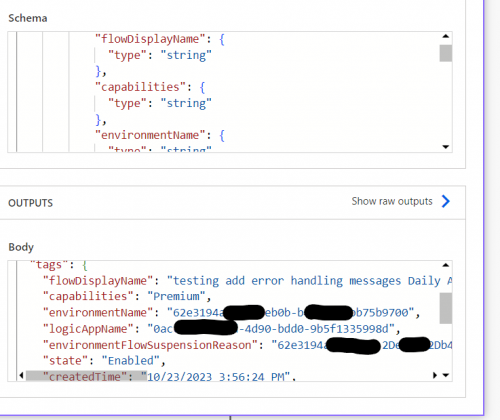
Parse JSON Output Do you have any idea why it isn't outputting any information into the string? I tried using a compose action to just pull in the individual fields but they return blank too.
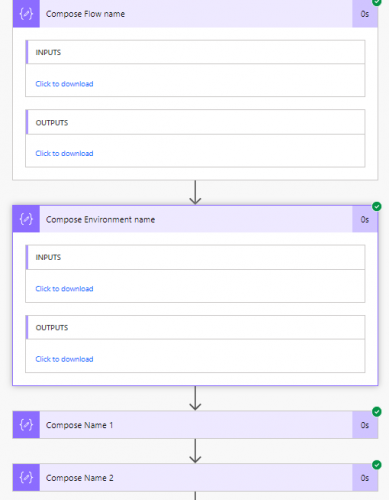
Compose item return no information I'm stumped and not sure where to go from here. ?
0 -
@Hallie Guiseppe
You are not pulling the right dynamic content.Your environmentName dynamic content is:
@{body('Parse_JSON_Current_Running_Work_Flow')?['content']?['tags']?['environmentName']}
However, it should be:
@{body('Parse_JSON_Current_Running_Work_Flow')?['tags']?['environmentName']}
You are somehow telling power automate that the data you want to use is inside a “content” object of JSON, and then within it find “tags" and then find “environmentName”. Where in reality “content” is not a property.
The easiest thing to do is to “delete” the dynamic content, and select it from the dynamic content area. However, b/c there is 1 property that is the same name, it is hard to know which one you want to take and put it where on the URL. So here's something you can do:
Go to your Parse JSON Current Running Work Flow action, and in the Schema, put this in:
{"type":"object","properties":{"id":{"type":"string"},"name":{"type":"string","description":"base name"},"type":{"type":"string"},"location":{"type":"string"},"tags":{"type":"object","properties":{"flowDisplayName":{"type":"string"},"environmentName":{"type":"string"},"logicAppName":{"type":"string"},"environmentFlowSuspensionReason":{"type":"string"}}},"run":{"type":"object","properties":{"id":{"type":"string"},"name":{"type":"string","description":"name inside run"},"type":{"type":"string"}}}}}
The different is in the “red”, where I put “base name” as the description for the property of “name” in the base of the JSON object, and “name inside run” as description for the property of “name” inside the “run” object.
“x” out each of the dynamic content used in your send team message action and select from the dynamci content box the needed values.
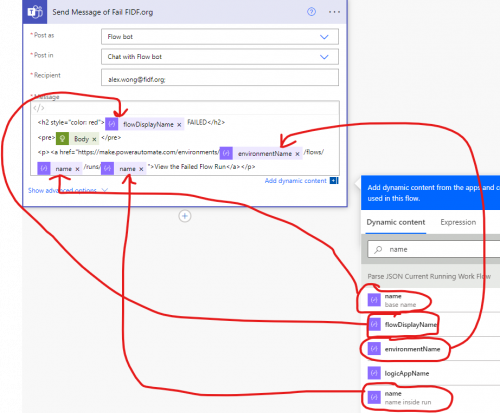
Note the “name” property with the description of “base name” goes before /runs/
and
“name" property with the description of ”name inside run" goes after /runs/
2 -
@Alex Wong
Thank you! I finally got it to work! Now I just to embed it in all my existing flows! As per usual, Alex to the rescue!Have a wonderful Thanksgiving, my friend!
???
1




Categories
- All Categories
- New YourCause Community TEST
- New SKY Community TEST
- New Grantmaking TEST Community
- New Altru Test Community
- New bbcon Community - TEST
- 12 Blackbaud Agents for Good™
- New Raiser's Edge NXT Community
- 7 Blackbaud Community Help
- 218 bbcon®
- 1.4K Blackbaud Altru®
- 409 Blackbaud Award Management™ and Blackbaud Stewardship Management™
- 1.2K Blackbaud CRM™ and Blackbaud Internet Solutions™
- 16 donorCentrics®
- 361 Blackbaud eTapestry®
- 2.7K Blackbaud Financial Edge NXT®
- 681 Blackbaud Grantmaking™
- 599 Blackbaud Education Management Solutions for Higher Education
- 3.3K Blackbaud Education Management Solutions for K-12 Schools
- 952 Blackbaud Luminate Online® and Blackbaud TeamRaiser®
- 85 JustGiving® from Blackbaud®
- 7K Blackbaud Raiser's Edge NXT®
- 3.9K SKY Developer
- 257 ResearchPoint™
- 123 Blackbaud Tuition Management™
- 165 Organizational Best Practices
- 247 Member Lounge (Just for Fun)
- 40 Blackbaud Community Challenges
- 37 PowerUp Challenges
- 3 (Closed) PowerUp Challenge: Grid View Batch
- 3 (Closed) PowerUp Challenge: Chat for Blackbaud AI
- 3 (Closed) PowerUp Challenge: Data Health
- 3 (Closed) Raiser's Edge NXT PowerUp Challenge: Product Update Briefing
- 3 (Closed) Raiser's Edge NXT PowerUp Challenge: Standard Reports+
- 3 (Closed) Raiser's Edge NXT PowerUp Challenge: Email Marketing
- 3 (Closed) Raiser's Edge NXT PowerUp Challenge: Gift Management
- 4 (Closed) Raiser's Edge NXT PowerUp Challenge: Event Management
- 3 (Closed) Raiser's Edge NXT PowerUp Challenge: Home Page
- 4 (Closed) Raiser's Edge NXT PowerUp Challenge: Standard Reports
- 4 (Closed) Raiser's Edge NXT PowerUp Challenge: Query
- 822 Community News
- 3.1K Jobs Board
- 57 Blackbaud SKY® Reporting Announcements
- 47 Blackbaud CRM Higher Ed Product Advisory Group (HE PAG)
- 19 Blackbaud CRM Product Advisory Group (BBCRM PAG)