Communicating Weekly Information to Faculty





How do you communicate all of the weekly happenings to faculty?
Years ago, we had a “Faculty Bulletin” that was typed up in Word, printed, and put in teacher's boxes. That moved to a Google Doc that was linked in “Resources”. This meant that people had to post information in multiple places (Faculty Bulletin Google Doc, Blackbaud Calendar, etc.) which often led to things not being consistent or only being updated in one place.
Last year, in order to streamline information we made the decision to get rid of the Google Doc and ask faculty to mostly rely on the Calendars to find the information they need. However, as we're nearing the end of the first semester there is now discussion about bringing back the Google Doc because teachers have complained about the calendars. While I think some of the issues with communication can be addressed with training (for both our faculty and those adding events to the calendar), the visual of the calendar in Blackbaud is terrible. Even after “hiding” various calendars and using filters it can still be VERY hard to find the information you’re looking for.
I started playing around with the idea of using a Resource Board that uses a “Detail Page”. I would think using “Announcements” and “Events” would be a really good starting place for this but I’m running into all sorts of roadblocks with Events and how we have our Calendars and subsequent “event categories” set up. I’m not responsible for the calendars but am often involved in conversations about them so I know a little bit about how they’re set up.
For example, we have a “HS Activities” calendar that houses all of the information about section (similar to homeroom) and Activity Period. We also have a calendar for “Meetings” that has faculty meetings, department chair meetings, etc. If I wanted events from both of these calendars to show on the resource board, It looks like I would need two separate “Events” Content Types. One for “HS Activities” and one for “Meetings”? This is definitely not ideal as it means you have to look through two different lists of events.
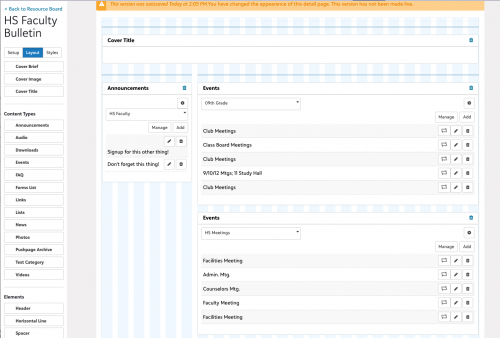
Is anyone willing to share screenshots of Resource Board Detail Pages where they share this kind of information to faculty and how they went about pulling in events from calendars?
Comments
-
@Megan Day we created a faculty community group (smart group) and so it works like a class. We can use the bulletin board for announcements, information, etc and the Events for calendar items relevant to faculty. We use the Topics for Professional Development resources, how tos, etc.
0 -
@Megan Day We have a community group for the Master Calendar, and events that are important to the entire school are shared with this group, or posted by it directly.
0 -
@Candi Roberts & @Petra Hall Thanks for your responses. I'll keep playing with the option but I don't think a Community Group will fit the bill for this. We use them for other things like clubs and community service but the Bulletin Board in groups is so limited and I don't see us using Topics for faculty as we're happy with how we provide tech resources/PD to faculty.
What we REALLY REALLY need is a simplified way to show faculty the upcoming events in the week that are already in onCampus calendars. Would you both mind sharing your workflows for adding events on your faculty community bulletin boards?
For example, when someone is adding an event to a calendar and the event is relevant for faculty, do they publish the event to the community group as well? Or do you have someone who explicitly manages the community group events?
0 -
@Megan Day We have calendar Event Categories that allow us to publish happenings to Division (LS, MS, and US) Internal calendars. When our Calendar Committee creates an event, they publish it to all appropriate event categories/calendars. If you create a new Faculty calendar, you can then pull that calendar into the Detail Page widget.
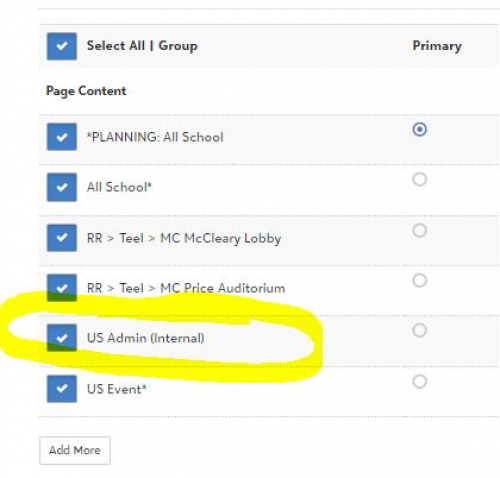
So using your example, events published to HS Activities and Meetings could also be tagged/published to the new Faculty calendar you want to display on your detail page. The example in my screenshot is for our Upper School Fall Play. It is tagged/published as a US public event, a US Admin (Internal) event, and also has room reservations (RR). We ask our US faculty to keep this “US Admin (Internal) calendar” turned on so they know what is happening. We also place lunch duties, etc. on this calendar. If we wanted to, we could pull this calendar onto a detail page for each division.
It takes a bit of training to remind our Calendar Committee to tag all the right calendars, but it's worth it for us!
1 -
@Nancy Kierstead Thank you! That is pretty much where I landed with my own tinkering. If we decide to go with the Resource Board detail page, we will need to make some changes to our calendars, including probably creating a separate calendar for faculty so a single “event category” could be pulled in. I appreciate you taking the time to explain your workflow!
1








Categories
- All Categories
- New YourCause Community TEST
- New SKY Community TEST
- New Grantmaking TEST Community
- New Altru Test Community
- New bbcon Community - TEST
- 12 Blackbaud Agents for Good™
- New Raiser's Edge NXT Community
- 7 Blackbaud Community Help
- 218 bbcon®
- 1.4K Blackbaud Altru®
- 409 Blackbaud Award Management™ and Blackbaud Stewardship Management™
- 1.2K Blackbaud CRM™ and Blackbaud Internet Solutions™
- 16 donorCentrics®
- 361 Blackbaud eTapestry®
- 2.7K Blackbaud Financial Edge NXT®
- 681 Blackbaud Grantmaking™
- 599 Blackbaud Education Management Solutions for Higher Education
- 3.3K Blackbaud Education Management Solutions for K-12 Schools
- 952 Blackbaud Luminate Online® and Blackbaud TeamRaiser®
- 85 JustGiving® from Blackbaud®
- 7K Blackbaud Raiser's Edge NXT®
- 3.9K SKY Developer
- 257 ResearchPoint™
- 123 Blackbaud Tuition Management™
- 165 Organizational Best Practices
- 247 Member Lounge (Just for Fun)
- 40 Blackbaud Community Challenges
- 37 PowerUp Challenges
- 3 (Closed) PowerUp Challenge: Grid View Batch
- 3 (Closed) PowerUp Challenge: Chat for Blackbaud AI
- 3 (Closed) PowerUp Challenge: Data Health
- 3 (Closed) Raiser's Edge NXT PowerUp Challenge: Product Update Briefing
- 3 (Closed) Raiser's Edge NXT PowerUp Challenge: Standard Reports+
- 3 (Closed) Raiser's Edge NXT PowerUp Challenge: Email Marketing
- 3 (Closed) Raiser's Edge NXT PowerUp Challenge: Gift Management
- 4 (Closed) Raiser's Edge NXT PowerUp Challenge: Event Management
- 3 (Closed) Raiser's Edge NXT PowerUp Challenge: Home Page
- 4 (Closed) Raiser's Edge NXT PowerUp Challenge: Standard Reports
- 4 (Closed) Raiser's Edge NXT PowerUp Challenge: Query
- 822 Community News
- 3.1K Jobs Board
- 57 Blackbaud SKY® Reporting Announcements
- 47 Blackbaud CRM Higher Ed Product Advisory Group (HE PAG)
- 19 Blackbaud CRM Product Advisory Group (BBCRM PAG)