PowerAutomate Invoke a flow with bespoke 200 response





Hello
I have managed to create a power automate flow that generates an acknowledgement letter from an add in on a gift, and it has been working well.
I would like to expand the success msg after a letter is generated, this is the current 200 message which seems to be default.
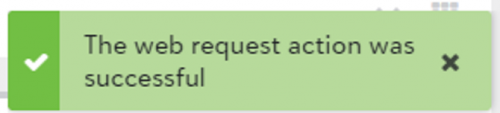
There is some documentation here about invoking a flow
Create an acknowledgement letter - Microsoft Integrations (blackbaud.com)
I have edited the response to look like this
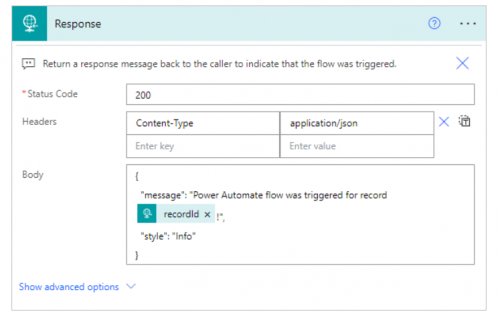
But this hasn’t changed the 200 success message, is anyone able to help?
Comments
-
@Ashley Gelderblom
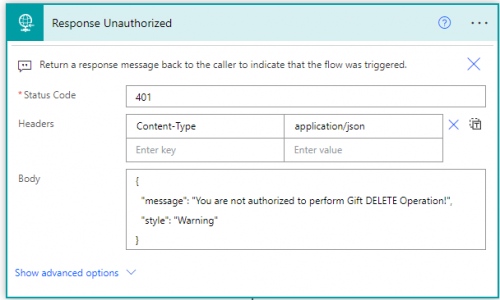
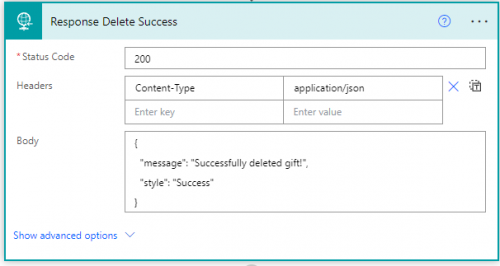
You have to check your flow run to make sure the Response action is the one you changed and did get executed.I have a flow that trigger on gift page to delete the gift record
when not authorized:
when successful:
when failed:
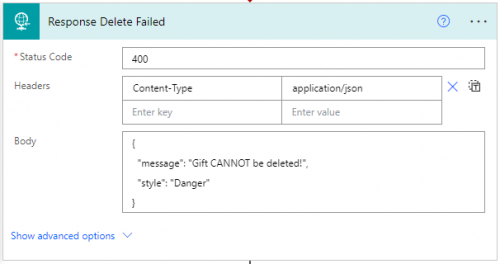
and it is working properly with correct message displayed depending on the flow path that got executed
0 -
@Alex Wong thanks Alex- how are you branching those?
0 -
@Ashley Gelderblom
i have a sharepoint list that records custom add-in and who is allow to do run those add-in.in the flow, I get the sharepoint list item for the add-in and check the email address that came back from the Validate a user identify token action and filter against who is allowed. if not allowed, the path where action of Response Unauthorized is triggered
if allowed then in run the API endpoint, success of API action = Response Delete Success action path, if failed, Response Delete Failed action path. This is done through using Configure Run After on the 2 response actions.
0 -
@Alex Wong Ah I got it, thanks for your help
0 -
@Alex Wong
Ah nice thanks0




Categories
- All Categories
- New YourCause Community TEST
- New SKY Community TEST
- New Grantmaking TEST Community
- New Altru Test Community
- New bbcon Community - TEST
- 12 Blackbaud Agents for Good™
- New Raiser's Edge NXT Community
- 7 Blackbaud Community Help
- 218 bbcon®
- 1.4K Blackbaud Altru®
- 409 Blackbaud Award Management™ and Blackbaud Stewardship Management™
- 1.2K Blackbaud CRM™ and Blackbaud Internet Solutions™
- 16 donorCentrics®
- 361 Blackbaud eTapestry®
- 2.7K Blackbaud Financial Edge NXT®
- 681 Blackbaud Grantmaking™
- 599 Blackbaud Education Management Solutions for Higher Education
- 3.3K Blackbaud Education Management Solutions for K-12 Schools
- 952 Blackbaud Luminate Online® and Blackbaud TeamRaiser®
- 85 JustGiving® from Blackbaud®
- 7K Blackbaud Raiser's Edge NXT®
- 3.9K SKY Developer
- 257 ResearchPoint™
- 123 Blackbaud Tuition Management™
- 165 Organizational Best Practices
- 247 Member Lounge (Just for Fun)
- 40 Blackbaud Community Challenges
- 37 PowerUp Challenges
- 3 (Closed) PowerUp Challenge: Grid View Batch
- 3 (Closed) PowerUp Challenge: Chat for Blackbaud AI
- 3 (Closed) PowerUp Challenge: Data Health
- 3 (Closed) Raiser's Edge NXT PowerUp Challenge: Product Update Briefing
- 3 (Closed) Raiser's Edge NXT PowerUp Challenge: Standard Reports+
- 3 (Closed) Raiser's Edge NXT PowerUp Challenge: Email Marketing
- 3 (Closed) Raiser's Edge NXT PowerUp Challenge: Gift Management
- 4 (Closed) Raiser's Edge NXT PowerUp Challenge: Event Management
- 3 (Closed) Raiser's Edge NXT PowerUp Challenge: Home Page
- 4 (Closed) Raiser's Edge NXT PowerUp Challenge: Standard Reports
- 4 (Closed) Raiser's Edge NXT PowerUp Challenge: Query
- 822 Community News
- 3.1K Jobs Board
- 57 Blackbaud SKY® Reporting Announcements
- 47 Blackbaud CRM Higher Ed Product Advisory Group (HE PAG)
- 19 Blackbaud CRM Product Advisory Group (BBCRM PAG)