Teachers not able to open google docs turned into BB LMS





Our teachers are not able to open google docs turned into BB LMS as of this morning. We get the message “This file cannot be viewed or annotated. Click here to download the file. It looks like the file uploaded may be corrupt. Please have the student resubmit the file or submit a new file.” PDFs uploaded seem to work. Anyone else seeing this problem?
-Michael
Comments
-
@Michael Moulton Thanks for the heads up. I've opened a case with Blackbaud because we also can't see student's file submissions. For us, I've confirmed it's Google Docs and jpgs. It does look like if the teacher opens the student's file submission from the Gradebook, they can still open their files (which is SUPER ironic because we've been having teachers complaining about not being able to open assignment files from the Gradebook for the last couple weeks…..).
1 -
@Megan Day. yea…I submitted a case too?
Funny…we can't get to the uploaded assinment files via the gradebook ? Wish there was a fix or, at least, a workaround like that. I see the problem is now on
1 -
We have the same problem: teachers have been complaining for the last couple weeks that they cannot [sporadically and unpredictably] “View Student's Assignment” from the gradebook.
I have a case open and it's supposedly been elevated, but it's been a few days….
Hopefully, they'll get to it sooner rather than later.
1 -
Hey Folks -
Just wanted to log a quick note here.
The issue with Google Drive files and assignments submissions not loading or resulting in a corrupted file error message should be completely resolved.
The issue where assignment submissions in the gradebook and assignment previews are sometimes not displaying should be resolved in the near future. We made some backend changes to how our system handles Mathjax functions and it's the cause of the periodic loading issue you see. Refreshing the page will typically make the information populate again. We've fixed 3 screens where this issue was present and we have two more to go. If you've submitted a case to Support, you'll get an update to said case once the fix has gone live.
If you have any questions, feel free to reach out!
-Mike
0 -
@Michael Morrissette Thanks for the update.
In addition, even though the “file corrupt” issue has been resolved, late assignment submissions now don't show properly. From the Assignment Detail page, if an assignment submission is late, it shows the blue submission icon and all assignment submission timestamps show “invalid” when a teacher hovers over the submission icons. Things seem to be fine if the teacher accesses submissions from the Gradebook.
We've got cases open for all of the above. Last week of classes….not a great week for all of this to happen.
0 -
@Megan Day thanks for the heads up.
I have the icon defect queued up to be worked on Monday, so hopefully we have a resolution for you all shortly on that one.
1 -
@Michael Morrissette Thanks Mike! Our teachers noticed very quickly the fact that the late timestamp was not accurate nor was that blue icon. Hopefully this is a easy fix!
0 -
Hi Folks -
The fix for the icon issue was released this morning. Teachers may need to log out and back in to see the icons reflected correctly when they go to their assignment evaluation page from the assignment center or the assignment page on their class pages.
We'll be working through the submissions not being visible in gradebooks issue next - more to come!
-Mike
1 -
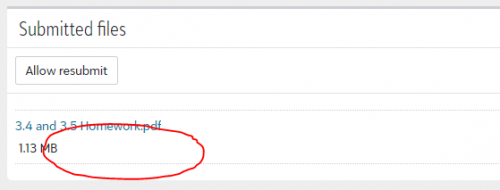
@Michael Morrissette Thanks Mike! Appreciate the quick fix. When the file submission piece patch is pushed out, will the date timestamp also be added back next to the file size?
 0
0 -
@Michael Morrissette Still missing the timestamps as @Chris Felinski mentioned.
Another assignment submission issue we discovered today while students are trying to submit their semester final projects….. Clicking “Allow resubmit” for students does not work. The option is available, teacher clicks the button, the button disappears. If the teacher refreshes the page, the “Allow resubmit” button again shows but nowhere in the process are students able to resubmit.
The “work around” of pushing the due date/time back on final projects is NOT an adequate solution.
0 -
@Megan Day agreed, that workaround isn't ideal but it will allow the student to resubmit the work while we get a fix deployed.
Speaking of fixes for that particular issue, we have one going through our pipeline now. I see you've already created a case with Support, so you'll receive an update that through that case once the fix has been pushed in our live environment. No specific ETA, but hoping to get it resolved in the very near future.0 -
Hi @Megan Day -
Just leaving a quick note here that the issue where clicking ‘Allow resubmit’ as a teacher would sometimes not trigger a resubmit state for the student has been fixed and deployed.
Let us know if you see any other issues with the resubmit process.
-Mike
0 -
The issues with student submissions have been compounded since returning at the start of the year. Initially, I still had teachers complaining about not being able to open student submissions (JPGs). They would get a blank screen that would eventually resolve the the “corrupt file” issue. While some of the submissions had special characters in the names, not all did and if they just kept trying, EVENTUALLY all the files would open fine.
It was sporadic and therefore hard to nail down and replicate to send the info on to support. I reached out to support last week with the screenshots and I received a response three days later saying that they didn't see ANY submissions for the example assignment info I had sent. After digging deeper with the teacher, we found that the teacher isn't seeing ANY of the student submissions if they access the submissions from the assignment detail page but they DO see the submitted icon if they go through the gradebook. When they go a step further and choose “Go to student's assignment”, there is no submission. Again, this is a NEW additional problem that is now making it impossible for support to resolve our initial problem that we reached out about.
0








Categories
- All Categories
- New K-12 Community Home (TEST)
- New Higher Education Home Page (Test)
- New Impact Edge Community TEST
- New YourCause Community TEST
- New SKY Community TEST
- New Grantmaking TEST Community
- New Altru Test Community
- New bbcon Community - TEST
- 12 Blackbaud Agents for Good™
- New Raiser's Edge NXT Community
- 8 Blackbaud Community Help
- 222 bbcon®
- 1.4K Blackbaud Altru®
- 410 Blackbaud Award Management™ and Blackbaud Stewardship Management™
- 1.2K Blackbaud CRM™ and Blackbaud Internet Solutions™
- 16 donorCentrics®
- 361 Blackbaud eTapestry®
- 2.7K Blackbaud Financial Edge NXT®
- 687 Blackbaud Grantmaking™
- 604 Blackbaud Education Management Solutions for Higher Education
- 3.3K Blackbaud Education Management Solutions for K-12 Schools
- 954 Blackbaud Luminate Online® and Blackbaud TeamRaiser®
- 85 JustGiving® from Blackbaud®
- 7K Blackbaud Raiser's Edge NXT®
- 4K SKY Developer
- 258 ResearchPoint™
- 123 Blackbaud Tuition Management™
- 165 Organizational Best Practices
- 248 Member Lounge (Just for Fun)
- 40 Blackbaud Community Challenges
- 37 PowerUp Challenges
- 3 (Closed) PowerUp Challenge: Grid View Batch
- 3 (Closed) PowerUp Challenge: Chat for Blackbaud AI
- 3 (Closed) PowerUp Challenge: Data Health
- 3 (Closed) Raiser's Edge NXT PowerUp Challenge: Product Update Briefing
- 3 (Closed) Raiser's Edge NXT PowerUp Challenge: Standard Reports+
- 3 (Closed) Raiser's Edge NXT PowerUp Challenge: Email Marketing
- 3 (Closed) Raiser's Edge NXT PowerUp Challenge: Gift Management
- 4 (Closed) Raiser's Edge NXT PowerUp Challenge: Event Management
- 3 (Closed) Raiser's Edge NXT PowerUp Challenge: Home Page
- 4 (Closed) Raiser's Edge NXT PowerUp Challenge: Standard Reports
- 4 (Closed) Raiser's Edge NXT PowerUp Challenge: Query
- 829 Community News
- 3.1K Jobs Board
- 57 Blackbaud SKY® Reporting Announcements
- 47 Blackbaud CRM Higher Ed Product Advisory Group (HE PAG)
- 19 Blackbaud CRM Product Advisory Group (BBCRM PAG)