Getting the fund description from "Get a Fund"




Hi all,
I'm trying to get the fund_description from Get a Fund, I noticed that List of gifts have the fund_id within gift splits. I've tried to get the fund_id using the Gift Splits Item + Gift splits fund id and I tried the Gift splits fund id by itself as well, but always returns null.
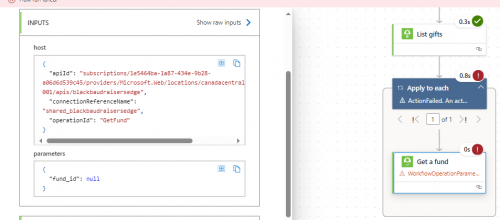
Any assistance would be greatly appreciated.
Comments
-
in list gift, there's a property call gift_splits, which is an array (since 1 gift can have multiple splits) of splits, that has the campaign_id, fund_id, appeal_id, package_id, amount (the amount of the split), etc. This is regardless of if your org uses split gift or not.
In order to get fund description of the gift split, you need to call Get a fund using the fund_id from the gift splits property, which power automate will put your get a fund into an apply to each loop, looping through each splits.
As to why you getting “null”, the likely answer is you used the wrong dynamic content for get a fund action. so what you want to do is (1) provide the full error message you got from get a fund action (2) in editing of your power automate flow, copy the dynamic content (click into the fund id input field for get a fund, then either highlight the dynamic content using your mouse, or just Ctrl-A to select and then paste it here.
0 -
@Alejandro Joven
Even though you probably only have 1 fund, I think you need a 2nd nested for each to loop through the split gifts and then get the fund description- If you can guarantee there are no split gifts- you might want to assign the fund description to a variable so you can use it outside the for eachs1 -
@Ashley Gelderblom
If there is definitively no spliting of gift used in an org, you can avoid using another apply to each looping through the gift splits array. the first() expression can be used to get the first (and only) split data in the array and target the fund_id property within it. Though will make the flow cleaner, isn't required.2 -
@Ashley Gelderblom
Thank you Ashley !!! In our organization we use the split gift module, therefore the solution included two nested.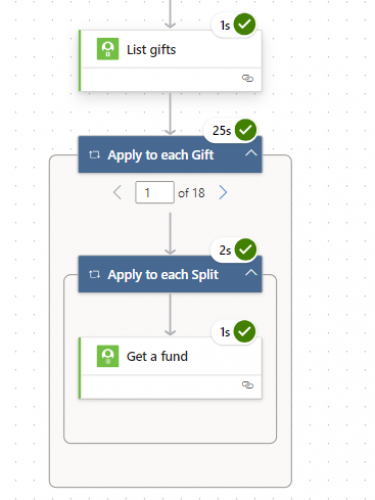 1
1 -
Thank you Alex !! It worked with the two “Apply to each”
0







Categories
- All Categories
- New K-12 Community Home (TEST)
- New Higher Education Home Page (Test)
- New Impact Edge Community TEST
- New YourCause Community TEST
- New SKY Community TEST
- New Grantmaking TEST Community
- New Altru Test Community
- New bbcon Community - TEST
- 12 Blackbaud Agents for Good™
- New Raiser's Edge NXT Community
- 8 Blackbaud Community Help
- 222 bbcon®
- 1.4K Blackbaud Altru®
- 411 Blackbaud Award Management™ and Blackbaud Stewardship Management™
- 1.2K Blackbaud CRM™ and Blackbaud Internet Solutions™
- 16 donorCentrics®
- 361 Blackbaud eTapestry®
- 2.7K Blackbaud Financial Edge NXT®
- 688 Blackbaud Grantmaking™
- 604 Blackbaud Education Management Solutions for Higher Education
- 3.3K Blackbaud Education Management Solutions for K-12 Schools
- 954 Blackbaud Luminate Online® and Blackbaud TeamRaiser®
- 85 JustGiving® from Blackbaud®
- 7.1K Blackbaud Raiser's Edge NXT®
- 4K SKY Developer
- 258 ResearchPoint™
- 123 Blackbaud Tuition Management™
- 165 Organizational Best Practices
- 249 Member Lounge (Just for Fun)
- 40 Blackbaud Community Challenges
- 37 PowerUp Challenges
- 3 (Closed) PowerUp Challenge: Grid View Batch
- 3 (Closed) PowerUp Challenge: Chat for Blackbaud AI
- 3 (Closed) PowerUp Challenge: Data Health
- 3 (Closed) Raiser's Edge NXT PowerUp Challenge: Product Update Briefing
- 3 (Closed) Raiser's Edge NXT PowerUp Challenge: Standard Reports+
- 3 (Closed) Raiser's Edge NXT PowerUp Challenge: Email Marketing
- 3 (Closed) Raiser's Edge NXT PowerUp Challenge: Gift Management
- 4 (Closed) Raiser's Edge NXT PowerUp Challenge: Event Management
- 3 (Closed) Raiser's Edge NXT PowerUp Challenge: Home Page
- 4 (Closed) Raiser's Edge NXT PowerUp Challenge: Standard Reports
- 4 (Closed) Raiser's Edge NXT PowerUp Challenge: Query
- 829 Community News
- 3.1K Jobs Board
- 57 Blackbaud SKY® Reporting Announcements
- 47 Blackbaud CRM Higher Ed Product Advisory Group (HE PAG)
- 19 Blackbaud CRM Product Advisory Group (BBCRM PAG)