Getting 403 Forbidden Error when trying to call Education Management School API reference endpoint

I am developing C#.net application to utilize Education School API endpoints , but getting 403 forbidden error. the below endpoint references - https://api.sky.blackbaud.com/school/v1/academics/courses
https://api.sky.blackbaud.com/school/v1/academics/departments

If I executing the endpoint over SKY API console, then it is working fine, but it is not working while trying through application. I am using the sample application which i downloaded from github is "sky-api-tutorial-auth-code-c-sharp" and modified and customized to use education endpoints. I got below error
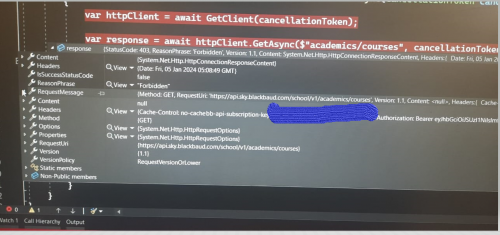
756fbed55bfc7a7e25e70cab6a3ef8e8-huge-im
Debug Info

Note: using Standard Tier subscription, Blackbaud ID - Full Access - Environment Admin

SKY API Application having Read/Write Access.

Please help me to proceed further to explore the API Endpoint reference.

Comments

  • Hi @ETL etldeveloper,

    Here are some things to check:

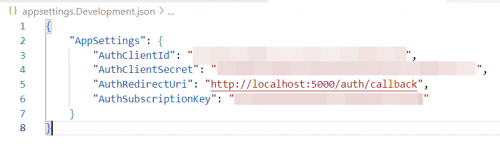
    • Have you renamed `appsettings.json-sample` to `appsettings.Development.json`?
    • Have you filled in all the values in that file? There should be no empty strings ("").
    5950d4baafcb4d9ad291a2b436def9f4-huge-im
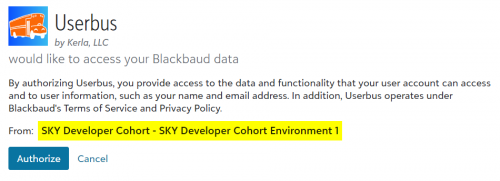
    • Launch your web app and click the Log in button. You should be redirected to Blackbaud for authorization. What tenant name shows up on that authorization page? Is it SKY Developer Cohort or another one? See the highlighted below.
    e5c08cd4cea384d86474190b8177badd-huge-im
    • If it's another tenant, does the account that you're authorizing with have permission to access the courses and departments endpoints in that tenant? Each endpoint needs certain permissions:
      • Courses needs Academic Group Manager or Platform Manager.
      • Departments needs Academic Group Manger, Platform Manager, or Any Manager Role.

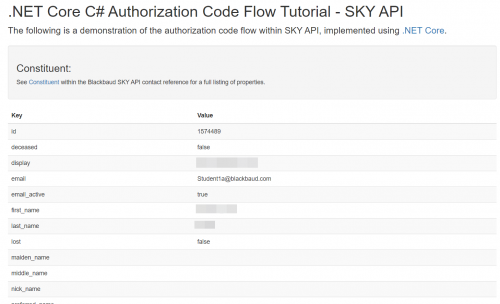
    As a test, I cloned that repo and tried it out this morning. I replaced the URLs in the constituents service so that it calls /school/v1/users. Then I replaced the Angular code so that it shows the details for a user. It all ended up working. See screenshot at bottom. My changes were:

    • Creating appsettings.Development.json per the README.
    • Adding the necessary values to that file: client ID, client secret, local redirect URI, and subscription key.
    • Replacing the endpoint strings for constituents with strings for school users.
    • Adding a UserModel.cs to represent the user.
    • Replacing the hardcoded constituent ID in _Layout.cshtml with the known ID of one of the school users in this tenant.
    • Modifying the table in _Layout.cshtml to show school user details instead of constituent details.

    So, we should be able to get this working. Let me know how it goes.

    f6d840e01bbbf240240c45ba6610f18e-huge-im
  • Thanks @Eric Eskildsen for helping on this.

    Yes I followed the same steps as you mentioned above.

    I see the same environment name in the Authorization Screen as displayed the environment name while trying through SKY API Console

    Aslo i tried the same through POSTMAN, getting same error as like below

    9dad0bb251719736d0af1715be1bb80c-huge-im
    Forbidden Issue

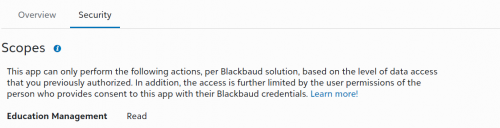
    But My skyApplication has read scope as like below screen while navigating into Market Manage Page

    Also User has full access with Environment Admin

    595a253379a7b8d30b254fa75a8cbefc-huge-im


    Is there any setting other than this for SKY Application, environment, developer account to approve the access?

  • @ETL etldeveloper Ah, that does sound like something Blackbaud needs to approve.

    You could also try changing the scope to Full data access to match my tests. That's the scope of the application that I tested with. That said, it sounds like you shouldn't need that scope for the types of calls you're making.

    If you want to try anyway, you can change that as you probably know at developer.blackbaud.com > Developer account > My applications > [Your application] > Scopes > Edit.

  • Chris Rodgers
    Chris Rodgers Blackbaud Employee
    Ninth Anniversary Kudos 3 Name Dropper Participant

    Hi, @ETL etldeveloper. I'm Chris with the SKY API team. I believe you and Eric are going about this the right way. I don't see any issues with your application configuration. However, I believe there might be an issue with the configuration of the Blackbaud Environment itself that is preventing that Education Read scope from being mapped to the environment Connection, which results in the scope not being present on your SKY API requests.

    I have reached out internally to check into this Environment configuration issue. In the the meantime, you could do as Eric suggests and set your application's Access to “Full Access.” After doing this, an environment admin will need to go back to the Marketplace's Manage page and approve the scope change for your application.

    I'll send you a private message regarding any updates I get about the environment configuration issue.

  • Great and Thanks @Eric Eskildsen and @Chris Rodgers. It works fine.

    Setting Full Data access for SKY Application is solving the issue. I am not sure why it is designed in such a way. I am accessing data from Education only with GET Request, but it is required to setup all the blackbaud application's access as below

    f069dabc2f145fc466743f08f1b90be2-huge-im
    Full Data Access

    Please help me to understand why it is required full data access rather than read only.

  • Chris Rodgers
    Chris Rodgers Blackbaud Employee
    Ninth Anniversary Kudos 3 Name Dropper Participant

    @ETL etldeveloper Agreed that you should not have to configure your application this way. This is simply an issue with how your particular environment is configured at the moment, which is preventing that Read scope from being properly applied to your application's connection. We should have a fix for your environment in the coming week. Apologies for the issue. Once the issue is resolved, you'll be able to limit your application's Access as intended. I'll keep you posted.

  • Chris Rodgers
    Chris Rodgers Blackbaud Employee
    Ninth Anniversary Kudos 3 Name Dropper Participant

    Hi, @ETL etldeveloper. Your issue should be resolved.

    As a reminder, after your update your application's Access configuration, an environment admin will need to go back to the Marketplace's Manage page and approve the scope change for your application before the connection will be updated to use the limited access configuration. If you notice any issues after this, please let me know.

Categories