Question: Is there a way to have specific contract text with a required signature section to show up on the enrollment contract for only those families who receive fin aid?





I am trying to avoid having two separate enrollment contracts but would like to include a section in our enrollment contract that requires parents to read and more importantly sign off on our financial aid policy, however, this section of the contract should only appear on the contracts that include financial aid. Hoping to hear what others do - I am open to any suggestions or “work arounds” if this feature is not available at time time. Thanks!
Comments
-
@Katie Newhall I think the easiest approach would be to create separate contract types. You can use the special contract text block and keep a single contract type, but you would need to add the financial aid policy to each student receiving FA's special contract text field. Other options could include creating a general section that includes the FA policy for everyone and says ‘if applicable’ or you could also set up a separate school form that is issued to families receiving financial aid.
1 -
@Katie Newhall I was going to suggest the same thing as Troy. The special considerations text would work, and you could probably do a bulk upload for everyone receiving financial aid. We have the special considerations block in all of our contracts, but it will only be displayed on the contract if something is entered for special considerations on the student's record in enrollment management. I don't think you can include a section specific signature or acknowledgement that way though.
We include financial aid policy on all contracts, but for us, at the time parents complete the contract they are simply indicating whether they are applying for financial aid by choosing “Yes” or “No” to the applying for financial aid question. Depending on the text you need to include, you might be able to reword that question to work as an agreement/acknowledgement to the financial aid information, but again, that question would appear on all contracts.
0 -
@Shannon Krise so helpful! Thank you for your time in writing a response! I like the idea of rewording the financial aid question… I will try that!
0 -
@Troy Burki Thank you so much for your response, very helpful!
0 -
@Shannon Krise - Hi Shannon, Can you tell me where on the enrollment contract you are able to add the question regarding whether or not the family has applied for financial assistance? I don't see this option when setting up the contract. Thanks!
0 -
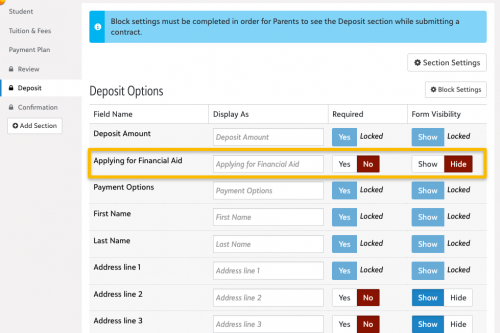
Hi @Katie Newhall in the deposit section of the contract you can show/hide the question Applying for Financial Aid.
 1
1 -
@Katie Newhall Bryan saved me some trouble because it might have taken me a while to find that again. You can customize the text of the question using the “Display As” column. I had forgotten that the question was actually in the deposit section though. It makes sense since it's used to set deposit rules, but that placement might be a little tricky for what you are trying to do.
0 -
@Bryan Lorenzo
THANK YOU!!! ?0 -
@Shannon Krise
THANK YOU!!! ?0 -
@Bryan Lorenzo just curious, we do not use this feature but add the financial aid so it appears on their contract. How is this question helpful if we want parents to complete their FA before contracts are issued?
0 -
@Katie Newhall I would encourage you to use the Special Contract Text Field. We use this field liberally and I add it to every contract we build even if I don't anticipate needing it since blank fields do not appear on the contracts as noted by another commentator.
0 -
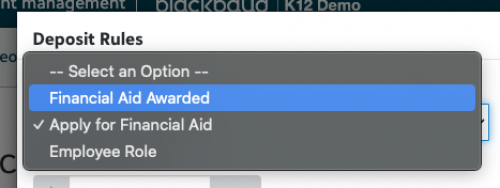
Hi @Coco Parham - it is a question available on the contract as the system allows for a deposit rule to be set up. The deposit rule would reduce the deposit to X amount if they respond Yes they are applying for Financial Aid.
1 -
@Bryan Lorenzo Thank you. We have not showed the question but we also use the deposit rules that reduce the deposit, depending on the amount of FA they recieved. We are setting up our 24-25 contracts now. I will show the question from now on. thanks!
0 -
Hi @Coco Parham - there is another deposit rule to adjust the deposit if X financial aid is awarded in EMS. So, if you're actually awarding aid in EMS you can use that option as well. In this case it wouldn't be necessary to have the Queston enabled.
 1
1 -
@Coco Parham Yeah, we have a similar system set up, where the awards for financial aid are listed on the contract itself, and the “deposit rules” are set to adjust the deposit based on the amount of aid given. We don't actually explain the adjusted deposit on the contract- I may bring up doing that this year.
We ask the “do you intend to apply for Financial Aid” question on our applications, and use it as a guide to remind people once enrollment season rolls around in case they are new and haven't applied yet.
There is always a difference between who self-reports as applying and who actually goes through the process.
I'm curious about how it works for those who ask if they intend to apply in the deposit section of the contract.
Do many schools have contracts set up where families have to agree to pay the whole tuition no matter what aid they get, and is there then an opportunity to withdraw later if they aren't able to afford it without the aid they're hoping to receive?
1 -
@Ash Smelkinson yes, we do the same. Our candidate families are required to answer the FA question on the application and then reminded to complete the process in later discussions. When our admission group calls families to congratulate them with acceptances, FA awarded is discussed as well. So it is covered in a few ways. Thanks!
0 -
@Bryan Lorenzo that is what we use. Thank you for all your help!
0
















Categories
- All Categories
- New K-12 Community Home (TEST)
- New Higher Education Home Page (Test)
- New Impact Edge Community TEST
- New YourCause Community TEST
- New SKY Community TEST
- New Grantmaking TEST Community
- New Altru Test Community
- New bbcon Community - TEST
- 12 Blackbaud Agents for Good™
- New Raiser's Edge NXT Community
- 8 Blackbaud Community Help
- 222 bbcon®
- 1.4K Blackbaud Altru®
- 411 Blackbaud Award Management™ and Blackbaud Stewardship Management™
- 1.2K Blackbaud CRM™ and Blackbaud Internet Solutions™
- 16 donorCentrics®
- 361 Blackbaud eTapestry®
- 2.7K Blackbaud Financial Edge NXT®
- 688 Blackbaud Grantmaking™
- 604 Blackbaud Education Management Solutions for Higher Education
- 3.3K Blackbaud Education Management Solutions for K-12 Schools
- 954 Blackbaud Luminate Online® and Blackbaud TeamRaiser®
- 85 JustGiving® from Blackbaud®
- 7.1K Blackbaud Raiser's Edge NXT®
- 4K SKY Developer
- 258 ResearchPoint™
- 123 Blackbaud Tuition Management™
- 165 Organizational Best Practices
- 249 Member Lounge (Just for Fun)
- 40 Blackbaud Community Challenges
- 37 PowerUp Challenges
- 3 (Closed) PowerUp Challenge: Grid View Batch
- 3 (Closed) PowerUp Challenge: Chat for Blackbaud AI
- 3 (Closed) PowerUp Challenge: Data Health
- 3 (Closed) Raiser's Edge NXT PowerUp Challenge: Product Update Briefing
- 3 (Closed) Raiser's Edge NXT PowerUp Challenge: Standard Reports+
- 3 (Closed) Raiser's Edge NXT PowerUp Challenge: Email Marketing
- 3 (Closed) Raiser's Edge NXT PowerUp Challenge: Gift Management
- 4 (Closed) Raiser's Edge NXT PowerUp Challenge: Event Management
- 3 (Closed) Raiser's Edge NXT PowerUp Challenge: Home Page
- 4 (Closed) Raiser's Edge NXT PowerUp Challenge: Standard Reports
- 4 (Closed) Raiser's Edge NXT PowerUp Challenge: Query
- 829 Community News
- 3.1K Jobs Board
- 57 Blackbaud SKY® Reporting Announcements
- 47 Blackbaud CRM Higher Ed Product Advisory Group (HE PAG)
- 19 Blackbaud CRM Product Advisory Group (BBCRM PAG)