Marking table entry inactive in webview





I feel like I must be missing something…
I need to inactivate a table entry in a database where tables are all managed in webview and I do not see where I can do this. Any ideas?
Please - I don't need suggestions of how to handle it by using replacement or anything else. I JUST need to inactivate an entry.
Thanks!
Comments
-
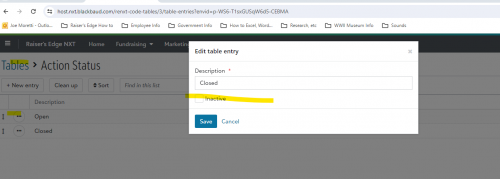
@Karen Diener You need to go to tables, pick the table you want and the item to make inactive, click on the dots, choose edit, then mark the inactive box and save.
 2
2 -
@Joe Moretti ah - thanks! I didn't bother opening it. I was expecting “mark inactive” to be one of the options from the ellipses.
2 -
@Karen Diener So frustrating that tables and Attributes are no longer available in Webview.
0 -
@Joe Moretti Joe now that these tables are on NXT do you know a way to export them? I would think that would be an option but I cant find it Thanks!
0 -
@Emily Boltz - Within Database View you can export a code table report. Go to Configuration > Tables, then File > Preview > Code Tables Report.
Also, Attributes are still accessible within Database View > Configuration > Attributes, only the table view as moved to Web View.1 -
@Austen Brown Hi Austen. I think I may be using the word Attribute in error. I hate to bug you but could you confirm I am correct with the following> (Type of individual ) is the table and for example, Board member would be what I was taught is the attribute?
0 -
@Emily Boltz - Where on the record does the “Board Member” listing live? Bio2 > Constituent Code, Attributes, or another location?
0 -
@Emily BoltzUnfortunately they cannot be exported.
0 -
@Karen Diener So frustrating that tables and Attributes are no longer available in Webview.
I'm not that annoyed by it. Webview offers better functionality for managing tables - aside from the small issue of having to “open” or edit each entry in order to mark it as inactive.
I have probably 100 complaints ahead of this one that I consider annoying, so I'll put my energy there. I think this move is actually fairly positive.
Karen
1 -
@Austen Brown I am trying to get to know NXT so I apologize - I found the table “Type of Individual” and if I double click on that I can see all of the attributes I have created-Board Member, volunteer etc. That is good.
But when I follow the path you mentioned for the Database view (configuration> Attributes, I can only find the table “Type of Individual”. I can't find Board member or any other attributes I put under Type of individual in RE.
0 -
@Emily Boltz You will only find the table name in attributes in RE Database View. The tables in RE NXT will show you what you have added for the Category. That is how it works. The Attributes in Configuration is for only creating the Table Name. It is in Tables that you can add the various drop-downs and see them.
0 -
@Emily Boltz - It sounds like you have a table called “Type of Individual”; “Board Member” would be a table entry. To locate where this table displays in the database is a bit trickier, but you can use a new feature available in WV to figure it out - simply locate the “Type of Individual” table in web view, click into it to view the entries. Then on the ellipsis to the left of an entry click to “View uses”. This will provide a pop-up window that will tell you where the table is used.

Click on “View Uses” to see where table is used. If it is an attribute then you can go to Database View > Configuration > Attributes > [Specific Record Type] > and review the list of attributes in your system. You'll be looking for “Types of Individuals” to be listed in the “Table Name” column.
Alternatively, you may be able to use the system IDs located in the pop-up window in WV to locate the associated records in database view. Remember that system IDs are different from look-up IDs and will require a different field in Query.
Hope this helps.1












Categories
- All Categories
- New eTapestry Home Community
- New K-12 Community Home (TEST)
- New Higher Education Home Page (Test)
- New Impact Edge Community TEST
- New YourCause Community TEST
- New SKY Community TEST
- New Grantmaking TEST Community
- New Altru Test Community
- New bbcon Community - TEST
- 12 Blackbaud Agents for Good™
- New Raiser's Edge NXT Community
- 8 Blackbaud Community Help
- 223 bbcon®
- 1.4K Blackbaud Altru®
- 411 Blackbaud Award Management™ and Blackbaud Stewardship Management™
- 1.2K Blackbaud CRM™ and Blackbaud Internet Solutions™
- 16 donorCentrics®
- 361 Blackbaud eTapestry®
- 2.7K Blackbaud Financial Edge NXT®
- 688 Blackbaud Grantmaking™
- 604 Blackbaud Education Management Solutions for Higher Education
- 3.3K Blackbaud Education Management Solutions for K-12 Schools
- 954 Blackbaud Luminate Online® and Blackbaud TeamRaiser®
- 85 JustGiving® from Blackbaud®
- 7.1K Blackbaud Raiser's Edge NXT®
- 4K SKY Developer
- 258 ResearchPoint™
- 124 Blackbaud Tuition Management™
- 165 Organizational Best Practices
- 249 Member Lounge (Just for Fun)
- 40 Blackbaud Community Challenges
- 37 PowerUp Challenges
- 3 (Closed) PowerUp Challenge: Grid View Batch
- 3 (Closed) PowerUp Challenge: Chat for Blackbaud AI
- 3 (Closed) PowerUp Challenge: Data Health
- 3 (Closed) Raiser's Edge NXT PowerUp Challenge: Product Update Briefing
- 3 (Closed) Raiser's Edge NXT PowerUp Challenge: Standard Reports+
- 3 (Closed) Raiser's Edge NXT PowerUp Challenge: Email Marketing
- 3 (Closed) Raiser's Edge NXT PowerUp Challenge: Gift Management
- 4 (Closed) Raiser's Edge NXT PowerUp Challenge: Event Management
- 3 (Closed) Raiser's Edge NXT PowerUp Challenge: Home Page
- 4 (Closed) Raiser's Edge NXT PowerUp Challenge: Standard Reports
- 4 (Closed) Raiser's Edge NXT PowerUp Challenge: Query
- 829 Community News
- 3.1K Jobs Board
- 57 Blackbaud SKY® Reporting Announcements
- 47 Blackbaud CRM Higher Ed Product Advisory Group (HE PAG)
- 19 Blackbaud CRM Product Advisory Group (BBCRM PAG)