Would anyone be willing to show me their Prospect Module in operation?





I would love to see the NXT prospect module in use and chat to someone who has a bit of experience with this. We are just in the early stages of looking into doing this and it all feels very theoretical - it would help to have an idea of pros / cons - dos / do nots etc. Many thanks. Claudia claudia@leuchie.org.uk
Comments
-
@Claudia Wellwood Here is an example of how our organization uses it:
There are FIVE steps or Phases for the moves management (which currently are listed in the Prospect Tab/General/Prospect Status in Database View or Prospect Management tile in RE NXT. Each prospect status has a time frame in days of how long someone can stay in each before they’re considered past due (number in parenthesis). The prospect status should be updated when necessary to keep current.
Phase 1- IDENTIFICATION/RESEARCH (30): Identify potential prospects, research & gather information
Phase 2- QUALIFICATION (21): Does the prospect quality to move to next step
Phase 3- CULTIVATION (180): Cultivate a relationship with prospect
Phase 4- SOLICITATION (90): Solicit a gift from prospect
Phase 5- STEWARDSHIP (365): Continue building a relationship with donor after the’ve given
The next section will show how to create proposals, actions, notes, etc. for these various steps plus an action reminder.
- Creating Proposals (known as Opportunities in RE NXT)
- Go to the RE record. Click on the Prospect Tab. In Prospect Status, if the status is not yet determined, choose from the drop down box the various steps/phases this prospect is currently in. In the Philantropic Interests, you can choose the various interests of the company or person. You can also add what interests they will not give to.
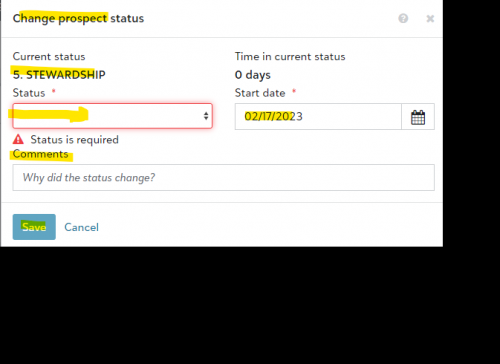
In RE NXT Prospect Status is slightly different (It lives in the Prospect Management Tile).
When you enter the status, you can also enter a date (when status is entered in Database view, the date that info is entered, will be recored in RE NXT). RE NXT will also track how many days it is in that status. Each time you change the status in RE NXT, you can add the new date. The time in status will revert back to zero and re-count. You also can add a comment to why the status changed.
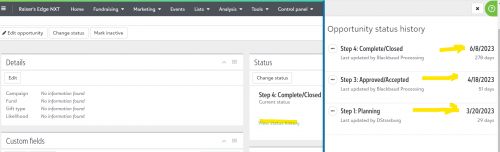
When the status is past the number of days allowed a warning will appear in RE NXT. You can also view status history.
TAKE NOTE: At this time the days in status (and also days in proposal/opportunity status) CANNOT be reported on or exported. It can only be viewed when the record is opened.
- To add the proposal and the information, click New Proposal and add the various information as seen below. You can also add Notes, Actions & media as well in regard to this proposal. If the money actually comes in, the gift will be linked to the proposal, which is done by the Database Manager, who will then, change the status to Step 4 Complete/Closed.
The proposal statuses are below. The first three steps show the number of days a proposal/opportunity can stay in each befoe it’s considered late. With each of the first three steps, when it is time to move to the next one, put in the date for the date ask field. So if Step One has 1/2/23 and you move to Step 2, change the date ask to 1/31/23. When you move to Step three, put in the date ask, whatever that date is.
- Step 1 : Planning (30 days)
- Step 2: Asked/Pending (30 days)
- Step 3: Approved/Accepted (30 days)
- Step 4: Complete/Closed
- Declined
- Withdrawn
A brief explanation of the fields. The below fields in blue are REQUIRED, which means, they must be filled in for you to save the information. If you know the information for some of the fields (even the ones not listed below), enter that information. The more information, the better.
- Name – Proposal Name (Should begin with the FY and then be specific. Ex. Naming Opportunity Louisiana Pavilion)
- Status – One of the following options:
- Step 1: Planning: Proposal has not been presented yet to the prospect, but will sometime in the near future
- Step 2: Asked/Pending: Proposal has been presented to prospect and we are waiting on a response
- Step 3: Approved/Accepted: Prospect has notified us that they have accepted the proposal and funding and/or a signed agreement is forthcoming
- Step 4: Complete/Closed: Signed pledge agreement or a check has been received and a gift record has been entered in Raiser’s Edge
- Declined: Prospect has declined the proposal
- Withdrawn: Proposal is in limbo/not followed through/put on hold, etc.
- Purpose – What the money will be funding (this will be more general; the name of the proposal is where you can name it with more detail). Examples of purpose include:
- Galleries / Pavilions
- Education
- Endowment
- Exhibits
- Events / Conferences / Entertainment
- Sponsorship
If you are unsure of the purpose at the time you create the proposal record (for example, if you are still deciding if the ask will be for the Campaigns Pavilion or the Liberation Pavilion), you can use “TO BE DETERMINED” as a place holder until you have decided.
- Solicitors – Who is a solicitor for the proposal. Click on the box labeled “Solicitors” to search for and add names (Solicitors must have a profile in RE and be marked as a solicitor. If you cannot locate the solicitor you are looking for, please contact the Database Manager.)
- Deadline: – Date Deadline (if known)
- Contact: – ONLY on Organization record (contact MUST be listed in the relationship tab of the ORG record (person does NOT need to have their own IND record).
- Priority, Type of Gift, Instrument, Probability, Date Rated, Deadline – You can ignore these fields if they do not pertain to you or if not known.
- Amount Asked – Proposal ask amount (if known)
- Date Asked – Date that the proposal was entered into the system. With each status, change this date. The original date will always be shown in the bottom of record.
- Verbal Commitment – Amount prospect has indicated that they will be funding; amount may differ than original ask amount
- FY Expected – Last day of the Fiscal Year during which we should expect a response or receive funding. For example: 6/30/20 (FY20), 6/30/21 (FY21) etc.
- Amount Funded – This will be filled in by Database Manager when the actual gift comes in. Database Manager will also link the gift to the proposal.
- Date Funded – Date This will be filled in by Database Manager when the gift comes in.
- Proposal is Inactive box – This box is checked after a certain time frame has passed and proposal is completed, declined or withdrawn. Usually after the fiscal year.
The most important information is located on the “General” tab, but you can also add actions, media (such as a proposal document) to the proposal record and notes. Notes can also be added within the Action tab (if it relates to the action).
In RE NXT terminology and processes are slightly different.
DATABASE VIEW RE NXT
Prospect/Proposal Tab Opportunities
Proposal Attributes Custom Fields
Media Tab (for uploading documents) Attachments
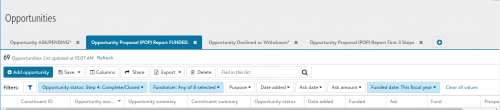
We also use the Opportunities List in RE NXT to keep track of the first three steps for our Major GIft Officers as well as a list of those funded for the FY.
 6
6 -
@Joe Moretti thank you so much for this! I really appreciate you taking the time to send this through.
3 -
@Joe Moretti - there seems to be a problem with your screenshots coming through. Is there any way you still have this and could forward to my email please?? claudia@leuchie.org.uk
Thanks so much
1 -
@Claudia Wellwood Sent you an email.
1 -
@Joe Moretti - this is an excellent resource - thank you for sharing!
0 -
@Joe Moretti
When you get to the part when a proposal is declined, where have you been keeping the date for that day? We don't want to override the Ask/Expected date for historical tracking for next year.0 -
@Alex Bruder We do change the “ask date” to when it was declined. but then we overide the “Ask date when the various steps are added, except for the Funded date. We do not treat the ”ask date" as that just as the date for each of the steps. Over in RE NXT the history for the various steps are recorded there. At this time RE NXT does not let you report on that but you at least have that information there. I wish that they would change the ASK DATE to something else, since it is important to know when each step takes place and how long they have been in each step,.
 2
2













Categories
- All Categories
- New K-12 Community Home (TEST)
- New Higher Education Home Page (Test)
- New Impact Edge Community TEST
- New YourCause Community TEST
- New SKY Community TEST
- New Grantmaking TEST Community
- New Altru Test Community
- New bbcon Community - TEST
- 12 Blackbaud Agents for Good™
- New Raiser's Edge NXT Community
- 8 Blackbaud Community Help
- 222 bbcon®
- 1.4K Blackbaud Altru®
- 411 Blackbaud Award Management™ and Blackbaud Stewardship Management™
- 1.2K Blackbaud CRM™ and Blackbaud Internet Solutions™
- 16 donorCentrics®
- 361 Blackbaud eTapestry®
- 2.7K Blackbaud Financial Edge NXT®
- 688 Blackbaud Grantmaking™
- 604 Blackbaud Education Management Solutions for Higher Education
- 3.3K Blackbaud Education Management Solutions for K-12 Schools
- 954 Blackbaud Luminate Online® and Blackbaud TeamRaiser®
- 85 JustGiving® from Blackbaud®
- 7.1K Blackbaud Raiser's Edge NXT®
- 4K SKY Developer
- 258 ResearchPoint™
- 123 Blackbaud Tuition Management™
- 165 Organizational Best Practices
- 249 Member Lounge (Just for Fun)
- 40 Blackbaud Community Challenges
- 37 PowerUp Challenges
- 3 (Closed) PowerUp Challenge: Grid View Batch
- 3 (Closed) PowerUp Challenge: Chat for Blackbaud AI
- 3 (Closed) PowerUp Challenge: Data Health
- 3 (Closed) Raiser's Edge NXT PowerUp Challenge: Product Update Briefing
- 3 (Closed) Raiser's Edge NXT PowerUp Challenge: Standard Reports+
- 3 (Closed) Raiser's Edge NXT PowerUp Challenge: Email Marketing
- 3 (Closed) Raiser's Edge NXT PowerUp Challenge: Gift Management
- 4 (Closed) Raiser's Edge NXT PowerUp Challenge: Event Management
- 3 (Closed) Raiser's Edge NXT PowerUp Challenge: Home Page
- 4 (Closed) Raiser's Edge NXT PowerUp Challenge: Standard Reports
- 4 (Closed) Raiser's Edge NXT PowerUp Challenge: Query
- 829 Community News
- 3.1K Jobs Board
- 57 Blackbaud SKY® Reporting Announcements
- 47 Blackbaud CRM Higher Ed Product Advisory Group (HE PAG)
- 19 Blackbaud CRM Product Advisory Group (BBCRM PAG)