Grant Amount field - extra zeros





Hello - when creating a requirement which includes a ‘read only’ field for Request: Grant Amount, the result displays a number with up to 4 decimal points showing. How can I remove these decimals? Blueprint does not give the option to do this in the case of a read only field.
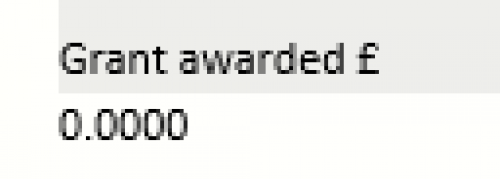
I have found an old thread about this, but no solution. Has anybody found what is causing this or how to resolve it please?
Comments
-
@Charlotte Burke Let me see if I can find someone who can help!
2 -
@Charlotte Burke
Mine reads that way too. I would like to know how to fix it.1 -
@Ray Borkman Thank you, much appreciated. It's not a good look at the moment…
0 -
@Dana Wilkes If I recall correctly, you need to tell BBGM which fields this is happening with and which forms, they will make adjustments to them, you then need to pull them out of the forms, and then put them back in to essentially “reset” them.
0 -
@Paula Lentoni I've worked with Blackbaud a while back on this and they told me there was no fix at that time. I'll try again.
0 -
@Charlotte Burke thanks so much for reaching out! I have caught up with collegaues here and this sounds like a support question. Would you please raise a case with the Buzzacott team? They will be best placed to provide guidance on this one
0 -
@Rebecca Williams Many thanks, I will email Buzzacott now and report back here on any progress we make towards a solution. Thank you all.
1 -
Hello - when creating a requirement which includes a ‘read only’ field for Request: Grant Amount, the result displays a number with up to 4 decimal points showing. How can I remove these decimals? Blueprint does not give the option to do this in the case of a read only field.
I have found an old thread about this, but no solution. Has anybody found what is causing this or how to resolve it please?
Good morning all - I have also discovered that Blackbaud has been aware of this issue for many years. There is another thread on this on the community forum (dating from August 2015) but appears not to have been thoroughly addressed let alone resolved. It's not a question of individual support for a form glitch, this is a systemic issue.
Want to get this resolved so that your forms don't look quite so incompetent to your applicants and grant holders? Me too.
Can I suggest that we ‘vote’ on this thread to try to get some traction? Feel free to share and escalate
 https://bbgm.ideas.aha.io/ideas/GIFTSONL-I-790










Categories
- All Categories
- New K-12 Community Home (TEST)
- New Higher Education Home Page (Test)
- New Impact Edge Community TEST
- New YourCause Community TEST
- New SKY Community TEST
- New Grantmaking TEST Community
- New Altru Test Community
- New bbcon Community - TEST
- 12 Blackbaud Agents for Good™
- New Raiser's Edge NXT Community
- 8 Blackbaud Community Help
- 222 bbcon®
- 1.4K Blackbaud Altru®
- 410 Blackbaud Award Management™ and Blackbaud Stewardship Management™
- 1.2K Blackbaud CRM™ and Blackbaud Internet Solutions™
- 16 donorCentrics®
- 361 Blackbaud eTapestry®
- 2.7K Blackbaud Financial Edge NXT®
- 687 Blackbaud Grantmaking™
- 603 Blackbaud Education Management Solutions for Higher Education
- 3.3K Blackbaud Education Management Solutions for K-12 Schools
- 954 Blackbaud Luminate Online® and Blackbaud TeamRaiser®
- 85 JustGiving® from Blackbaud®
- 7K Blackbaud Raiser's Edge NXT®
- 4K SKY Developer
- 258 ResearchPoint™
- 123 Blackbaud Tuition Management™
- 165 Organizational Best Practices
- 248 Member Lounge (Just for Fun)
- 40 Blackbaud Community Challenges
- 37 PowerUp Challenges
- 3 (Closed) PowerUp Challenge: Grid View Batch
- 3 (Closed) PowerUp Challenge: Chat for Blackbaud AI
- 3 (Closed) PowerUp Challenge: Data Health
- 3 (Closed) Raiser's Edge NXT PowerUp Challenge: Product Update Briefing
- 3 (Closed) Raiser's Edge NXT PowerUp Challenge: Standard Reports+
- 3 (Closed) Raiser's Edge NXT PowerUp Challenge: Email Marketing
- 3 (Closed) Raiser's Edge NXT PowerUp Challenge: Gift Management
- 4 (Closed) Raiser's Edge NXT PowerUp Challenge: Event Management
- 3 (Closed) Raiser's Edge NXT PowerUp Challenge: Home Page
- 4 (Closed) Raiser's Edge NXT PowerUp Challenge: Standard Reports
- 4 (Closed) Raiser's Edge NXT PowerUp Challenge: Query
- 829 Community News
- 3.1K Jobs Board
- 57 Blackbaud SKY® Reporting Announcements
- 47 Blackbaud CRM Higher Ed Product Advisory Group (HE PAG)
- 19 Blackbaud CRM Product Advisory Group (BBCRM PAG)