LYBUNT and SYBUNT





How do I make LYBUNT and SYBUNT reports in RE NXT? There are “canned” reports in RE Database, but I don't see it in NXT.
Comments
-
@Joy Prevost I am not sure if you can do those in RE NXT, but you can either use the reports in database view or create queries to capture that information, such as Total Gifts greater than 0 and gift dates made between 7.1.22 and 6.30.23 (FY23) but not between 7.1.23 and 6.30.24 (FY24).
3 -
@Joy Prevost The Retention dashboard shows the number of Lybunts from which you could create a list.
3 -
@Marie Stark Where is the Retention dashboard in NXT or how is it created?
0 -
@Joy Prevost In NXT, Fundraising/Reporting, then choose Retention in the dropdown list.
7 -
@Joy Prevost I will say that with some of the reporting, RE NXT does not always seem to match up completely with RE Dashboard. I find this to be true with the Rention LYBUNT in RE NXT and the LYBUNT Report in Database View, so just be aware. It may have something to do with how it reports in RE NXT compared to the Database View.
5 -
@Marie Stark Can you pull cumulative giving greater than a certain amount for last fiscal year? Thanks!
0 -
@Tracy McLuskie It seems like maybe you can create a list from the dashboard and add some filters.
0 -
@Marie Stark hello! I am trying to find the number of donors who gave during our 2023 Year End Appeal but not in the 2024 Year End Appeal. Can that be found on the retention report page or is there a different way in either NXT or DB view? I am very new and have no idea. Thank you!
0 -
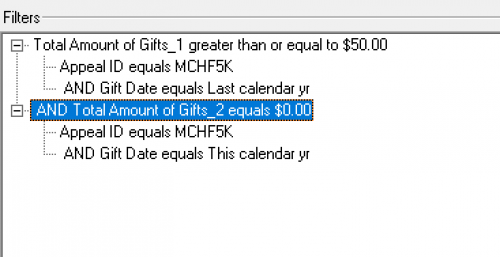
@Cameron Bellestri I'm not sure about the dashboards but I know how to do that with a query.
It would be something like this.
 0
0 -
@Cameron Bellestri
Marie gave you the query that you can do (Constituent query). Just want to add that if you are on RE NXT, you can do Query in webview now. it has mostly the same functionalities, with some enhancement (i..e ONE OF operator can take 2000 instead of only 500 entries), Easy to Copy Paste too.0 -
@Marie Stark thank you so much, it is so appreciated!
1 -
@Alex Wong thank you! I am trying to learn both so I am going to attempt to do both ways. I really appreciate your help.
0 -
@Marie Stark thank you again, I was able to pull an accurate report!
1 -
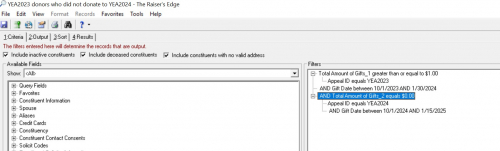
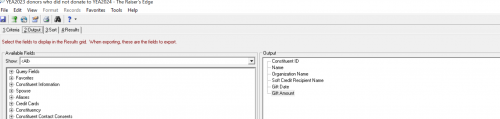
@Marie Stark hello again, in all my excitement I did not realize that there are donors on the list that donated in 2023 and 2024 when I was looking to find donors who donated in 2023 and not in 2024. I included what my query looked like.
0 -
@Cameron Bellestri When did the 2024 donors give and to what appeal?
0 -
@Marie Stark our YEA time frame is usually October 1st to January 30th every year.
0 -
@Cameron Bellestri You said you were donors on the list who gave in 2024. What was the gift date and appeal?
0 -
@Cameron Bellestri
looking at your screenshot, your problem is in your criteria.Your first “total amount of gift” criteria did not have the gift date in the “sub criteria”. (look at your 2nd total amount of gift, you will notice an “intentation” to the gift date criteria vs gift date sub criteria.
0 -
@Marie Stark There were multiple donors who gave in 2023 and 2024 on this list but on example was a gift with the appeal YEA2023 given on 11/13/2023 and then a gift with the appeal YEA2024 given on 12/3/2024
0 -
@Alex Wong I didn't notice that!
0 -
@Alex Wong I fixed it and now I am getting donors/donations starting as far back as 1988! lol!
0 -
@Cameron Bellestri
please show screenshot of your criteria0 -
@Cameron Bellestri if it is a constituent query the output is probably showing all the gift for those donors. You should use this query for an export to get the data you need.
0 -
@Cameron Bellestri
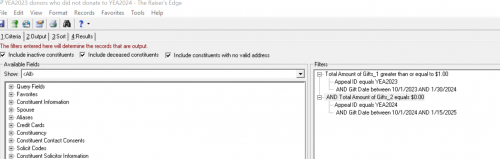
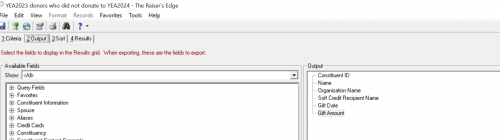
Your filter is going to give you “WHO” you want to show (who as in constituent as this is a constituent query).Your filter is: give me all constituent (not gift) that gave $1 or more to Appeal ID YEA2023 between gift date 10/1/23-1/30/24 AND that also gave $0 to Appeal ID YEA2024 between gift date 10/1/24-1/15/25.
Your output is: constituent id, name, org name, soft credit recipient name, gift date, gift amount.
Since you did not have any “filtering” on individual gift, the query will output ALL gifts for the constituent that meet the criteria above.
If you are trying to output the gift date and amount of the gifts that are Appeal ID YEA2023 between gift date 10/1/23-1/30/24, then you are going to need additioanl filter in the criteria tab:
- total amount of gift greater than or equals $1
- appeal id=YEA2023
- gift date between 10/1/23 and 1/30/24
- AND total amount of gift equals 0
- appeal id=YEA2024
- gift date between 10/1/24 and 1/15/25
- AND Gift Appeal ID = YEA2023
- AND Gift Date between 10/1/23 and 1/30/24
0 - total amount of gift greater than or equals $1
-
@Marie Stark do you mean only add constituent code in the output and then pull this query into another one and then add the output details in the new query?
0 -
@Cameron Bellestri No I mean to use the export module. Or follow the advice from Alex for your query output.
1

















Categories
- All Categories
- New eTapestry Home Community
- New K-12 Community Home (TEST)
- New Higher Education Home Page (Test)
- New Impact Edge Community TEST
- New YourCause Community TEST
- New SKY Community TEST
- New Grantmaking TEST Community
- New Altru Test Community
- New bbcon Community - TEST
- 12 Blackbaud Agents for Good™
- New Raiser's Edge NXT Community
- 8 Blackbaud Community Help
- 223 bbcon®
- 1.4K Blackbaud Altru®
- 411 Blackbaud Award Management™ and Blackbaud Stewardship Management™
- 1.2K Blackbaud CRM™ and Blackbaud Internet Solutions™
- 16 donorCentrics®
- 361 Blackbaud eTapestry®
- 2.7K Blackbaud Financial Edge NXT®
- 688 Blackbaud Grantmaking™
- 604 Blackbaud Education Management Solutions for Higher Education
- 3.3K Blackbaud Education Management Solutions for K-12 Schools
- 954 Blackbaud Luminate Online® and Blackbaud TeamRaiser®
- 85 JustGiving® from Blackbaud®
- 7.1K Blackbaud Raiser's Edge NXT®
- 4K SKY Developer
- 258 ResearchPoint™
- 124 Blackbaud Tuition Management™
- 165 Organizational Best Practices
- 249 Member Lounge (Just for Fun)
- 40 Blackbaud Community Challenges
- 37 PowerUp Challenges
- 3 (Closed) PowerUp Challenge: Grid View Batch
- 3 (Closed) PowerUp Challenge: Chat for Blackbaud AI
- 3 (Closed) PowerUp Challenge: Data Health
- 3 (Closed) Raiser's Edge NXT PowerUp Challenge: Product Update Briefing
- 3 (Closed) Raiser's Edge NXT PowerUp Challenge: Standard Reports+
- 3 (Closed) Raiser's Edge NXT PowerUp Challenge: Email Marketing
- 3 (Closed) Raiser's Edge NXT PowerUp Challenge: Gift Management
- 4 (Closed) Raiser's Edge NXT PowerUp Challenge: Event Management
- 3 (Closed) Raiser's Edge NXT PowerUp Challenge: Home Page
- 4 (Closed) Raiser's Edge NXT PowerUp Challenge: Standard Reports
- 4 (Closed) Raiser's Edge NXT PowerUp Challenge: Query
- 829 Community News
- 3.1K Jobs Board
- 57 Blackbaud SKY® Reporting Announcements
- 47 Blackbaud CRM Higher Ed Product Advisory Group (HE PAG)
- 19 Blackbaud CRM Product Advisory Group (BBCRM PAG)