How can I create same query in NXT?



Please help. How can I create same query in NXT? Step 1: I have selected “Constituents” from “List” then selected “Alumni/us” from "Constituent Code". Step 2: I have selected “Education” from the filter. I've selected class type such as Graduate, Undergraduate etc. I can choose “Class of” equal to/between etc. But I am getting separate lists for each class year.
Please help to the next steps to make a list.
Thanks.
Comments
-
@Mir Parvin what is your goal? To have all 5 year reunion classes in the same list?
0 -
@Mir Parvin I think there are two options, but each has a caveat and is a bit of a workaround because this functionality with parentheses around two separate criteria is not available in NXT lists.
First, you could create two separate lists in NXT and add one list to the other. However, it would not be dynamic. So once you “merge” or add one list to another using the add/exclude option, the list you add will not add or remove from your “merged” list.
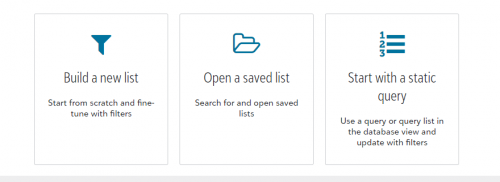
Second, you could save the query you have in database view as a static query and bring that over into NXT. However, in order to update the list in NXT, you will need to first refresh the static query in database view.
Personally, if it had to be in NXT I would go with the second option cause there still is the ability to refresh, while the first option does not have that capability.
I believe support for dynamic queries from database view being available is coming to NXT soon though which would completely solve your issue.
 2
2 -
Please help. How can I create same query in NXT? Step 1: I have selected “Constituents” from “List” then selected “Alumni/us” from "Constituent Code". Step 2: I have selected “Education” from the filter. I've selected class type such as Graduate, Undergraduate etc. I can choose “Class of” equal to/between etc. But I am getting separate lists for each class year.
Please help to the next steps to make a list.
Thanks.
What do you ultimately hope to do with the list? Is there a reason it needs to be done in webview?
Karen
2 -
@Mir Parvin Lists and Queries are two completely different things. You will never get a query in RE Database View to matich up with Lists in RE NXT. Both are different. It is apples and organges. It is just the way Lists are in RE NXT which is not a query. The functionality is different. I have been saying this for years now, RE NXT is not completely built out and works differently that the fully functional RE Database, hence why I rarely use RE NXT.
5 -
@Mir Parvin
You might have luck using the add/exclude feature. You'll need to make two separate lists, then add the data to one or the other. I created a Tango walk through of it. (And small note: You'll see the list in an early step say 47 records, and then 48 records in a later step; someone was updating these records as I was creating this. SO, the lists are DYNAMIC this way).0


















Categories
- All Categories
- New K-12 Community Home (TEST)
- New Higher Education Home Page (Test)
- New Impact Edge Community TEST
- New YourCause Community TEST
- New SKY Community TEST
- New Grantmaking TEST Community
- New Altru Test Community
- New bbcon Community - TEST
- 12 Blackbaud Agents for Good™
- New Raiser's Edge NXT Community
- 8 Blackbaud Community Help
- 223 bbcon®
- 1.4K Blackbaud Altru®
- 411 Blackbaud Award Management™ and Blackbaud Stewardship Management™
- 1.2K Blackbaud CRM™ and Blackbaud Internet Solutions™
- 16 donorCentrics®
- 361 Blackbaud eTapestry®
- 2.7K Blackbaud Financial Edge NXT®
- 688 Blackbaud Grantmaking™
- 604 Blackbaud Education Management Solutions for Higher Education
- 3.3K Blackbaud Education Management Solutions for K-12 Schools
- 954 Blackbaud Luminate Online® and Blackbaud TeamRaiser®
- 85 JustGiving® from Blackbaud®
- 7.1K Blackbaud Raiser's Edge NXT®
- 4K SKY Developer
- 258 ResearchPoint™
- 123 Blackbaud Tuition Management™
- 165 Organizational Best Practices
- 249 Member Lounge (Just for Fun)
- 40 Blackbaud Community Challenges
- 37 PowerUp Challenges
- 3 (Closed) PowerUp Challenge: Grid View Batch
- 3 (Closed) PowerUp Challenge: Chat for Blackbaud AI
- 3 (Closed) PowerUp Challenge: Data Health
- 3 (Closed) Raiser's Edge NXT PowerUp Challenge: Product Update Briefing
- 3 (Closed) Raiser's Edge NXT PowerUp Challenge: Standard Reports+
- 3 (Closed) Raiser's Edge NXT PowerUp Challenge: Email Marketing
- 3 (Closed) Raiser's Edge NXT PowerUp Challenge: Gift Management
- 4 (Closed) Raiser's Edge NXT PowerUp Challenge: Event Management
- 3 (Closed) Raiser's Edge NXT PowerUp Challenge: Home Page
- 4 (Closed) Raiser's Edge NXT PowerUp Challenge: Standard Reports
- 4 (Closed) Raiser's Edge NXT PowerUp Challenge: Query
- 829 Community News
- 3.1K Jobs Board
- 57 Blackbaud SKY® Reporting Announcements
- 47 Blackbaud CRM Higher Ed Product Advisory Group (HE PAG)
- 19 Blackbaud CRM Product Advisory Group (BBCRM PAG)