Power BI Dynamic Column Name





From Power BI, I am able to use parameter field to create dynamically named column, which is very useful for creating column name that is more meaningful. So instead of This Year Contribution and Last Year Contribution, I can have column named as 2024 Contribution and 2023 Contribution, respectively.
The Dynamic Column “table” definition:
Dynamic Column = {
(YEAR(TODAY()) & " Contribution", NAMEOF('v_prod_constit'[TY Contribution]), 0),
(YEAR(TODAY())-1 & " Contribution", NAMEOF('v_prod_constit'[TY-1 Contribution]), 0)
}
All is good until the year has crossed, so on 12/31/2023, the Columns header is 2023 Contribution and 2022 Contribution, for this year and last year. The expectation is, on 1/1/2024 first refresh, the column header should become 2024 Contribution and 2023 Contribution. However, this did not happen.
While the calcuation for TY Contribution and TY-1 Contribution is correctly calculating the Contribution of this year and last year (this year minus 1), the column header label remained as 2023 Contribution and 2022 Contribution, which obviously is a problem as 2023 contribution column label's value is actually 2024 contribution total. I have to go into the Power BI editing (online or on desktop both is OK), and remove the column, and add the SAME column back into the report for the column header to update.
I have posted this issue on the Power BI user group yesterday, and got a suggestion to use Offset Year in the Date Table, which I just tried.
when trying to do what Larry is suggesting, I created a column in my Date Table as Offset Year = YEAR([Date]) - YEAR(TODAY()), which a date in 2023 will have -1, and date in 2022 will have -2, etc.
Then trying to use this Offset Year column in my Dynamic Column Parameter table result in an error.
Dynamic Column = {
(YEAR(TODAY())+'Date Table'[Offset Year] & " Contribution", NAMEOF('v_prod_constit'[TY Contribution]), 0),
(YEAR(TODAY())-1 & " Contribution", NAMEOF('v_prod_constit'[TY-1 Contribution]), 0)
}

The error is indicated on the [Offset Year] part of the DAX formula, where the error read:
A single value of column ‘Offset Year’ in table ‘Date Table’ cannot be determined. This can happen when a measure formula refers to a column that contains many values without specifying an aggregation such as min, max, count, or sum to get a single result.
If I use MIN('Date Table'[Offset Year]), it will return -11, which makes the dynamic column as 2013 Contribution (2013 is the earliest date, 2024-11=2013).
@Larry Callan or anyone else that was on the Power BI User Group, please let me know if I was attempting the suggestion correctly, or did I misunderstood the suggestion.
Thank you
Comments
-
Also, I have Power BI that does dynamic column name on Calculated Column and Measure, and the problem exists on both, so the issue is not the use of either.
0 -
@Alex Wong
I tested the Offset option. It does not work.I looked at your Parameter Formatting. I have three (3) simple measures NetSales using SUM,
NetSales LY using DATEADD -1, anf NetSales 2 Years Ago using DATEADD -2.
Below is the formatting that is working for me. Try it and let me know.
Parameter = {
(FORMAT(TODAY(),"yyyy") & " | NetSales", NAMEOF('1 Table Measures'[NetSales]), 0),
(FORMAT(TODAY(),"yyyy")-1 & " | NetSales", NAMEOF('1 Table Measures'[NetSales LY]), 1),
(FORMAT(TODAY(),"yyyy")-2 & " | NetSales", NAMEOF('1 Table Measures'[NetSales 2 Years Ago]), 2)
}
1 -
@Larry Callan
doing today and yesterday is more problematic..good thing we are at the end of month. so i did this:Dynamic Column = {
("Month" & FORMAT(TODAY(),"M") & " Donation", NAMEOF('v_prod_constit'[TM Donation]), 0),
("Month" & FORMAT(TODAY(),"M")-1 & " Donation", NAMEOF('v_prod_constit'[TM-1 Donation]), 0)
}
which looks like this on power bi service
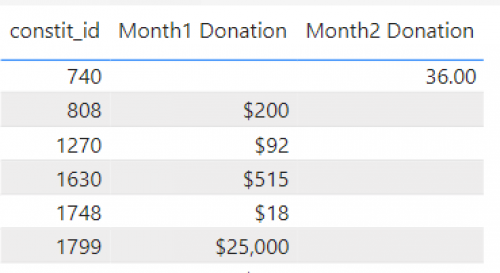
by March 1 refresh, I expect the column label Month1 Donation becomes Month2 Donation and Month2 Donation becomes Month3 Donation. Let's see what happens.
0 -
@Alex Wong
Actually, I couldn't wait lolSo I changed to this instead:
Dynamic Column = {
("Day " & FORMAT(TODAY(),"d") & " Donation", NAMEOF('v_prod_constit'[TM Donation]), 1),
("Day " & FORMAT(TODAY(),"d")-1 & " Donation", NAMEOF('v_prod_constit'[TM-1 Donation]), 2)
}
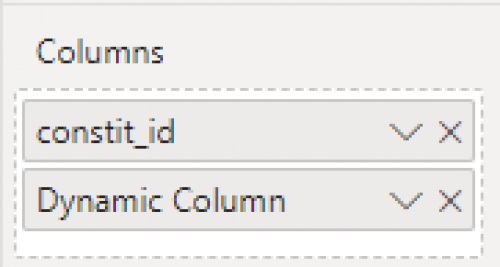
But I realize there may be another “variation” here, so I added 2 visualization:

On the LEFT I use the dynamic column directly:
On the RIGHT I use the individual column
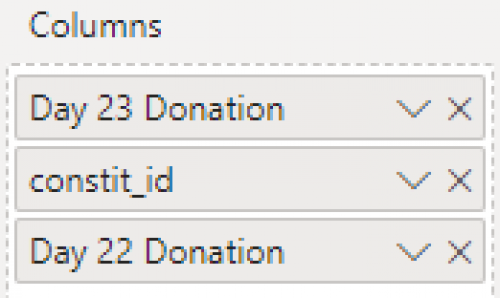
When adding the individual column, the original “name” of the column is used, but when you “add” the dynamic column and then remove it, the column name is changed.
And as you can see, if I use the dynamic column directly, the label DOES get refreshed, while when using the column individually, the label DOES NOT get refreshed.
I think that is it. In order for dynamic column name to be refreshed, you have to use the dynamic column directly. The only drawback here is, you must have dynamic columns next to each other, it cannot be spread out wherever you want it……
0 -
@Larry Callan
Can you give an example of what you use Offset Year for? I would like to know if it is something that I current do but isn't doing it in the most efficient manner or something I haven't done and can learn from.Thank you.
0





Categories
- All Categories
- New K-12 Community Home (TEST)
- New Higher Education Home Page (Test)
- New Impact Edge Community TEST
- New YourCause Community TEST
- New SKY Community TEST
- New Grantmaking TEST Community
- New Altru Test Community
- New bbcon Community - TEST
- 12 Blackbaud Agents for Good™
- New Raiser's Edge NXT Community
- 8 Blackbaud Community Help
- 222 bbcon®
- 1.4K Blackbaud Altru®
- 410 Blackbaud Award Management™ and Blackbaud Stewardship Management™
- 1.2K Blackbaud CRM™ and Blackbaud Internet Solutions™
- 16 donorCentrics®
- 361 Blackbaud eTapestry®
- 2.7K Blackbaud Financial Edge NXT®
- 687 Blackbaud Grantmaking™
- 603 Blackbaud Education Management Solutions for Higher Education
- 3.3K Blackbaud Education Management Solutions for K-12 Schools
- 954 Blackbaud Luminate Online® and Blackbaud TeamRaiser®
- 85 JustGiving® from Blackbaud®
- 7K Blackbaud Raiser's Edge NXT®
- 4K SKY Developer
- 258 ResearchPoint™
- 123 Blackbaud Tuition Management™
- 165 Organizational Best Practices
- 248 Member Lounge (Just for Fun)
- 40 Blackbaud Community Challenges
- 37 PowerUp Challenges
- 3 (Closed) PowerUp Challenge: Grid View Batch
- 3 (Closed) PowerUp Challenge: Chat for Blackbaud AI
- 3 (Closed) PowerUp Challenge: Data Health
- 3 (Closed) Raiser's Edge NXT PowerUp Challenge: Product Update Briefing
- 3 (Closed) Raiser's Edge NXT PowerUp Challenge: Standard Reports+
- 3 (Closed) Raiser's Edge NXT PowerUp Challenge: Email Marketing
- 3 (Closed) Raiser's Edge NXT PowerUp Challenge: Gift Management
- 4 (Closed) Raiser's Edge NXT PowerUp Challenge: Event Management
- 3 (Closed) Raiser's Edge NXT PowerUp Challenge: Home Page
- 4 (Closed) Raiser's Edge NXT PowerUp Challenge: Standard Reports
- 4 (Closed) Raiser's Edge NXT PowerUp Challenge: Query
- 829 Community News
- 3.1K Jobs Board
- 57 Blackbaud SKY® Reporting Announcements
- 47 Blackbaud CRM Higher Ed Product Advisory Group (HE PAG)
- 19 Blackbaud CRM Product Advisory Group (BBCRM PAG)