Flow- Word Merge adds extra line





I have an acknowledgement flow set up. I have a string variable that pulls in the preferred address lines from get a constituent.
I have the pref address lines then pref city, pref state, etc. I put the string variable into the Populate Word Template.
When someone has more than 1 address line it adds an extra line. I CANNOT figure out how to get rid of this. I've searched the community and RE Facebook group and no one had answers there either.
Here is an example:
Roger Rabbit
PO Box 999567
4 Bunny Lane 18th Floor
St. Catharines, ON L2R7A7
Canada
It looks fine in the Flow when I review the output from the last run. No extra line.
This is one plain text control in Word with the allow carriage returns marked.
Has this happened to anyone else? What was your fix? Do I need to do a long expression with if statements for this?
Thanks,
Carol
Comments
-
As I was investigating more- it seems in the API it adds a new line/line return in the preferred address lines:
"address_lines": "PO Box 999567\\r\\n4 Bunny Lane 18th Floor",
so somehow I need to replace the \\r\\n with just a “\\n” perhaps…
1 -
@Carol Grant
\\r\\n or \\n is only going to do 1 newline character, so it shouldn't be.however, it doesn't hurt to try. so you can try replacing \\r\\n with a non-special character first and see how it behaves. (i.e. just a “dash” (-) character)
the expectation would be PO Box 999567-4 Bunny Lane 18th Floor
1 -
I actually found this solution and it works great. The /r/n is this: decodeUriComponent('%0D%0A') and then you replace it with a new line which is this: decodeUriComponent('%0A')
replace(outputs('Get_a_constituent')?['body/address/address_lines'],decodeUriComponent('%0D%0A'),decodeUriComponent('%0A'))
Now I just need to find a way to remove the line where there isn't a country listed.
0 -
@Carol Grant
what I do with address is, I do not have separate “input field” for each (address line, city, state, zip, country), instead I just have ONE input field that is multi-line “block”. Then in power automate, I'll craft the address block, so for country that is blank (or United States), I will not append a newline charcter follow by country.0 -
@Alex Wong- that is sort of what I'm doing, see below.
I'm not using the Formatted Address in Get Constituent.
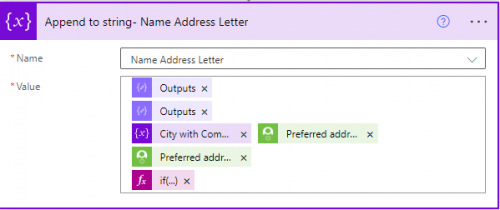
Line 1= Addressee Name with a hard return in the variable.
Line 2= Address Lines with the replace for the /r/n
Line 3- Variable to add a comma to City then State and Zip Code
Line 4- Country if it says United States leave blank else Country.
Many of these are wanted by my Gift Processing team, the City and comma, don't show United States if it appears.
Do you add the line return differently, I just put a hard return in the string variable. I'd love to see how others are doing it.
0 -
@Carol Grant
if there is expectation for a specific “field” to be potentially blank and newline needed or not based on that, then you have to account for them in expression.Specifically for conntry, it will be right after the “zip/post code” but don't hit “enter” to go to next line. use expression to condition @{if(or(equals(country_field,'United States'),empty(country_field)), ‘’, concat(expression_for_newline, country_field))}
0




Categories
- All Categories
- New K-12 Community Home (TEST)
- New Higher Education Home Page (Test)
- New Impact Edge Community TEST
- New YourCause Community TEST
- New SKY Community TEST
- New Grantmaking TEST Community
- New Altru Test Community
- New bbcon Community - TEST
- 12 Blackbaud Agents for Good™
- New Raiser's Edge NXT Community
- 8 Blackbaud Community Help
- 222 bbcon®
- 1.4K Blackbaud Altru®
- 411 Blackbaud Award Management™ and Blackbaud Stewardship Management™
- 1.2K Blackbaud CRM™ and Blackbaud Internet Solutions™
- 16 donorCentrics®
- 361 Blackbaud eTapestry®
- 2.7K Blackbaud Financial Edge NXT®
- 688 Blackbaud Grantmaking™
- 604 Blackbaud Education Management Solutions for Higher Education
- 3.3K Blackbaud Education Management Solutions for K-12 Schools
- 954 Blackbaud Luminate Online® and Blackbaud TeamRaiser®
- 85 JustGiving® from Blackbaud®
- 7.1K Blackbaud Raiser's Edge NXT®
- 4K SKY Developer
- 258 ResearchPoint™
- 123 Blackbaud Tuition Management™
- 165 Organizational Best Practices
- 249 Member Lounge (Just for Fun)
- 40 Blackbaud Community Challenges
- 37 PowerUp Challenges
- 3 (Closed) PowerUp Challenge: Grid View Batch
- 3 (Closed) PowerUp Challenge: Chat for Blackbaud AI
- 3 (Closed) PowerUp Challenge: Data Health
- 3 (Closed) Raiser's Edge NXT PowerUp Challenge: Product Update Briefing
- 3 (Closed) Raiser's Edge NXT PowerUp Challenge: Standard Reports+
- 3 (Closed) Raiser's Edge NXT PowerUp Challenge: Email Marketing
- 3 (Closed) Raiser's Edge NXT PowerUp Challenge: Gift Management
- 4 (Closed) Raiser's Edge NXT PowerUp Challenge: Event Management
- 3 (Closed) Raiser's Edge NXT PowerUp Challenge: Home Page
- 4 (Closed) Raiser's Edge NXT PowerUp Challenge: Standard Reports
- 4 (Closed) Raiser's Edge NXT PowerUp Challenge: Query
- 829 Community News
- 3.1K Jobs Board
- 57 Blackbaud SKY® Reporting Announcements
- 47 Blackbaud CRM Higher Ed Product Advisory Group (HE PAG)
- 19 Blackbaud CRM Product Advisory Group (BBCRM PAG)