Spliting Address Lines in Power Automate





Hi all!
Hopefully you can help me with the issue I'm currently banging my head against the desk about. I've been building out a flow in automate to create prospect profiles for our development officers. I am able to pull almost everything I need out of NXT with correct formatting EXCEPT splitting address1 and address 2 lines through the “List constituent addresses" action.
What my ideal situation would be pulling the address lines from NXT into automate and then putting each line into its own string so that I can populate each field in my word template to fit this formatting:
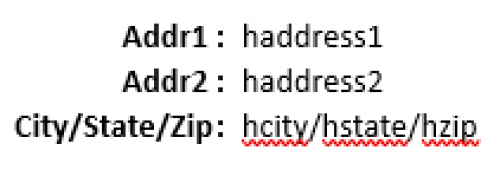
If I'm missing something and I can already pull add1 and add2 seperately without pulling the entire address lines field (just like you can with city,state,zip) that would be wonderful! Otherwise, knowing a way to separate these two values out as is would be appreciated. I'm more than happy to share any other pics or insights that would help solve this issue I'm having.
Thank you!
Comments
-
@David Kortes
you can use the split() expression to split your address lines by newline character(s) dynamic content into an array of individual line. Then use [0], [1] to access the first and 2nd line. What you want to consider is IF there are more than 2 lines, what are your plan?Rather than having:
Addr1
Addr2
You can use
Address Line(s):
and split out the address lines dynamic content so it looks like this: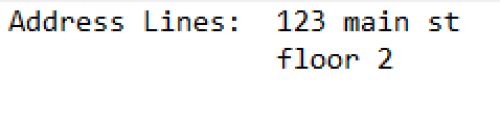
If you still want to do the Addr1 and Addr2 route, then:
Addr1: split(addresslines, ‘\\r\\n’)?[0]
Addr2: split(addresslines, ‘\\r\\n’)?[1]if the split on ‘\\r\\n’ doesn't work, you may need to do a workaround, here's one way to do it:
https://medium.com/@saikou9901/split-multi-lines-by-new-line-code-d7de3020454c
1 -
@Alex Wong
Thank you for the quick response! I wasn't able to get \\r\\n to work but the work around did the job. The reason I want to bring the information in this way is to keep an even formatting between each profile created. It's an attempt to not have to touch the document after it is created and most of the records I will be pulling do not have beyond two lines.I'm sure something will break eventually as I still have a lot to learn with automate and all of its quirks. Thank you for this!
1





Categories
- All Categories
- New YourCause Community TEST
- New SKY Community TEST
- New Grantmaking TEST Community
- New Altru Test Community
- New bbcon Community - TEST
- 12 Blackbaud Agents for Good™
- New Raiser's Edge NXT Community
- 7 Blackbaud Community Help
- 218 bbcon®
- 1.4K Blackbaud Altru®
- 409 Blackbaud Award Management™ and Blackbaud Stewardship Management™
- 1.2K Blackbaud CRM™ and Blackbaud Internet Solutions™
- 16 donorCentrics®
- 361 Blackbaud eTapestry®
- 2.7K Blackbaud Financial Edge NXT®
- 681 Blackbaud Grantmaking™
- 599 Blackbaud Education Management Solutions for Higher Education
- 3.3K Blackbaud Education Management Solutions for K-12 Schools
- 952 Blackbaud Luminate Online® and Blackbaud TeamRaiser®
- 85 JustGiving® from Blackbaud®
- 7K Blackbaud Raiser's Edge NXT®
- 3.9K SKY Developer
- 257 ResearchPoint™
- 123 Blackbaud Tuition Management™
- 165 Organizational Best Practices
- 247 Member Lounge (Just for Fun)
- 40 Blackbaud Community Challenges
- 37 PowerUp Challenges
- 3 (Closed) PowerUp Challenge: Grid View Batch
- 3 (Closed) PowerUp Challenge: Chat for Blackbaud AI
- 3 (Closed) PowerUp Challenge: Data Health
- 3 (Closed) Raiser's Edge NXT PowerUp Challenge: Product Update Briefing
- 3 (Closed) Raiser's Edge NXT PowerUp Challenge: Standard Reports+
- 3 (Closed) Raiser's Edge NXT PowerUp Challenge: Email Marketing
- 3 (Closed) Raiser's Edge NXT PowerUp Challenge: Gift Management
- 4 (Closed) Raiser's Edge NXT PowerUp Challenge: Event Management
- 3 (Closed) Raiser's Edge NXT PowerUp Challenge: Home Page
- 4 (Closed) Raiser's Edge NXT PowerUp Challenge: Standard Reports
- 4 (Closed) Raiser's Edge NXT PowerUp Challenge: Query
- 822 Community News
- 3.1K Jobs Board
- 57 Blackbaud SKY® Reporting Announcements
- 47 Blackbaud CRM Higher Ed Product Advisory Group (HE PAG)
- 19 Blackbaud CRM Product Advisory Group (BBCRM PAG)