Can I export the comments added in custom field from NXT list?





Hi,
I need to provide a list of constituent where fundraisers can see the custom fields where I have added comments. I can see the comments in the list in NXT but when I export in Excel, it only shows the description but not comments. Can someone help me with that?
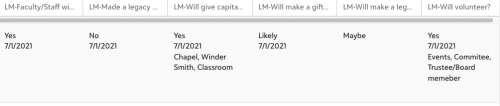
In Excel it shows like this:

I get the description and date but not the comments.
Thanks,
Naila
Comments
-
@Naila Asif - You'll need to export this information out of Database View, unfortunately. The only other alternative is to use Power Automate; you could create a flow that grabs the data on a recurring basis and puts it into an excel file that gets emailed/shared with your team.
2 -
@Austen Brown
Can you provide here (in a link and/or screen captures, etc) and example of what this Power Automate generated flow that grabs the data on a recurring basis and puts it into an excel file that gets emailed/shared with your team looks like.1 -
@Austen Brown, thank you Austen. I do not know how to do power automate, can you post a link for that as Darlene also suggested.
0 -
@Austen Brown
As we know already, Power Automate requires specific access and integration/configuration set up and procedures and regardless of this, can we see screen captures of examples of how you have implemented this or something very similar to this Use Case that might utilizer the same workflow concepts you noted here. Thanks.0 -
@Darlene LeVielle & @Naila Asif - I've included a link to a blog I wrote a while back that has lots of resources in it for what's possible in Power Automate and how to get started if you're interested.
Power Automate is a great resource to use, not use for getting data out of RE but for taking care of ‘busy work’ tasks that clutter your plate or tasks you've never had time to do. A flow like this would be fairly simple to set up, and would be beginner level. You could run it off of the Web View list that already exists, the rest of the flow is fairly straightforward.
I recommend starting with the on-demand accelerator course or a BBU class to learn the basics of Power Automate. From there check out the Template Library to export flows shared amongst the community that you can implement within your own environment.
There is a small cost to using Power Automate, you'll need an elevated license to utilize the RE NXT premium connectors. For non-profits this can be as little as $4 per month per user; you only need one license for the person building the flows.
Resources mentioned above:- Blog: Can Power Automate Help Me? https://community.blackbaud.com/blogs/13/8292
- Power Automate Training Information https://docs.blackbaud.com/microsoft-connectors-docs/microsoft-power-platform/getting-started/training
- BB Community Power Platform template showcase https://docs.blackbaud.com/microsoft-connectors-docs/microsoft-power-platform/showcase
1









Categories
- All Categories
- New K-12 Community Home (TEST)
- New Higher Education Home Page (Test)
- New Impact Edge Community TEST
- New YourCause Community TEST
- New SKY Community TEST
- New Grantmaking TEST Community
- New Altru Test Community
- New bbcon Community - TEST
- 12 Blackbaud Agents for Good™
- New Raiser's Edge NXT Community
- 8 Blackbaud Community Help
- 222 bbcon®
- 1.4K Blackbaud Altru®
- 410 Blackbaud Award Management™ and Blackbaud Stewardship Management™
- 1.2K Blackbaud CRM™ and Blackbaud Internet Solutions™
- 16 donorCentrics®
- 361 Blackbaud eTapestry®
- 2.7K Blackbaud Financial Edge NXT®
- 687 Blackbaud Grantmaking™
- 604 Blackbaud Education Management Solutions for Higher Education
- 3.3K Blackbaud Education Management Solutions for K-12 Schools
- 954 Blackbaud Luminate Online® and Blackbaud TeamRaiser®
- 85 JustGiving® from Blackbaud®
- 7K Blackbaud Raiser's Edge NXT®
- 4K SKY Developer
- 258 ResearchPoint™
- 123 Blackbaud Tuition Management™
- 165 Organizational Best Practices
- 248 Member Lounge (Just for Fun)
- 40 Blackbaud Community Challenges
- 37 PowerUp Challenges
- 3 (Closed) PowerUp Challenge: Grid View Batch
- 3 (Closed) PowerUp Challenge: Chat for Blackbaud AI
- 3 (Closed) PowerUp Challenge: Data Health
- 3 (Closed) Raiser's Edge NXT PowerUp Challenge: Product Update Briefing
- 3 (Closed) Raiser's Edge NXT PowerUp Challenge: Standard Reports+
- 3 (Closed) Raiser's Edge NXT PowerUp Challenge: Email Marketing
- 3 (Closed) Raiser's Edge NXT PowerUp Challenge: Gift Management
- 4 (Closed) Raiser's Edge NXT PowerUp Challenge: Event Management
- 3 (Closed) Raiser's Edge NXT PowerUp Challenge: Home Page
- 4 (Closed) Raiser's Edge NXT PowerUp Challenge: Standard Reports
- 4 (Closed) Raiser's Edge NXT PowerUp Challenge: Query
- 829 Community News
- 3.1K Jobs Board
- 57 Blackbaud SKY® Reporting Announcements
- 47 Blackbaud CRM Higher Ed Product Advisory Group (HE PAG)
- 19 Blackbaud CRM Product Advisory Group (BBCRM PAG)