Vendor Import IDs and other Record Properties in web view

We have an API that uses the Blackbaud Vendor Import ID to add invoices to the AP system. With database view Vendor Records now set to be eliminated in just a couple months, I'm panicking because I don't see any way to look up a Vendor's Import ID (or any other Properties for that matter!) in web view. Does anyone see this - or know if BB plans to add the ability to see record Properties better in general in web view before sunsetting database view? In general, losing the “Properties” window is actually my #1 concern right now about losing database view.

Comments

  • @Casey Richey
    I definitely agree with you. We need to be able to look up a vendor's import ID in NXT if they will be eliminating the database totally since we do quite a few A/P imports .

  • Alex Wong
    Alex Wong Community All-Star
    Ninth Anniversary Kudos 5 Facilitator 3 Raiser's Edge NXT Fall 2025 Product Update Briefing Badge

    @LeeAnn Schmidtberger
    when database view goes away, so does the ability to do import.

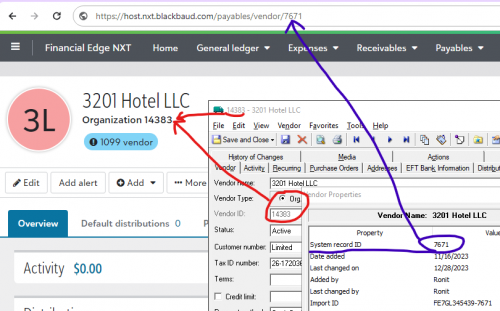
    The only 2 “import” feature on webview currently is using the Excel Add-in for importing new GL JE and importing new/updating budget. If Blackbaud goes the same route with other “import” ability, then import id is not needed, rather it will be the system record id (when you open any record page on webview, you can see the record id in the URL).
    https://host.nxt.blackbaud.com/payables/vendor/408

  • @Alex Wong
    Thanks for your reply. Just to be clear, I am NOT using the “Import” feature native in database view. I understand this will be going away, and that's fine. We're using an API, using the Sky API Console to make the connection.

    Interestingly, since Sky API is native to ‘NXT’, one would think this wouldn't be an issue… but at least the way we set up the API, and up to this point, the way it works is our source system needs to know each Vendor's Import ID in order to create the invoices in FE.

    From what I gather from your response - but please CONFIRM - it sounds like maybe we need to update our API so that instead of using the Vendor Import ID, it uses the ID that I see in web view beneath the Vendor's name. Is that right? Sounds like it could be a tricky change for me, but one I'll have to figure out!

    Side note: This must be new? Don't recall seeing this ID until now (maybe they read my Ideas Bank comment about this!). Kind of odd that the way it's displaying for me is “Organization #####” or “Individual #####", which is a little confusing. Should I assume both ID types are coded as one and the same type of Vendor ID in NXT? What would the exact endpoint be named in Sky?

  • Alex Wong
    Alex Wong Community All-Star
    Ninth Anniversary Kudos 5 Facilitator 3 Raiser's Edge NXT Fall 2025 Product Update Briefing Badge

    @Casey Richey
    not sure what API you are referring to, as the SKY API documented that to create a new invoice for a vendor, you are using the vendor system id, not vendor import id

    https://developer.sky.blackbaud.com/api#api=57a342f1d7dcde1c28a749fe&operation=CreateInvoice

    "vendor_id": 1082

    I'm assuming maybe you mean the COM API?

    As far as your question on how you should update your API, I can't really answer that without real understanding of what your “API” is and how it works.

    As for the “Organization #####” or “Individual #####”, that's just the Vendor Type + the Vendor ID (which is NOT the same as vendor system id

    00d1d459f91a3ee1c1e5656ef8296556-huge-im

    SKY API will only work with the vendor system id, which in above case, it is 7671

  • @Alex Wong
    OK I think we're on the same page now. Sorry if I was using the wrong term; yes we're talking about the “vendor_id” as shown in the SKY documentation page you linked (thank you!).

    As you stated, the “Vendor ID” we see in web view is NOT the same as the “vendor_id” from database view, and SKY API will only work with the vendor system id, which in above case, it is 7671”.

    So you see the problem, right? If database view went away today, how do I find the system record ID (in your case 7671) to associate with that vendor in my source system?

  • Alex Wong
    Alex Wong Community All-Star
    Ninth Anniversary Kudos 5 Facilitator 3 Raiser's Edge NXT Fall 2025 Product Update Briefing Badge

    @Casey Richey
    it's in the URL when you open the vendor page on FE NXT webview.
    https://host.nxt.blackbaud.com/payables/vendor/3239

  • @Alex Wong
    WOW. OK thank you for pointing this out, you're right. A little scary that it's that obscure. I sure hope they add this to documentation and don't change their format for URLs down the road. Why wouldn't they just put it on the page somewhere? Anyway, thank you so much for pointing me in the right direction. You've been very helpful.

  • @Casey Richey
    We have the same issue with our payment processing software, Certify. We use the vendor ID and I would have never found it, had I not seen the reply to your message. How odd that it's not on the vendor record.