DB: A/P Records




In database, I can go on Records in AP and update an invoice number or description (not the GL Description info) if there is an error, etc. I do not see this as an option in webview/FE NXT. Does anyone know where this is or is it something that has not come over yet, please?
Comments
-
@Jennifer Clark
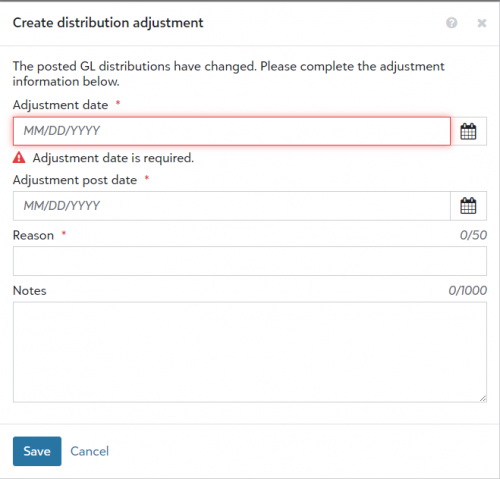
You just open the invoice and choose to Edit it. make your changes then click Save. If you change anything in the distribution fields and the invoice was already posted, then FE considers that an invoice adjustment and will post a reversal and adjustment transactions when you validate the the post date of the adjustment.1 -
@Kevin Brazell Thank you for your response. I cannot make a change to the invoice number or the general description without getting an adjustment screen…..then it will not save because it is not an adjustment to the GL. Have you tried updating an invoice number or the general description after you have posted an invoice, but before you have paid the invoice, please?
 1
1 -
@Jennifer Clark
I have had the same thing too. It won't save because nothing changed. you have to change the account or project or something there for it to save.0 -
@Kevin Brazell
Maybe it is my permissions, but it does not work without giving me an adjustment prompt. Have you tried editing an invoice number that has already been posted, please? I can do it in DB view.0







Categories
- All Categories
- New YourCause Community TEST
- New SKY Community TEST
- New Grantmaking TEST Community
- New Altru Test Community
- New bbcon Community - TEST
- 12 Blackbaud Agents for Good™
- New Raiser's Edge NXT Community
- 7 Blackbaud Community Help
- 218 bbcon®
- 1.4K Blackbaud Altru®
- 409 Blackbaud Award Management™ and Blackbaud Stewardship Management™
- 1.2K Blackbaud CRM™ and Blackbaud Internet Solutions™
- 16 donorCentrics®
- 361 Blackbaud eTapestry®
- 2.7K Blackbaud Financial Edge NXT®
- 680 Blackbaud Grantmaking™
- 598 Blackbaud Education Management Solutions for Higher Education
- 3.3K Blackbaud Education Management Solutions for K-12 Schools
- 952 Blackbaud Luminate Online® and Blackbaud TeamRaiser®
- 85 JustGiving® from Blackbaud®
- 7K Blackbaud Raiser's Edge NXT®
- 3.9K SKY Developer
- 257 ResearchPoint™
- 123 Blackbaud Tuition Management™
- 165 Organizational Best Practices
- 247 Member Lounge (Just for Fun)
- 40 Blackbaud Community Challenges
- 37 PowerUp Challenges
- 3 (Closed) PowerUp Challenge: Grid View Batch
- 3 (Closed) PowerUp Challenge: Chat for Blackbaud AI
- 3 (Closed) PowerUp Challenge: Data Health
- 3 (Closed) Raiser's Edge NXT PowerUp Challenge: Product Update Briefing
- 3 (Closed) Raiser's Edge NXT PowerUp Challenge: Standard Reports+
- 3 (Closed) Raiser's Edge NXT PowerUp Challenge: Email Marketing
- 3 (Closed) Raiser's Edge NXT PowerUp Challenge: Gift Management
- 4 (Closed) Raiser's Edge NXT PowerUp Challenge: Event Management
- 3 (Closed) Raiser's Edge NXT PowerUp Challenge: Home Page
- 4 (Closed) Raiser's Edge NXT PowerUp Challenge: Standard Reports
- 4 (Closed) Raiser's Edge NXT PowerUp Challenge: Query
- 822 Community News
- 3.1K Jobs Board
- 57 Blackbaud SKY® Reporting Announcements
- 47 Blackbaud CRM Higher Ed Product Advisory Group (HE PAG)
- 19 Blackbaud CRM Product Advisory Group (BBCRM PAG)