Adding past students




I have been tasked with adding past students (who's record are on printouts and not digital). What is the best way to add these students so that they are listed correctly? For example, John Brown was a student in 2005-2006 for 3rd grade before transferring to another school.
I only need to add these for reporting and record keeping so that we have, in one place, a record of all students past, present, and future.
Thanks
Comments
-
@Mike Hatfield Beginning with a test student, It sounds like you would want to perform 2 “Data Imports” (Core → System Tools → Data Import)
You will want to have your data in a .csv spreadsheet file1 Contact Card import/Refresh→ General User
This import will create your student in the system
2 Student→ Historic Enrollment (or Historic Academic Enrollment)
This import will create the academic records for your past students.
1 -
@John Bozek
Thanks for the quick reply. These record are printed out on paper. Is there a way to enter the historical academic enrollment manually?0 -
@Mike Hatfield for your sake I hope it is a small list. There may be some options using the OCR feature on your organizations scanner/printer to help digitize the records.
Yes you are able to do this manually;
you will begin at the home page of core find the option to “add a new user”
after the user has been created you will be automatically taken to their “contact card"
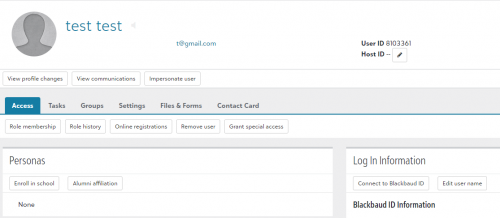
under “Personas” Select Enroll in school which will show the below box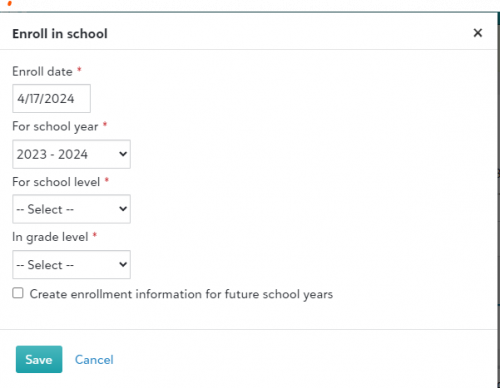
besure that “Create Enrollment information for future school years” is unselected
0 -
@John Bozek
Thanks! (it is not a small list ?)0 -
@Mike Hatfield my thoughts and prayers are with you.
1 -
@Mike Hatfield just speaking from experience, using the .csv import method suggested by @John Bozek might be the efficient and straightforward approach. This method has proven effective for us when dealing with historical records. We generated an import file using templates, input the required data, and proceeded with the import. Subsequently, we had the flexibility to manually fine-tune records as necessary. The manual add to the system takes many more clicks. However, either way is possible.
1 -
@Corrine Duncan Thanks for the advice. I can put the data into a cvs file (or files). How do you add parent records at the same time?
0






Categories
- All Categories
- New YourCause Community TEST
- New SKY Community TEST
- New Grantmaking TEST Community
- New Altru Test Community
- New bbcon Community - TEST
- 12 Blackbaud Agents for Good™
- New Raiser's Edge NXT Community
- 7 Blackbaud Community Help
- 218 bbcon®
- 1.4K Blackbaud Altru®
- 409 Blackbaud Award Management™ and Blackbaud Stewardship Management™
- 1.2K Blackbaud CRM™ and Blackbaud Internet Solutions™
- 16 donorCentrics®
- 361 Blackbaud eTapestry®
- 2.7K Blackbaud Financial Edge NXT®
- 681 Blackbaud Grantmaking™
- 599 Blackbaud Education Management Solutions for Higher Education
- 3.3K Blackbaud Education Management Solutions for K-12 Schools
- 952 Blackbaud Luminate Online® and Blackbaud TeamRaiser®
- 85 JustGiving® from Blackbaud®
- 7K Blackbaud Raiser's Edge NXT®
- 3.9K SKY Developer
- 257 ResearchPoint™
- 123 Blackbaud Tuition Management™
- 165 Organizational Best Practices
- 247 Member Lounge (Just for Fun)
- 40 Blackbaud Community Challenges
- 37 PowerUp Challenges
- 3 (Closed) PowerUp Challenge: Grid View Batch
- 3 (Closed) PowerUp Challenge: Chat for Blackbaud AI
- 3 (Closed) PowerUp Challenge: Data Health
- 3 (Closed) Raiser's Edge NXT PowerUp Challenge: Product Update Briefing
- 3 (Closed) Raiser's Edge NXT PowerUp Challenge: Standard Reports+
- 3 (Closed) Raiser's Edge NXT PowerUp Challenge: Email Marketing
- 3 (Closed) Raiser's Edge NXT PowerUp Challenge: Gift Management
- 4 (Closed) Raiser's Edge NXT PowerUp Challenge: Event Management
- 3 (Closed) Raiser's Edge NXT PowerUp Challenge: Home Page
- 4 (Closed) Raiser's Edge NXT PowerUp Challenge: Standard Reports
- 4 (Closed) Raiser's Edge NXT PowerUp Challenge: Query
- 822 Community News
- 3.1K Jobs Board
- 57 Blackbaud SKY® Reporting Announcements
- 47 Blackbaud CRM Higher Ed Product Advisory Group (HE PAG)
- 19 Blackbaud CRM Product Advisory Group (BBCRM PAG)