Managing Attachment Tags





Happy Friday Eve everyone, I have a situation that I'm looking for advice on.
I've inherited a database that required some serious cleaning, and after much of it I've stumbled upon the issue of the attachment tags. These were put in seemingly without thought to how they'd be used, and there's many that I just don't want people to be able to select when uploading documentation. Is there any way to query these out and change them?
Comments
-
@Cole Welsh The list is in the table ‘Media Types.'
In web view, look at Control Panel > Tables > Media types. There you can combine types using clean up, open a type an mark as inactive, or if removed from all uses delete it.1 -
Hi Cole,
We had a similar issue. If you are looking to query them out first before changing them I would use:
- Constituent Query
- Criteria: Media>Media Type
- Operator = Equals
- Value = (name of media type you want to review)
- Output:
- Media Type, Media Title, Media Description, Media Date, Media Author.
3 -
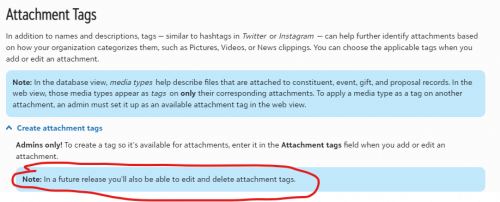
@Cole Welsh These responses are actually about the Media Type in database view when you upload attachments there. Are you talking specifically abut the tags that are associated with attachments when you upload them in web view? As far as I know we're not able to edit tags at this point. It would be nice if they were added to the Tables now that it's in web view since we also have a lot of typos and duplicates that need to be cleaned up. I'm also not sure if you can lock these down so no one else can add to them like you can with tables so that people can't randomly add new ones.
1 -
@Matthew Nareff These are a table - the table is called Media Type. It's used in db and in web view they are called ‘tags’. Table entries can be found, edited, cleaned up, marked inactive from Control Panel > Tables > Media Types.
I don't think the option to lock down/limit entries is possible any longer. Will be another things that hopefully will be added in the future.
1 -
@JoAnn Strommen This table does not reflect the tags for Web View - according to mine, there's “No Rows to Show” despite the fact that there's definitely tags being used in the database.
0 -
@Cole Welsh Could be definition of ‘tags.’ Are we talking about the same thing? Maybe screenshot would help.
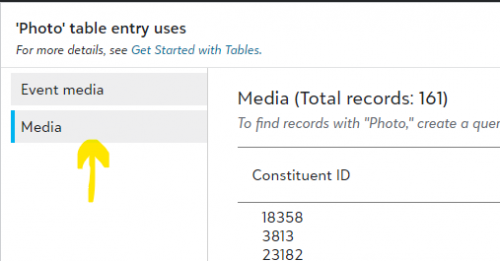
This is what I see in web view. When I went to the Media Type table and selected Photo > View Uses. I did have to go Media in the left panel to see the results I was looking for. Do you have options to select from? I almost missed that but I assume option is only there when tags are present.
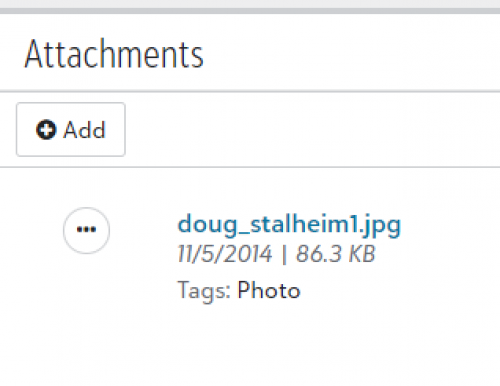
This what shows in db view for the same file: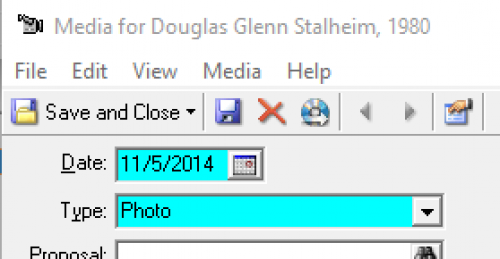 0
0 -
0













Categories
- All Categories
- New YourCause Community TEST
- New SKY Community TEST
- New Grantmaking TEST Community
- New Altru Test Community
- New bbcon Community - TEST
- 12 Blackbaud Agents for Good™
- New Raiser's Edge NXT Community
- 7 Blackbaud Community Help
- 218 bbcon®
- 1.4K Blackbaud Altru®
- 409 Blackbaud Award Management™ and Blackbaud Stewardship Management™
- 1.2K Blackbaud CRM™ and Blackbaud Internet Solutions™
- 16 donorCentrics®
- 361 Blackbaud eTapestry®
- 2.7K Blackbaud Financial Edge NXT®
- 681 Blackbaud Grantmaking™
- 599 Blackbaud Education Management Solutions for Higher Education
- 3.3K Blackbaud Education Management Solutions for K-12 Schools
- 952 Blackbaud Luminate Online® and Blackbaud TeamRaiser®
- 85 JustGiving® from Blackbaud®
- 7K Blackbaud Raiser's Edge NXT®
- 3.9K SKY Developer
- 257 ResearchPoint™
- 123 Blackbaud Tuition Management™
- 165 Organizational Best Practices
- 247 Member Lounge (Just for Fun)
- 40 Blackbaud Community Challenges
- 37 PowerUp Challenges
- 3 (Closed) PowerUp Challenge: Grid View Batch
- 3 (Closed) PowerUp Challenge: Chat for Blackbaud AI
- 3 (Closed) PowerUp Challenge: Data Health
- 3 (Closed) Raiser's Edge NXT PowerUp Challenge: Product Update Briefing
- 3 (Closed) Raiser's Edge NXT PowerUp Challenge: Standard Reports+
- 3 (Closed) Raiser's Edge NXT PowerUp Challenge: Email Marketing
- 3 (Closed) Raiser's Edge NXT PowerUp Challenge: Gift Management
- 4 (Closed) Raiser's Edge NXT PowerUp Challenge: Event Management
- 3 (Closed) Raiser's Edge NXT PowerUp Challenge: Home Page
- 4 (Closed) Raiser's Edge NXT PowerUp Challenge: Standard Reports
- 4 (Closed) Raiser's Edge NXT PowerUp Challenge: Query
- 822 Community News
- 3.1K Jobs Board
- 57 Blackbaud SKY® Reporting Announcements
- 47 Blackbaud CRM Higher Ed Product Advisory Group (HE PAG)
- 19 Blackbaud CRM Product Advisory Group (BBCRM PAG)