System Marks Constituent Deceased During Gift Batch





I am completely stumped on this. I looked in our Business Rules, searched online and in Knowledgebase, chatted with Support and cannot solve this one.
Our company policy is to enter all gifts via a gift batch in database view. I was doing this today for a multitude of donations from an ACH payment and have had to create many new constituent records while in said batch. Many of these new donors did not provide a physical address so I had to leave that information blank, although I did mark to not send mail to the address and that there were no valid addresses. When I tabbed to the end of a line on the batch to go to the next line for a new constituent, I received this error:
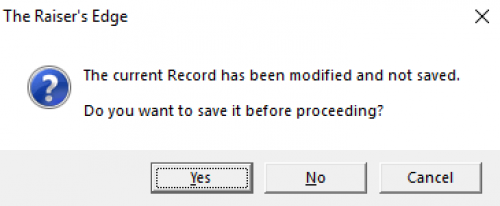
If I click Yes, I found the constituent record gets marked as deceased. If I click No, it does not update and all is well. This only happens during gift batch entry. If I create a new constituent through our RELO integration and don't have an address this will not occur, nor will it when I create a new record by adding a new record on its own.
Does anyone have any thoughts as to what's prompting the system to mark the record as deceased just because the address is blank? Thank you!!
Comments
-
@Miki Martin Image not visible to me even when online viewing your post (Chrome) but you described your choices well. We used to say the RE has gremlins that just appear from time to time.
Wow, really strange. Maybe a support question. Hopefully it's not some new programming default. We will all be in trouble.
Best wishes on figuring out this one.
1 -
@Miki Martin The only thing I could think of is if there was a tribute tied to the gift. Or maybe there is a deceased flag that was marked as a hidden default. All of those things seem unlikely, but stranger things have occurred.
1 -
@Miki Martin are you creating a new batch from a template batch? Could the template have the deceased checkbox marked?
0 -
@Karen Diener they're each brand new batches. I do pull defaults from a past batch but none of those batches have any defaults set to pull schedules, splits or honor/memorial information (I did just check to be sure!). Plus, if I add a new constituent that HAS an address it does not happen; only with blank addresses as best I can tell.
Great thought, though; this is why I asked here. ?
0 -
@Miki Martin The hidden defualt is a great thought. You mentioned the batch defaults, did you also check the list of fields (general) in the batch to be sure ‘deceased' is not a field hiding in the batch?
I thought @Dariel Dixon and @Karen Diener had your answer.3 -
@JoAnn Strommen and @Karen Diener it was a default! I had never used the constituent fields at my old org but now I am. I had set up a list of things to appear on the right during a batch, not realizing fields with a Yes/No checkbox were defaulting to Yes. So, that was it! Ugh.
Thank you all so much!
3










Categories
- All Categories
- New K-12 Community Home (TEST)
- New Higher Education Home Page (Test)
- New Impact Edge Community TEST
- New YourCause Community TEST
- New SKY Community TEST
- New Grantmaking TEST Community
- New Altru Test Community
- New bbcon Community - TEST
- 12 Blackbaud Agents for Good™
- New Raiser's Edge NXT Community
- 8 Blackbaud Community Help
- 222 bbcon®
- 1.4K Blackbaud Altru®
- 411 Blackbaud Award Management™ and Blackbaud Stewardship Management™
- 1.2K Blackbaud CRM™ and Blackbaud Internet Solutions™
- 16 donorCentrics®
- 361 Blackbaud eTapestry®
- 2.7K Blackbaud Financial Edge NXT®
- 688 Blackbaud Grantmaking™
- 604 Blackbaud Education Management Solutions for Higher Education
- 3.3K Blackbaud Education Management Solutions for K-12 Schools
- 954 Blackbaud Luminate Online® and Blackbaud TeamRaiser®
- 85 JustGiving® from Blackbaud®
- 7.1K Blackbaud Raiser's Edge NXT®
- 4K SKY Developer
- 258 ResearchPoint™
- 123 Blackbaud Tuition Management™
- 165 Organizational Best Practices
- 249 Member Lounge (Just for Fun)
- 40 Blackbaud Community Challenges
- 37 PowerUp Challenges
- 3 (Closed) PowerUp Challenge: Grid View Batch
- 3 (Closed) PowerUp Challenge: Chat for Blackbaud AI
- 3 (Closed) PowerUp Challenge: Data Health
- 3 (Closed) Raiser's Edge NXT PowerUp Challenge: Product Update Briefing
- 3 (Closed) Raiser's Edge NXT PowerUp Challenge: Standard Reports+
- 3 (Closed) Raiser's Edge NXT PowerUp Challenge: Email Marketing
- 3 (Closed) Raiser's Edge NXT PowerUp Challenge: Gift Management
- 4 (Closed) Raiser's Edge NXT PowerUp Challenge: Event Management
- 3 (Closed) Raiser's Edge NXT PowerUp Challenge: Home Page
- 4 (Closed) Raiser's Edge NXT PowerUp Challenge: Standard Reports
- 4 (Closed) Raiser's Edge NXT PowerUp Challenge: Query
- 829 Community News
- 3.1K Jobs Board
- 57 Blackbaud SKY® Reporting Announcements
- 47 Blackbaud CRM Higher Ed Product Advisory Group (HE PAG)
- 19 Blackbaud CRM Product Advisory Group (BBCRM PAG)