Export Definition Custom Column Names





I'm working with a large NGO on a migration to Blackbaud CRM and one of the pain points we have is that when we create export definitions the columns* sometimes have long, unintuitive names. (They also have an additional first column which we didn't specify called BUSINESPROCESSOUTPUT_PKID but appears to be a record ID.)
I've read the only other post I could find here about this issue and it doesn't address the inability to customise column names that are more than 2 “levels” deep in the data structures. In these cases, even though we have customised the names and set the options to Use field names as one to one column headers and Use short column headers, these column names still come out as, for example:
Interaction_ID exports as RevCnIntracs_Interaction_ID, or worse
Number_of_Installments exports as RevRecurringGiftPaysRecurringGiftDetails_Number_Of_Installments
The Exports we are generating from these Definitions are usually meant to be provided to supporter calling agencies and the like, so we need these files to be intelligible for them. Our only options appear to be to either manually rename the columns after export, or to run a script over them to do so. Neither solution is attractive to us, especially since some of the Exports are daily or weekly.
I expect that many of you have seen this behaviour. My question is, what have you done to mitigate it, if anything?
Cheers and thanks,
Steven Cinquegrana
Comments
-
@Steven Cinquegrana I know this is from a couple months ago but I wanted to reply in case you or others are still looking for a solution for this.
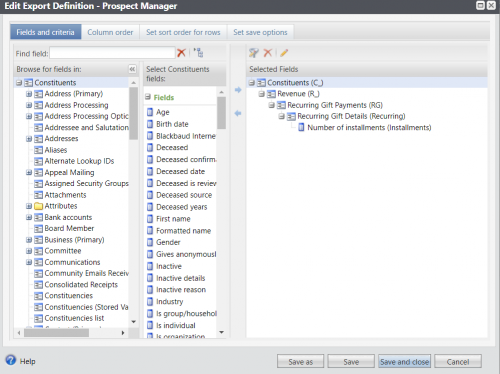
You can use the “Pencil” icon in Export Definition to rename all levels of the Selected Fields hierarchy.
So for example, the field you referenced that was exporting as “RevRecurringGiftPaysRecurringGiftDetailsNumberOfInstallments”. You could rename all of the layers above it with shorter identifiers - even a single letter or an underscore, as shown in the screenshot below. This would leave you with a new header name for this field of “CR_RG_Recurring Installments”. It's not perfect, but definitely better than how it's named out of the box. Hope that helps!
 2
2 -
@Aaren Ballinger Hi. Thanks for your comment. I should have been clearer that I have tried all combinations of naming along with customising the names, but nothing gives us full control over the column headers. We always end up with ungainly names. It's a real pain when you're providing data to third-parties as they either have to map to weird names or we have to manually change them to suit them.
0 -
@Aaren Ballinger I didn't realise you could rename the sections as well as the actual fields, this is really useful - thanks! ?
0 -
@Alan French Watch out if you decide to go back and rename the columns in existing export definitions - the column you rename will drop to the bottom of the list on the Column Order tab. If you rename a section, all of those columns drop to the bottom. You can do some renaming directly on the Column Order tab without the order changing, but it is inconsistent. I haven't tested to see exactly when the column order will change and when it won't. Just know it will probably be a factor.
1








Categories
- All Categories
- New YourCause Community TEST
- New SKY Community TEST
- New Grantmaking TEST Community
- New Altru Test Community
- New bbcon Community - TEST
- 12 Blackbaud Agents for Good™
- New Raiser's Edge NXT Community
- 7 Blackbaud Community Help
- 219 bbcon®
- 1.4K Blackbaud Altru®
- 409 Blackbaud Award Management™ and Blackbaud Stewardship Management™
- 1.2K Blackbaud CRM™ and Blackbaud Internet Solutions™
- 16 donorCentrics®
- 361 Blackbaud eTapestry®
- 2.7K Blackbaud Financial Edge NXT®
- 681 Blackbaud Grantmaking™
- 599 Blackbaud Education Management Solutions for Higher Education
- 3.3K Blackbaud Education Management Solutions for K-12 Schools
- 952 Blackbaud Luminate Online® and Blackbaud TeamRaiser®
- 85 JustGiving® from Blackbaud®
- 7K Blackbaud Raiser's Edge NXT®
- 3.9K SKY Developer
- 257 ResearchPoint™
- 123 Blackbaud Tuition Management™
- 165 Organizational Best Practices
- 247 Member Lounge (Just for Fun)
- 40 Blackbaud Community Challenges
- 37 PowerUp Challenges
- 3 (Closed) PowerUp Challenge: Grid View Batch
- 3 (Closed) PowerUp Challenge: Chat for Blackbaud AI
- 3 (Closed) PowerUp Challenge: Data Health
- 3 (Closed) Raiser's Edge NXT PowerUp Challenge: Product Update Briefing
- 3 (Closed) Raiser's Edge NXT PowerUp Challenge: Standard Reports+
- 3 (Closed) Raiser's Edge NXT PowerUp Challenge: Email Marketing
- 3 (Closed) Raiser's Edge NXT PowerUp Challenge: Gift Management
- 4 (Closed) Raiser's Edge NXT PowerUp Challenge: Event Management
- 3 (Closed) Raiser's Edge NXT PowerUp Challenge: Home Page
- 4 (Closed) Raiser's Edge NXT PowerUp Challenge: Standard Reports
- 4 (Closed) Raiser's Edge NXT PowerUp Challenge: Query
- 822 Community News
- 3.1K Jobs Board
- 57 Blackbaud SKY® Reporting Announcements
- 47 Blackbaud CRM Higher Ed Product Advisory Group (HE PAG)
- 19 Blackbaud CRM Product Advisory Group (BBCRM PAG)