HTML Table Formatting Won't work





For a few years I've been wanting to put some CSS Style into my HTML tables. I have read through all of the posts in Austen Brown's post here:
and I've tried Ben Regier's suggestions for adding html and head to the body. Can anyone see what the issue is here? I'm using Outlook. The CSS Style is something I built through the free tool that Austen mentioned.
<html>
<head>
<style>
table.paleBlueRows {
font-family: Arial, Helvetica, sans-serif;
border: 1px solid #FFFFFF;
width: 350px;
height: 200px;
text-align: left;
border-collapse: collapse;
}
table.paleBlueRows td, table.paleBlueRows th {
border: 1px solid #FFFFFF;
padding: 3px 2px;
}
table.paleBlueRows tbody td {
font-size: 13px;
color: #215ACC;
}
table.paleBlueRows tr:nth-child(even) {
background: #D0E4F5;
}
table.paleBlueRows thead {
background: #215ACC;
border-bottom: 5px solid #FFFFFF;
}
table.paleBlueRows thead th {
font-size: 17px;
font-weight: bold;
color: #FFFFFF;
text-align: left;
border-left: 2px solid #FFFFFF;
}
table.paleBlueRows thead th:first-child {
border-left: none;
}
table.paleBlueRows tfoot td {
font-size: 14px;
}
</style>
</head>
<table><thead><tr><th>Gift Date</th><th>Donor</th><th>Donor Codes</th><th>Class Agent</th><th>Was Gift Anonymous</th><th>Gift Amt</th><th>Fund</th></tr></thead><tbody><tr><td>06/23/2024 </td><td><a href=http://renxt.blackbaud.com/constituents/11111>Name 2023</a></td><td>Undergraduate Alumni</td><td> </td><td>False</td><td><a href=http://renxt.blackbaud.com/gifts/>$15.00</a></td><td>Middlebury Financial Aid Fund</td></tr></tbody></table>
</html>
This is all in one compose where I put the output of the cleaned up HTML table into the body of the Compose- CSS Style.
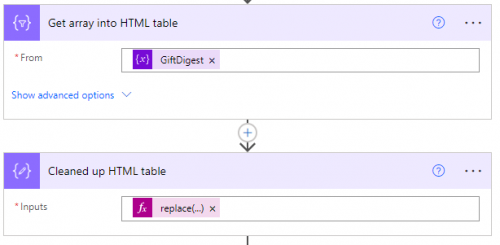
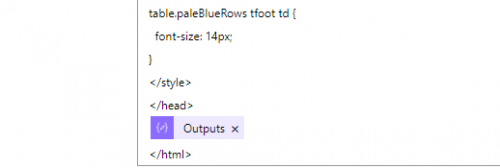
My email has the outputs from the Compose CSS Style.
I've also seen emails where you put both the CSS Style in the email along with the outputs from the Cleaned up HTML table.
I do get an email but nothing is formatted.
Thanks,
Carol
Comments
-
@Carol Grant
there are a few issues:- From strictly HTML/CSS perspective, your <style> tag reference TABLE element .paleBlueRows class, but you are not using paleBlueRows class in any <TABLE> element. so none of the style is actually used in any table.
- From Email HTML/CSS perspective, you cannot use class definition for styling. There are a lot more restriction to CSS when it comes to sending HTML email.
So meaning, you need to do
table {
font-family: Arial, Helvetica, sans-serif;
border: 1px solid #FFFFFF;
width: 350px;
height: 200px;
text-align: left;
border-collapse: collapse;
}
table td, table th {
border: 1px solid #FFFFFF;
padding: 3px 2px;
}
table tbody td {
font-size: 13px;
color: #215ACC;
}
table tr:nth-child(even) {
background: #D0E4F5;
}
table thead {
background: #215ACC;
border-bottom: 5px solid #FFFFFF;
}
table thead th {
font-size: 17px;
font-weight: bold;
color: #FFFFFF;
text-align: left;
border-left: 2px solid #FFFFFF;
}
table thead th:first-child {
border-left: none;
}table tfoot td {
font-size: 14px;
}notice I removed all the .paleBlueRows
I also don't think nth-child(even) works in HTML email.
0 -
@Alex Wong- thanks Alex! That worked, I was trying out some custom colors in the free tool to see how fancy I could make the table. Now I know not to try that. ?
Thank you for getting it to at least have some color, now I definitely need to fine tune it.
0 -
@Carol Grant
from a low-code perspective, there are limited things you can do with styling the email.However, if you got someone in your org that handle your website and/or email campaigning, you can get some advanced styling from them to use in your email.
As for the table itself, not worth the effort, BUT if you really want to, you can make it visually more appealing by adding each row of table directly in the apply to each. (meaning, instead of adding append to array variable the object that has the data column:
{
“constituent id”: “1234”,
“name”: “john smith”,
“gift date”: “1/1/2024”,
“gift amount”: “$1000”
}and then use create html table on this array. You can use a string variable that store the HTML for the table row and customize however you want it.
- init string variable with
- <table border="1" width="100%" cellspacing="0" cellpadding="3">
<thead><tr><th>RE ID</th><th>Donor Name</th><th>Gift Date</th><th>Gift Amount</th></tr></thead>
<tbody>
- <table border="1" width="100%" cellspacing="0" cellpadding="3">
- Apply to each gift
- gather info as you need
- append to string variable with
- <tr>
<td style="whateverstyle">1234</td>
<td style="whateverotherstyle"><a href="https://renxturltoconstituent">john smith</a></td>
<td style="anotherstyling">1/1/2024</td>
<td style="text-align:right; color:green">$1,000</td>
</tr>
- <tr>
- append to string variable to close the table body and table tag
- </tbody>
</table>
- </tbody>
notice I made the $1,000 dollar amount green and align to the right which mimics what excel would have the currency value.
Also, you can use this expression iterationIndexes() to determine if you are in the “odd” or “even” data row in the loop for banding the row background: https://learn.microsoft.com/en-us/azure/logic-apps/workflow-definition-language-functions-reference#iterationIndexes
if you have condition in your gift loop that some gift doesn't go on the table, then you can use a toggle variable that toggles even and odd for banding.
obviously this will require a bit more HTML and CSS knowledge, but for a day when you feeling artistics on your email. =D
1 - init string variable with
-
@Alex Wong- thank you for the great tips! I may dig into this when I'm feeling artistic. ?
0




Categories
- All Categories
- New K-12 Community Home (TEST)
- New Higher Education Home Page (Test)
- New Impact Edge Community TEST
- New YourCause Community TEST
- New SKY Community TEST
- New Grantmaking TEST Community
- New Altru Test Community
- New bbcon Community - TEST
- 12 Blackbaud Agents for Good™
- New Raiser's Edge NXT Community
- 8 Blackbaud Community Help
- 222 bbcon®
- 1.4K Blackbaud Altru®
- 410 Blackbaud Award Management™ and Blackbaud Stewardship Management™
- 1.2K Blackbaud CRM™ and Blackbaud Internet Solutions™
- 16 donorCentrics®
- 361 Blackbaud eTapestry®
- 2.7K Blackbaud Financial Edge NXT®
- 687 Blackbaud Grantmaking™
- 604 Blackbaud Education Management Solutions for Higher Education
- 3.3K Blackbaud Education Management Solutions for K-12 Schools
- 954 Blackbaud Luminate Online® and Blackbaud TeamRaiser®
- 85 JustGiving® from Blackbaud®
- 7K Blackbaud Raiser's Edge NXT®
- 4K SKY Developer
- 258 ResearchPoint™
- 123 Blackbaud Tuition Management™
- 165 Organizational Best Practices
- 248 Member Lounge (Just for Fun)
- 40 Blackbaud Community Challenges
- 37 PowerUp Challenges
- 3 (Closed) PowerUp Challenge: Grid View Batch
- 3 (Closed) PowerUp Challenge: Chat for Blackbaud AI
- 3 (Closed) PowerUp Challenge: Data Health
- 3 (Closed) Raiser's Edge NXT PowerUp Challenge: Product Update Briefing
- 3 (Closed) Raiser's Edge NXT PowerUp Challenge: Standard Reports+
- 3 (Closed) Raiser's Edge NXT PowerUp Challenge: Email Marketing
- 3 (Closed) Raiser's Edge NXT PowerUp Challenge: Gift Management
- 4 (Closed) Raiser's Edge NXT PowerUp Challenge: Event Management
- 3 (Closed) Raiser's Edge NXT PowerUp Challenge: Home Page
- 4 (Closed) Raiser's Edge NXT PowerUp Challenge: Standard Reports
- 4 (Closed) Raiser's Edge NXT PowerUp Challenge: Query
- 829 Community News
- 3.1K Jobs Board
- 57 Blackbaud SKY® Reporting Announcements
- 47 Blackbaud CRM Higher Ed Product Advisory Group (HE PAG)
- 19 Blackbaud CRM Product Advisory Group (BBCRM PAG)