How do you actually send a form out.





I figured out how to create a form and set it up, add recipients and such…. How do you actually send the form out???
Comments
-
@Richard Pan, from the School Forms screen, choose the “Settings” button for your form. Switch to the Recipients sub-tab, and from there, there should be a button to “Add Recipients".
1 -
@Richard Pan Once you've added recipients and have an active reminder set up (in the forms' settings), as soon as you make the form “Active” it will send reminders. If the form was already active when you added recipients, the reminders should have been sent when the form was saved.
If this is your first form, maybe send it to yourself (or a test family in your database)?
1 -
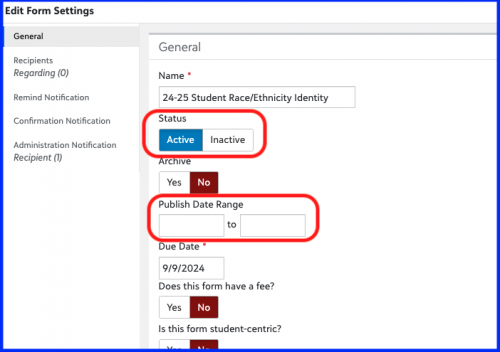
@Richard Pan Also be sure the publish dates are current. Start date is when you want the form to go out. Once the end publish date has passed, the recipients will no longer have access to the form even if they haven't completed it.
 1
1 -
@Veronica Zermani what will it look like on the other end, how will parents and the community receive it??
0 -
- If you set up the remind notifications, they will receive an email letting them know they have a form to fill out. The email is customizable and you can choose the frequency of when these emails are sent out.
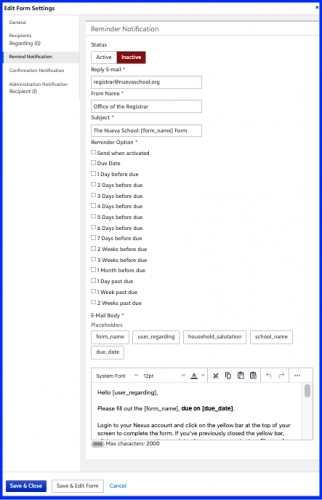
1. Email notification set-up 2. The user will also see a yellow banner across the top of their screen
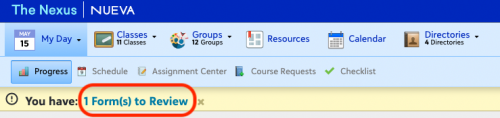
2. user view of yellow banner 1









Categories
- All Categories
- New YourCause Community TEST
- New SKY Community TEST
- New Grantmaking TEST Community
- New Altru Test Community
- New bbcon Community - TEST
- 12 Blackbaud Agents for Good™
- New Raiser's Edge NXT Community
- 7 Blackbaud Community Help
- 218 bbcon®
- 1.4K Blackbaud Altru®
- 409 Blackbaud Award Management™ and Blackbaud Stewardship Management™
- 1.2K Blackbaud CRM™ and Blackbaud Internet Solutions™
- 16 donorCentrics®
- 361 Blackbaud eTapestry®
- 2.7K Blackbaud Financial Edge NXT®
- 680 Blackbaud Grantmaking™
- 598 Blackbaud Education Management Solutions for Higher Education
- 3.3K Blackbaud Education Management Solutions for K-12 Schools
- 952 Blackbaud Luminate Online® and Blackbaud TeamRaiser®
- 85 JustGiving® from Blackbaud®
- 7K Blackbaud Raiser's Edge NXT®
- 3.9K SKY Developer
- 257 ResearchPoint™
- 123 Blackbaud Tuition Management™
- 165 Organizational Best Practices
- 247 Member Lounge (Just for Fun)
- 40 Blackbaud Community Challenges
- 37 PowerUp Challenges
- 3 (Closed) PowerUp Challenge: Grid View Batch
- 3 (Closed) PowerUp Challenge: Chat for Blackbaud AI
- 3 (Closed) PowerUp Challenge: Data Health
- 3 (Closed) Raiser's Edge NXT PowerUp Challenge: Product Update Briefing
- 3 (Closed) Raiser's Edge NXT PowerUp Challenge: Standard Reports+
- 3 (Closed) Raiser's Edge NXT PowerUp Challenge: Email Marketing
- 3 (Closed) Raiser's Edge NXT PowerUp Challenge: Gift Management
- 4 (Closed) Raiser's Edge NXT PowerUp Challenge: Event Management
- 3 (Closed) Raiser's Edge NXT PowerUp Challenge: Home Page
- 4 (Closed) Raiser's Edge NXT PowerUp Challenge: Standard Reports
- 4 (Closed) Raiser's Edge NXT PowerUp Challenge: Query
- 822 Community News
- 3.1K Jobs Board
- 57 Blackbaud SKY® Reporting Announcements
- 47 Blackbaud CRM Higher Ed Product Advisory Group (HE PAG)
- 19 Blackbaud CRM Product Advisory Group (BBCRM PAG)